robotmcp_client
by robotmcp·★ 12·Score 42
MCP client for ROS robot integration with Gemini, Ollama and other LLMs.
Overview
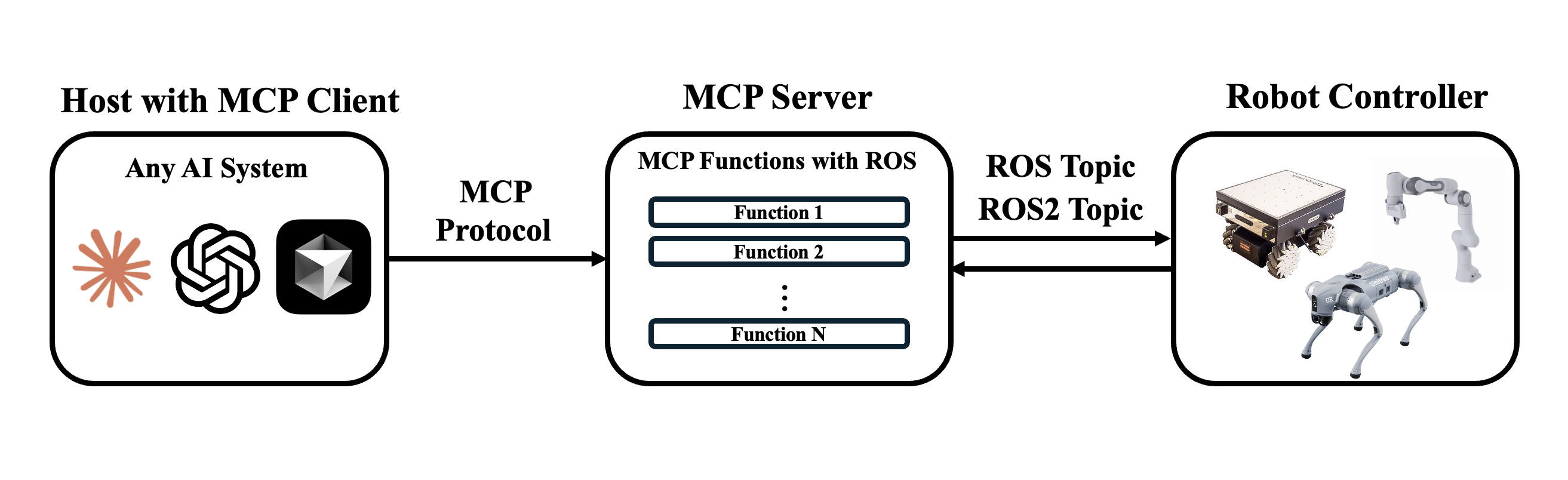
The ROS MCP Client implements the Model Context Protocol client specification to bridge LLMs with ROS and ROS2 robots. It provides a bidirectional communication channel that allows natural language commands to be sent to robots and real-time sensor data to be streamed back to AI models. The project features modular architecture with specialized clients like the Gemini Live Client, enabling offline-capable AI controllers for robotics applications.
Try asking AI
After installing, here are 5 things you can ask your AI assistant:
When to choose this
Choose this when you need to connect LLMs with ROS/ROS2 robots via MCP protocol for natural language interaction, testing, or autonomous control.
When NOT to choose this
Not suitable if you don't have ROS or ROS2 environments set up, as it requires both ros-mcp-server and rosbridge to function properly.
Comparable tools
Installation
Installation
- Clone the repository
git clone https://github.com/robotmcp/ros-mcp-client.git
cd ros-mcp-client- Install dependencies
uv sync # or pip install -e .- Set up the Gemini Live client (example):
cd clients/gemini_live
./setup_gemini_client.sh
uv run gemini_client.py- Start rosbridge on the target robot
ros2 launch rosbridge_server rosbridge_websocket_launch.xmlFAQ
- What MCP servers does this client connect to?
- It specifically connects to the ros-mcp-server which exposes ROS/ROS2 functionality through MCP.
- Can I use this with other robotics frameworks?
- The client is designed specifically for ROS/ROS2 robots with rosbridge. It may require adaptation for other robotics frameworks.
Compare robotmcp_client with
Last updated · Auto-generated from public README + GitHub signals.