peta-core
by dunialabs·★ 47·综合分 47
MCP 控制平面,提供安全、策略强制和审计功能。
概述
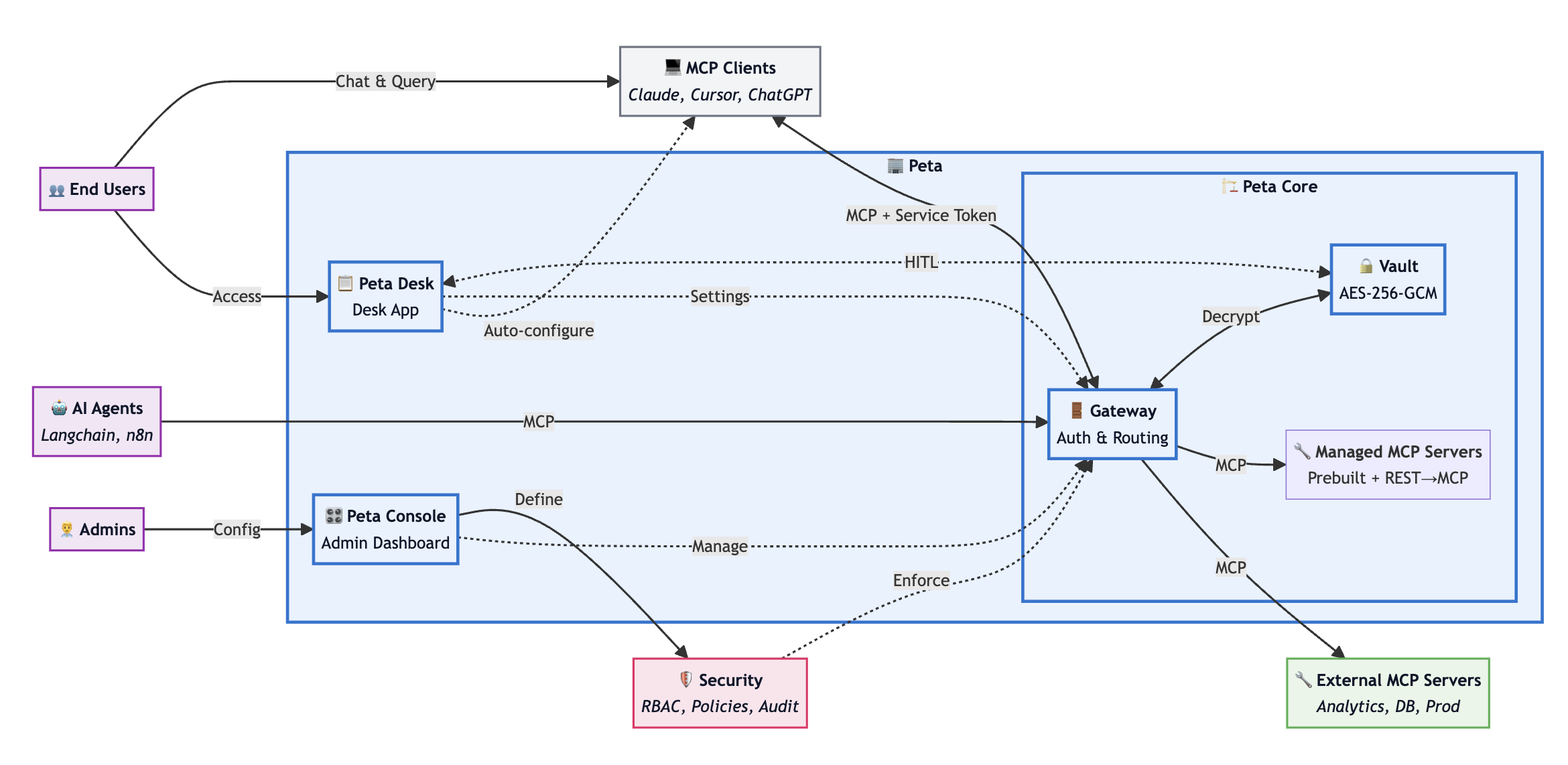
Peta Core 是 MCP 的控制平面,作为 AI 代理和下游 MCP 服务器之间的网关、保险库、策略引擎和审计跟踪。它为在生产环境中运行 MCP 提供了必要的基础设施,包括凭据保险库(加密存储)、RBAC/ABAC 策略引擎(可选人工审批)以及详细的工具调用审计日志。该解决方案支持具有生命周期控制的托管运行时、协议兼容性和自托管部署模式,无需 SaaS 依赖。
试试问 AI
装完之后,这里有 5 个你可以让 AI 做的事:
什么时候选它
当您需要一个生产就绪的 MCP 控制平面,具有企业级安全性、集中式策略管理和针对多个下游服务器的全面审计功能时,选择 Peta Core。
什么时候不要选它
如果您不需要依赖数据库的独立解决方案、偏好更简单的身份验证模型,或不愿接受 Elastic License 2.0 对托管服务的限制,请避免使用 Peta Core。
此 server 暴露的工具
从 README 抽取出 8 个工具catalog.searchSearch the tool catalog for available tools across servers
catalog.describeGet detailed description of a specific tool from the catalog
catalog.executeExecute a tool discovered through the catalog
tools.listList all available tools for the current server
tools.callExecute a specific tool with provided arguments
policy.evaluateEvaluate a policy decision for a tool call
approval.requestRequest approval for a high-risk operation
approval.statusCheck the status of a pending approval request
说明:Tool names inferred from the architecture documentation describing MCP gateway functionality and catalog features. Exact tool signatures not explicitly documented in this README.
可对比工具
安装
安装
Peta Core 可以使用 Docker 或作为 Node.js 应用程序部署。
Docker 部署
docker run -d --name peta-core -p 8080:8080 \
  -e DATABASE_URL=postgresql://user:pass@localhost:5432/peta \
  -e NEXTAUTH_SECRET=your-secret-key \
  petaio/peta-core:latest
Node.js 部署
npm install -g @peta/core
peta-core start
配置
配置 MCP 客户端连接到 Peta Core:
{
  "mcpServers": {
    "peta": {
      "command": "npx",
      "args": ["@modelcontextprotocol/server-peta", "--host", "localhost", "--port", "8080"]
    }
  }
}
FAQ
- 支持哪些数据库?
- Peta Core 需要 PostgreSQL 15+ 作为其主要数据库。用于存储审计日志、策略配置和凭据保险库信息。
- Peta Core 如何处理凭据?
- 凭据使用 PBKDF2 + AES-GCM 加密存储,并在执行时在服务器端注入。客户端永远不会看到原始凭据,并且机密信息永远不会包含在审计日志中。
peta-core 对比
最后更新于 · 由 README + GitHub 公开数据自动生成。