codebase-mcp
by danyQe·★ 43·综合分 42
隐私优先的 AI 编码助手,将 Claude 转化为具有语义搜索、记忆和高质量代码生成的强大 MCP 开发工具。
概述
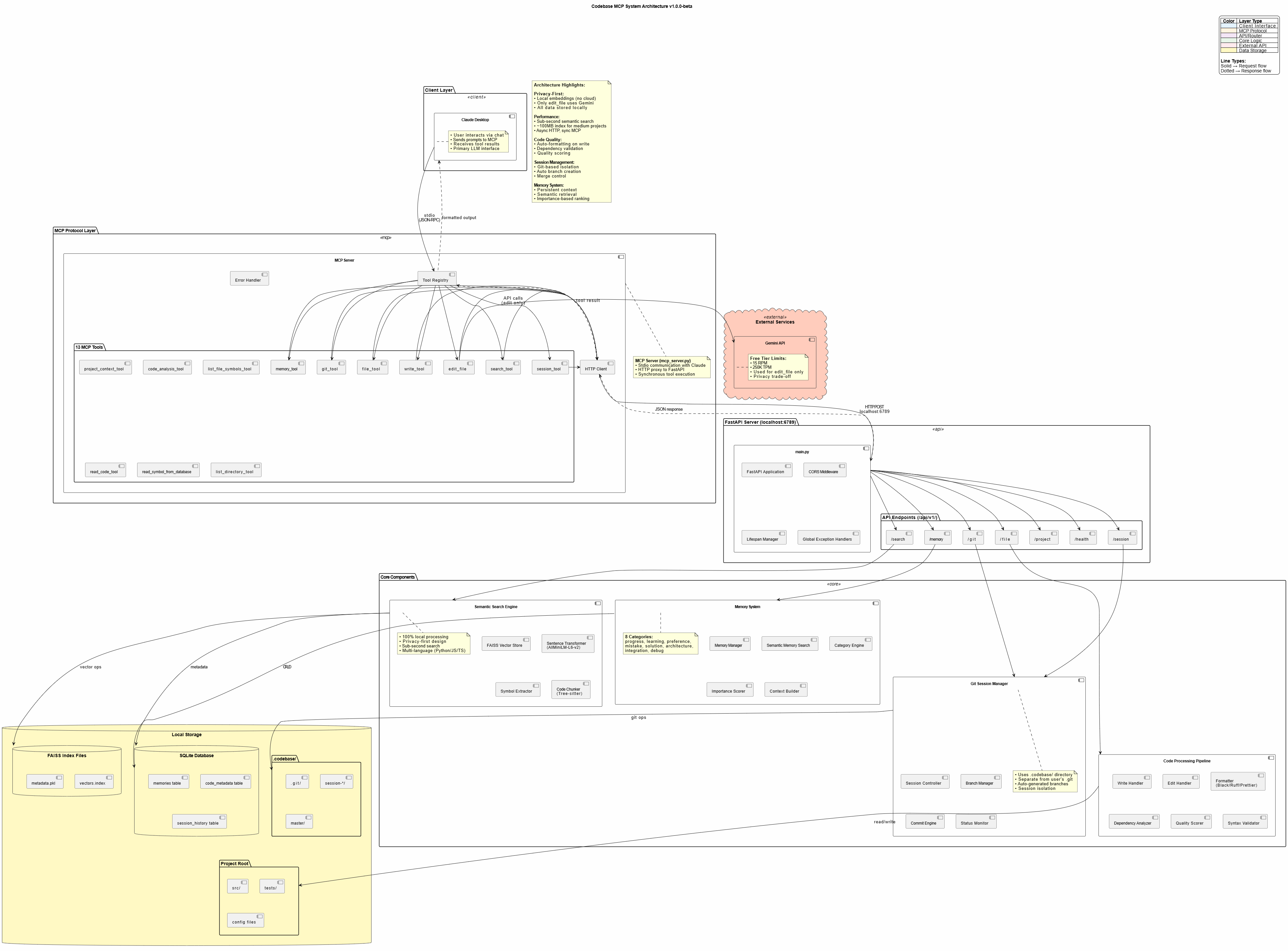
Codebase MCP 是一个开源开发助手,通过模型上下文协议与 Claude Desktop 集成。它提供 13 种专业工具用于代码库管理,包括语义搜索、持久化记忆、智能代码编写与自动格式化,以及基于会话的 Git 工作流。系统几乎完全在本地运行,仅使用 Google 的 Gemini API 进行 AI 辅助编辑操作。它设计为付费编码助手(如 Cursor)的免费替代方案,利用现有的 Claude 订阅。
试试问 AI
装完之后,这里有 5 个你可以让 AI 做的事:
什么时候选它
如果您已经拥有Claude订阅,并希望获得隐私优先的AI编程辅助,而不愿为Cursor或Windsurf等工具支付额外月费,请选择此工具。
什么时候不要选它
如果您需要超出Gemini免费套餐限制的编辑操作(每分钟15次请求,每分钟250K令牌),或者需要支持Python、JavaScript、TypeScript和FastAPI以外的语言,请避免使用此工具。
此 server 暴露的工具
从 README 抽取出 12 个工具session_toolManage development sessions with automatic branch creation and commits
memory_toolStore and retrieve persistent knowledge across chat sessions
git_toolPerform Git operations including status, diff, commit and branch management
write_toolCreate new files with auto-formatting and quality scoring
edit_fileAI-assisted file editing with Gemini-powered suggestions
search_toolPerform semantic code search across the entire codebase
read_code_toolRead code with symbol-level precision and line range support
project_context_toolAnalyze project structure and dependencies
list_directory_toolExplore directory structures with tree views and metadata
code_analysis_toolPerform code quality checks including syntax, linting and dependencies
list_file_symbols_toolExtract functions, classes and interfaces from source files
project_structure_toolVisualize project structure with enhanced tree views and statistics
可对比工具
安装
前置要求
- Python 3.11+
- Claude Desktop(或任何兼容 MCP 的客户端)
- 已安装 Git
- 推荐使用 [uv](https://github.com/astral-sh/uv) 包管理器
安装步骤
- **克隆仓库:**
git clone https://github.com/danyQe/codebase-mcp.git
cd codebase-mcp- **全局安装:**
# 如果尚未安装 uv
pip install uv

# 创建虚拟环境并安装依赖
uv venv
source .venv/bin/activate  # Windows: .venv\Scripts\activate
uv pip install -r requirements.txt

# 全局安装格式化工具
pip install black ruff- **配置 Gemini API:**
cp .env.example .env
# 从 https://aistudio.google.com/app/apikey 获取免费 API 密钥
# 添加到 .env 文件:
GEMINI_API_KEY=your_api_key_here- **配置 Claude Desktop:**
在 claude_desktop_config.json 中添加:
{
  "mcpServers": {
    "codebase-manager": {
      "command": "/path/to/your/.venv/bin/python",
      "args": [
        "/path/to/codebase-mcp/mcp_server.py"
      ]
    }
  }
}- **启动 FastAPI 服务器:**
python main.py /path/to/your/project- 重启 Claude Desktop 开始聊天 - Claude 现在可以访问 13+ 个 MCP 工具!
FAQ
- Codebase MCP 与 Cursor 相比如何?
- Codebase MCP 是一个开源替代方案,它使用您现有的 Claude 订阅,而不需要单独支付 20-40 美元/月的费用。它提供类似的功能,如语义搜索和 AI 辅助编辑,同时是隐私优先的,所有处理都在本地进行。
- 哪些数据会发送到外部服务?
- 只有 edit_file 工具使用 Google 的 Gemini API,并且只发送正在编辑的特定文件(不发送项目上下文或历史记录)。所有其他操作,包括嵌入、搜索和内存处理,都在您的本地机器上运行。
codebase-mcp 对比
最后更新于 · 由 README + GitHub 公开数据自动生成。