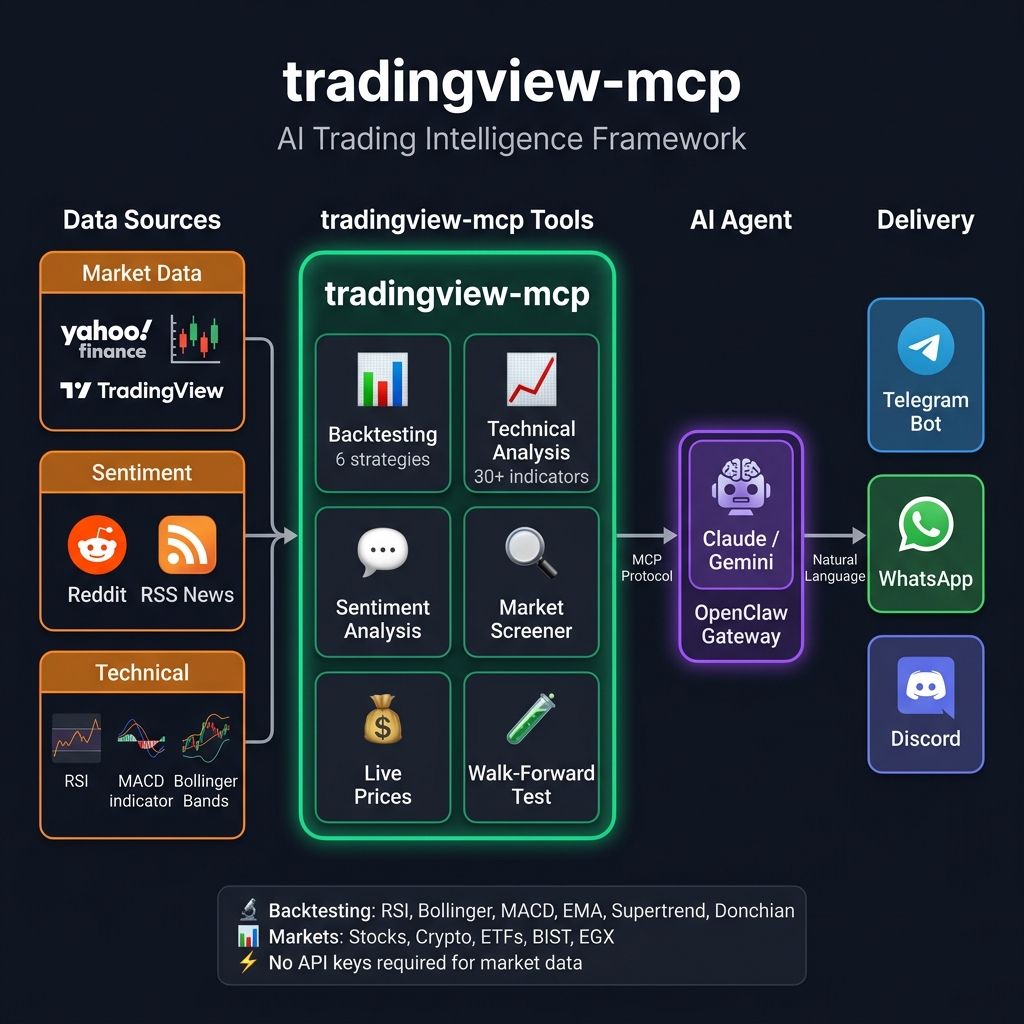
tradingview-mcp
by atilaahmettaner·★ 2,698·综合分 57
AI 交易 MCP 服务器,提供实时股票/加密货币筛选、技术分析和原生 Claude 集成。
概述
TradingView-MCP 是一个全面的 AI 驱动交易工具包,通过 MCP 协议与 Claude Desktop 集成。它提供实时市场数据、技术分析指标、回测功能和跨多个交易所的情绪分析。该服务器包含专门的 AI 代理,用于技术分析、情绪分析和风险管理,生成带有置信度评分的可操作交易建议。它既支持自托管,也提供优质托管选项,供用户避免处理技术设置。
试试问 AI
装完之后,这里有 5 个你可以让 AI 做的事:
什么时候选它
如果您需要AI驱动的交易工具,具备回测能力和多资产类别技术分析功能,特别是想避免设置多个数据源和API的复杂性,应该选择这个MCP服务器。
什么时候不要选它
如果您需要实时交易执行、期货/期权交易功能,或者偏好云解决方案而非自托管,应避免使用此服务器。
此 server 暴露的工具
从 README 抽取出 12 个工具backtest_strategyBacktest 1 of 6 trading strategies with institutional metrics
compare_strategiesRun all 6 strategies on same symbol and rank by performance
yahoo_priceGet real-time quote with price, change%, 52w high/low, market state
market_snapshotGlobal market overview with indices, crypto, and forex
market_sentimentAnalyze Reddit sentiment across finance communities
financial_newsGet live RSS headlines from Reuters, CoinDesk, CoinTelegraph
combined_analysisConfluence analysis combining technicals, sentiment, and news
get_technical_analysisFull technical analysis with 23 indicators and BUY/SELL/HOLD
get_bollinger_band_analysisProprietary Bollinger Bands analysis with ±3 rating system
get_stock_decision3-layer decision engine with ranking, trade setup, and quality score
screen_stocksMulti-exchange screener with 20+ filter criteria
get_candlestick_patternsDetect 15 different candlestick patterns
可对比工具
安装
通过 pip 安装:
pip install tradingview-mcp-serverClaude Desktop 配置 (claude_desktop_config.json):
{
  "mcpServers": {
    "tradingview": {
      "command": "/Users/YOUR_USERNAME/.local/bin/uvx",
      "args": ["--from", "tradingview-mcp-server", "tradingview-mcp"]
    }
  }
}
在 Linux 上,将 /Users/YOUR_USERNAME 替换为 /home/YOUR_USERNAME。在 Windows 上,使用 %USERPROFILE%\.local\bin\uvx.exe。
FAQ
- 这需要金融数据提供商的 API 密钥吗?
- 不需要,tradingview-mcp 服务器从公开市场数据源获取数据,不需要 API 密钥。
- 支持哪些交易策略进行回测?
- 服务器支持 6 种策略:RSI 均值回归、布林带均值回归、MACD 黄金/死亡交叉、EMA 交叉、超级趋势趋势跟踪和唐奇安通道突破。
tradingview-mcp 对比
最后更新于 · 由 README + GitHub 公开数据自动生成。