postgresql-ssh-mcp
by Zlash65·★ 6·综合分 39
PostgreSQL MCP 服务器,具有 SSH 隧道功能,可通过堡垒主机安全访问数据库。
概述
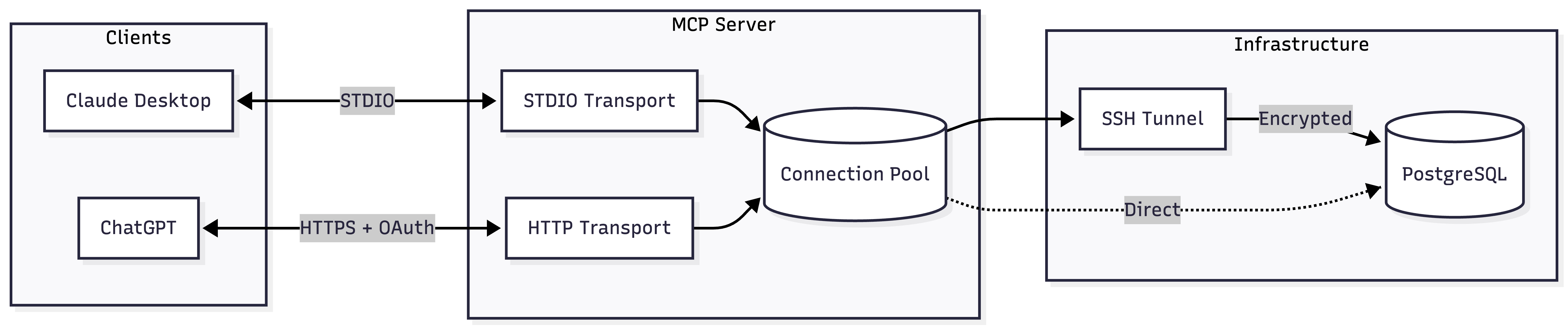
这是一个功能齐全的 PostgreSQL MCP 服务器,具有内置的 SSH 隧道功能。它提供双传输模式 - Claude Desktop 的 STDIO 和 ChatGPT 的 HTTP - 使其能够在不同的 AI 环境中灵活使用。服务器实现了强大的安全功能,包括只读默认设置、OAuth 支持以及具有 TOFU(首次使用信任)身份验证的自动 SSH 隧道管理。
试试问 AI
装完之后,这里有 5 个你可以让 AI 做的事:
什么时候选它
当您需要通过SSH隧道安全访问PostgreSQL数据库,特别是用于ChatGPT集成或在受限环境中使用Claude Desktop时,请选择此服务器。
什么时候不要选它
如果您默认需要写入权限(除非明确配置,否则它是只读的)或者您不使用PostgreSQL,请不要选择此服务器。
此 server 暴露的工具
从 README 抽取出 12 个工具execute_queryExecute SQL with parameterized queries. Results capped by MAX_ROWS.
explain_queryGet EXPLAIN plans in text, JSON, YAML, or XML format. Supports ANALYZE.
list_schemasList database schemas. Excludes system schemas by default.
list_tablesList tables with row counts and sizes. Optionally include views.
describe_tableGet columns, constraints, and indexes for a table.
list_databasesList all databases with owner, encoding, and size.
get_connection_statusGet pool stats, tunnel state, and connection info.
list_active_connectionsShow active connections from pg_stat_activity.
list_long_running_queriesFind queries running longer than a threshold.
get_database_versionGet PostgreSQL server version.
get_database_sizeGet database size and largest tables.
get_table_statsGet vacuum/analyze stats and scan counts for a table.
可对比工具
安装
Claude Desktop (STDIO)
添加到您的 Claude Desktop 配置中:
{
  "mcpServers": {
    "postgres": {
      "command": "npx",
      "args": ["-y", "@zlash65/postgresql-ssh-mcp"],
      "env": {
        "DATABASE_URI": "postgresql://user:password@localhost:5432/mydb"
      }
    }
  }
}
ChatGPT (HTTP 服务器)
DATABASE_URI="postgresql://user:pass@localhost:5432/mydb" npx @zlash65/postgresql-ssh-mcp-http然后配置 ChatGPT 连接到 HTTP 端点。
FAQ
- SSH 隧道功能如何工作?
- 服务器会自动创建到您堡垒主机的 SSH 隧道,并通过它安全地转发数据库连接。无需手动执行 `ssh -L` 命令。
- 我可以使用此服务器修改数据库表吗?
- 默认情况下,服务器设置为只读模式以确保生产环境的安全使用。您可以通过将 READ_ONLY 环境变量设置为 'false' 来启用写入功能。
postgresql-ssh-mcp 对比
最后更新于 · 由 README + GitHub 公开数据自动生成。