time-mcp
by yokingma·★ 66·综合分 45
时间MCP服务器为LLM提供时间感知能力,包括时区转换、当前时间和日期计算工具。
developer-toolsproductivityai-llm
12
Forks
3
活跃 Issue
9 个月前
最近提交
162 天前
收录于
概述
时间MCP服务器是一个JavaScript实现,扩展了LLM的时间感知功能。服务器提供多种工具,包括当前时间显示(UTC和本地时间)、相对时间计算、时间戳生成、月份天数查询、时区转换以及周/年信息。该实现支持多种LLM客户端,包括Claude Desktop、Claude Code、Cursor和Windsurf,使其在不同的AI开发环境中具有高度通用性。
试试问 AI
装完之后,这里有 5 个你可以让 AI 做的事:
你:需要实时信息进行日程安排和时间敏感任务的LLM助手
你:全球团队的多时区协调应用程序
你:需要准确日期和时间计算的日历和生产力工具
你:time-mcp服务器支持哪些时区?
你:时间数据更新的频率如何?
什么时候选它
当您的应用程序需要精确的时间计算和时区转换时,特别是处理调度应用程序或跨多个时区运行的系统时,选择此服务器。
什么时候不要选它
如果您需要历史时间数据、日历管理功能或超出所列工具范围的复杂数算术,请不要选择此服务器。
此 server 暴露的工具
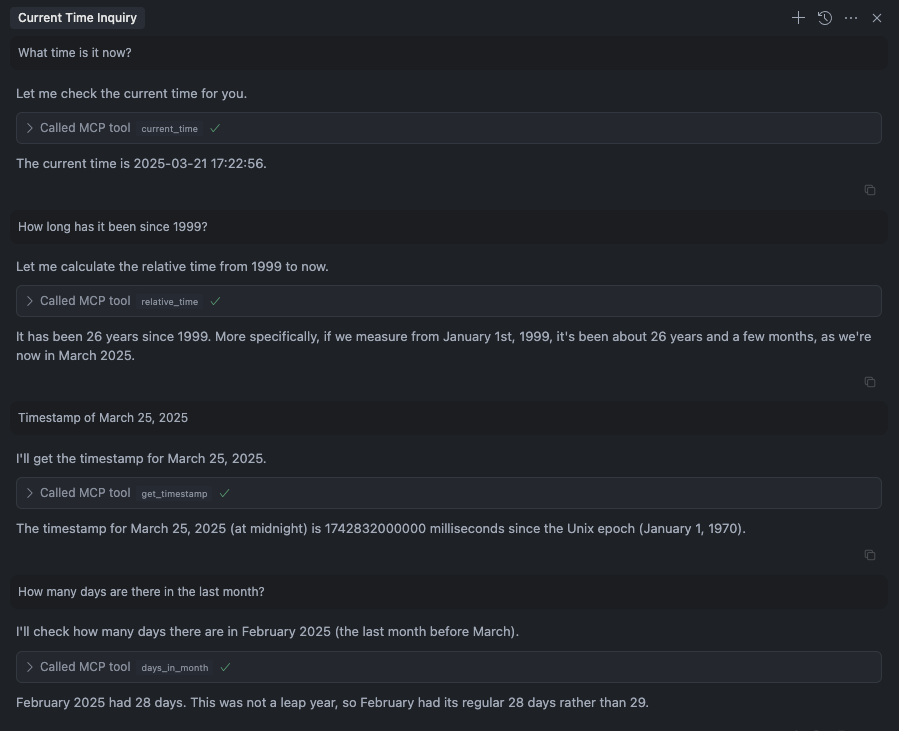
从 README 抽取出 6 个工具current_timeGet current time (UTC and local time)
relative_timeGet relative time
get_timestampGet timestamp for the time
days_in_monthGet days in month
convert_timeConvert time between timezones
get_week_yearGet week and isoWeek of the year
可对比工具
date-fnsmomentluxondayjs
安装
安装
Smithery(推荐)
npx -y @smithery/cli install @yokingma/time-mcp --client claude手动安装
npm install -g time-mcpClaude Desktop
添加到Claude Desktop配置:
{
  "mcpServers": {
    "time-mcp": {
      "command": "npx",
      "args": ["-y", "time-mcp"]
    }
  }
}
Cursor
添加到您的mcp.json文件:
{
  "mcpServers": {
    "time-mcp": {
      "command": "npx",
      "args": ["-y", "time-mcp"]
    }
  }
}
FAQ
- time-mcp服务器支持哪些时区?
- 服务器通过'convert_time'工具支持任何时区之间的转换,使用系统可用的时区数据。
- 时间数据更新的频率如何?
- 每次调用工具时都会实时获取时间数据,确保准确和当前的时间信息。
time-mcp 对比
最后更新于 · 由 README + GitHub 公开数据自动生成。