mcp-toggl
by verygoodplugins·★ 17·综合分 45
MCP 服务器用于 Toggl Track 集成,具有智能缓存、时间跟踪和活动报告工具。
概述
MCP Toggl 为 Toggl Track 时间跟踪与兼容 MCP 的客户端之间提供全面接口。它提供结构化数据检索功能,包含条目信息丰富化处理(项目、工作空间、客户和标签)。该服务器实现了智能缓存以减少 API 调用,并支持来自 Toggl Track Desktop 的时间线分析,使用户能够分析其实际跟踪时间与应用使用模式之间的关系。
试试问 AI
装完之后,这里有 5 个你可以让 AI 做的事:
什么时候选它
如果你使用 Toggl Track 进行时间跟踪,并希望将 AI 驱动的洞察直接集成到工作流程中,无需手动生成报告,请选择此服务器。
什么时候不要选它
如果你的时间跟踪需求不在 Toggl 生态系统内,需要对时间跟踪数据有写入权限,或担心将桌面活动与 AI 系统共享的隐私问题,请避免使用此工具。
此 server 暴露的工具
从 README 抽取出 12 个工具toggl_daily_reportHours by project and workspace for a date
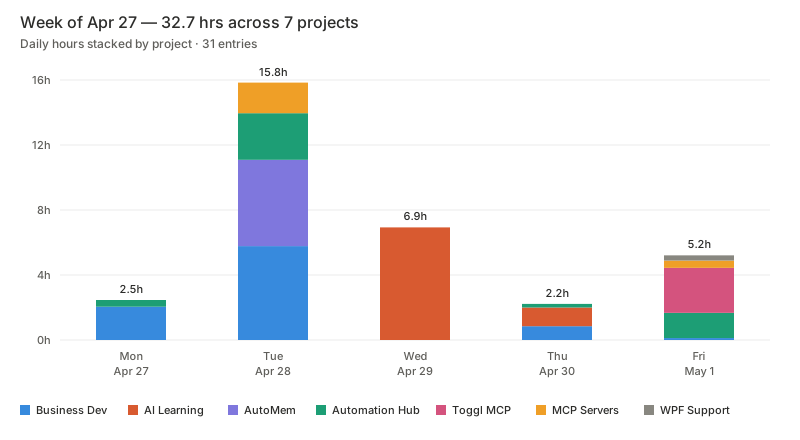
toggl_weekly_report7-day breakdown with daily totals and project rollups
toggl_get_time_entriesRaw hydrated entries by period, date range, workspace, or project
toggl_get_timelineToggl Track Desktop app usage summary with optional raw events
toggl_get_current_entryReturns the running timer, elapsed seconds, and hydrated project/workspace context
toggl_start_timerStarts a timer with description, optional project/task, and tags
toggl_stop_timerStops the currently running timer
toggl_check_authVerifies token access and lists available workspaces without exposing the token
toggl_list_workspacesLists all accessible workspaces
toggl_list_projectsLists projects for a workspace using cache-backed reads after first fetch
toggl_warm_cachePre-fetches workspace, project, client, and tag data before a heavy reporting session
toggl_project_summaryTotal hours per project for a period or date range
可对比工具
安装
Claude Desktop 安装
添加到 ~/Library/Application Support/Claude/claude_desktop_config.json:
{
  "mcpServers": {
    "mcp-toggl": {
      "command": "npx",
      "args": ["-y", "@verygoodplugins/mcp-toggl@latest"],
      "env": {
        "TOGGL_API_KEY": "your_api_key_here",
        "TOGGL_DEFAULT_WORKSPACE_ID": "123456"
      }
    }
  }
}
全局安装:
npm install -g @verygoodplugins/mcp-toggl
mcp-toggl --help
FAQ
- 这个 MCP 服务器与直接使用 Toggl 有何不同?
- 此服务器将原始时间条目与项目、客户和工作空间数据丰富化处理在单个 API 调用中,实现智能缓存以减少 API 请求,提供实际桌面活动的时间线分析,并优化为适合 AI 消耗和报告的格式提供结构化数据。
- 时间线隐私功能如何工作?
- 时间线功能支持三种模式:仅摘要模式(无原始事件)、事件标题遮蔽模式(保留持续时间但移除敏感信息)和完整事件模式。用户可以通过设置 include_events: false 或 redact_titles: true 来控制隐私。
mcp-toggl 对比
最后更新于 · 由 README + GitHub 公开数据自动生成。