mcptools
by posit-dev·★ 174·综合分 48
mcptools 在 R 中实现了模型上下文协议,使 R 能作为 MCP 服务器和客户端,实现与 AI 工具的集成。
概述
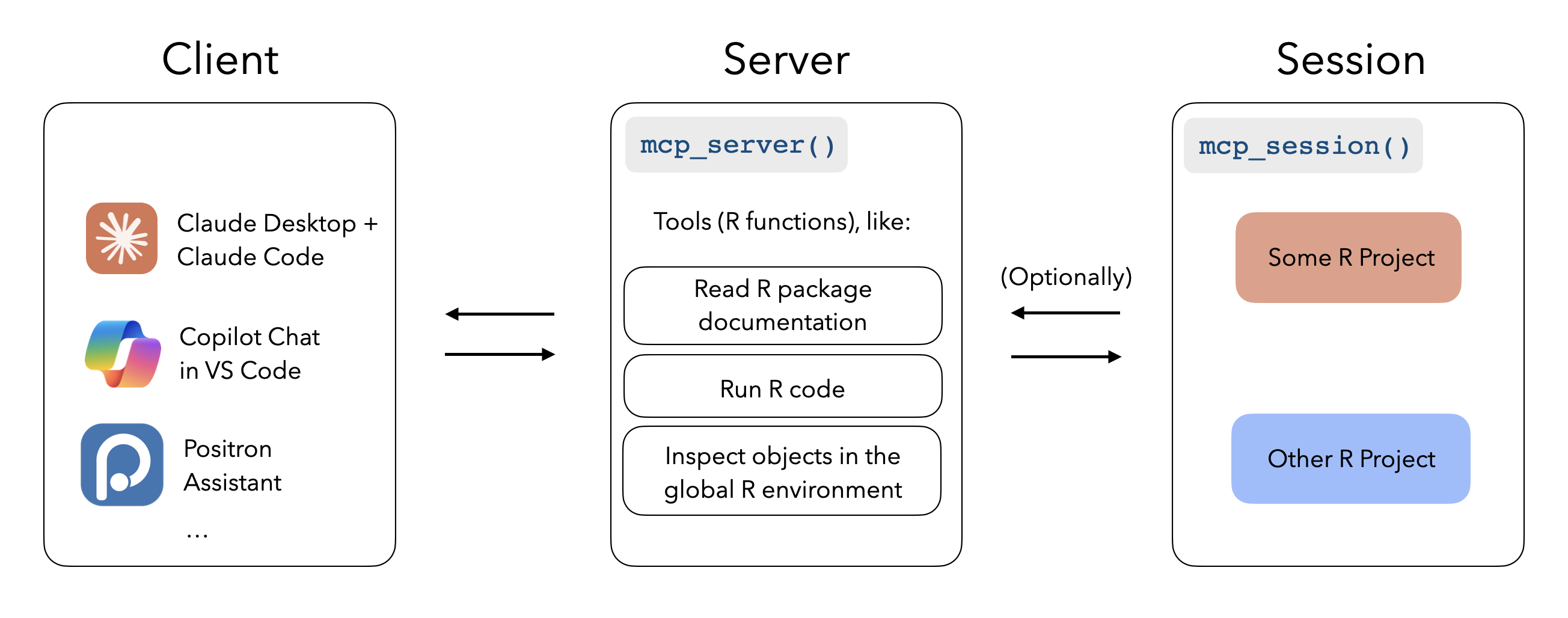
mcptools 是一个在 R 编程语言中实现模型上下文协议的综合性工具。它使 R 能够同时作为 MCP 服务器(允许 Claude Desktop 等工具在活动的 R 会话中执行 R 代码)和 MCP 客户端(在 R 环境中注册第三方 MCP 服务器)。该软件包提供两种主要功能:作为 MCP 服务器,它提供读取包文档、运行 R 代码和检查全局环境对象的工具;作为 MCP 客户端,它允许将第三方服务器与 ellmer 聊天集成。这种双向能力在 R 和 AI 助手之间建立了强大的桥梁。
试试问 AI
装完之后,这里有 3 个你可以让 AI 做的事:
什么时候选它
如果您使用 R 并希望 AI 助手与您的 R 会话交互、访问环境变量或在 R 工作流中直接执行代码,mcptools 是理想选择。
什么时候不要选它
如果您不使用 R,不应选择 mcptools,因为它专门为 R 生态系统设计,对其他编程语言没有用处。
此 server 暴露的工具
从 README 抽取出 3 个工具mcp_servermcp_server()Initializes the mcptools MCP server for R
mcp_sessionmcp_session()Registers an R session to be accessed by MCP clients
mcp_toolsmcp_tools()Returns a list of MCP tools from configuration
说明:The documentation describes MCP server functionality but doesn't provide a complete list of individual tools. The tools mentioned are primarily initialization functions rather than specific data processing tools.
可对比工具
安装
从 CRAN 安装 mcptools:
install.packages("mcptools")或安装开发版本:
pak::pak("posit-dev/mcptools")要使用 R 作为 Claude Desktop 的 MCP 服务器,将以下内容添加到 Claude Desktop 配置文件中(~/Library/Application Support/Claude/claude_desktop_config.json):
{
  "mcpServers": {
    "r-mcptools": {
      "command": "Rscript",
      "args": ["-e", "mcptools::mcp_server()"]
    }
  }
}
要使用 R 作为 MCP 客户端,在 ~/.config/mcptools/config.json 创建包含您所需 MCP 服务器的配置文件。
mcptools 对比
最后更新于 · 由 README + GitHub 公开数据自动生成。