domscribe
by patchorbit·★ 168·综合分 48
Domscribe 通过 MCP 桥接运行中的应用程序和源代码,使 AI 代理能够查看实时 UI 上下文并进行精准编辑。
概述
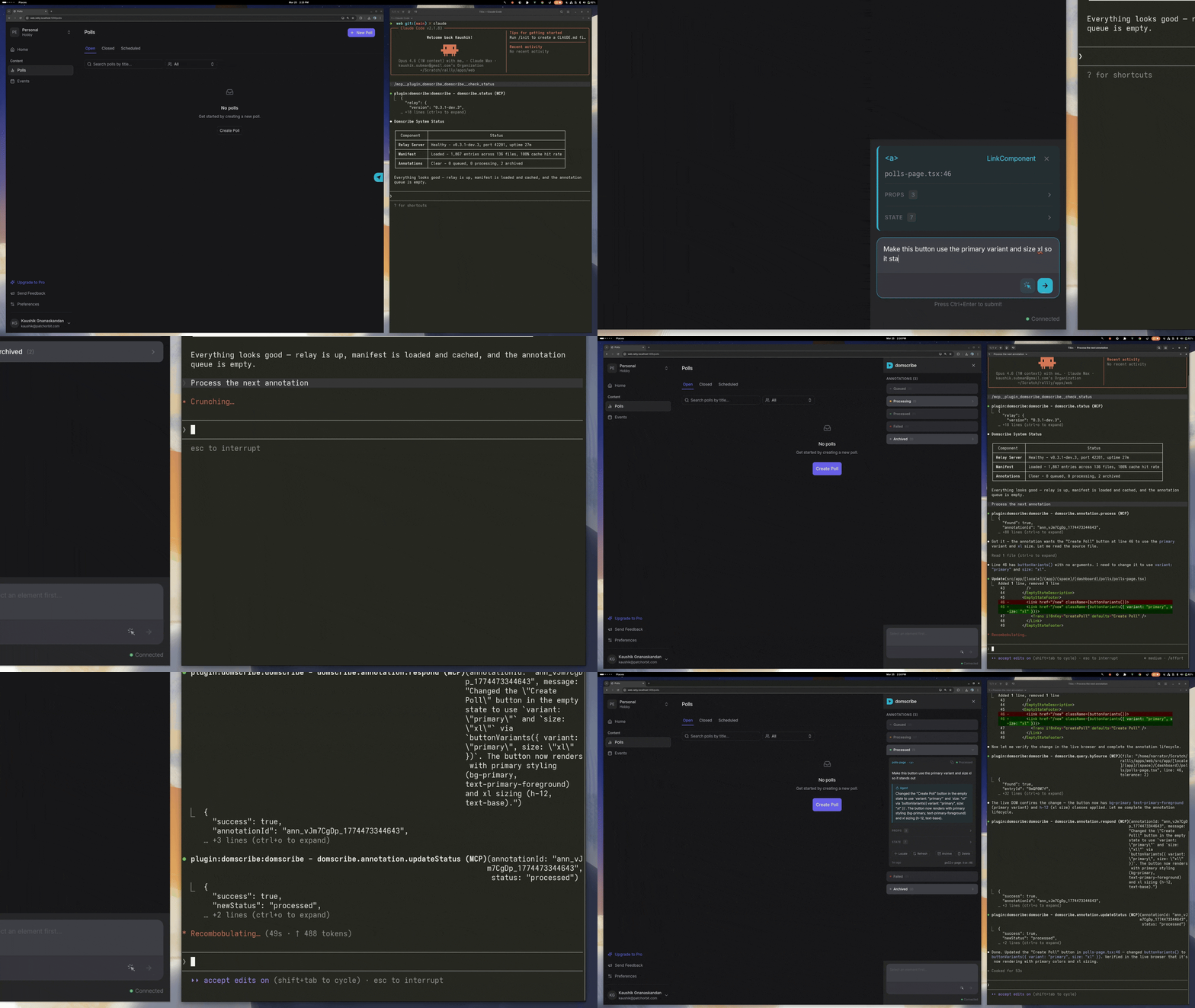
Domscribe 是一个像素到代码的开发工具,提供 AI 编码代理与运行中 Web 应用之间的双向通信。它允许代理通过源位置查询 DOM 元素,同时让开发者点击 UI 元素来引导代理到达精确的代码位置。该工具支持多种框架(React、Vue、Next.js、Nuxt)和打包工具(Vite、Webpack、Turbopack),并通过构建时仪器剥离确保对生产环境零影响。
试试问 AI
装完之后,这里有 5 个你可以让 AI 做的事:
什么时候选它
当您使用 AI 编码代理处理复杂的 Web 应用程序,并需要在运行中的 UI 和源代码之间进行双向通信时,选择 Domscribe。
什么时候不要选它
如果您正在处理非 Web 应用程序,或者需要保留没有任何插桩的生产构建,则避免使用 Domscribe。
此 server 暴露的工具
从 README 抽取出 2 个工具domscribe.query.bySourcedomscribe.query.bySource(file: string, line: number)Query live DOM snapshot, props, state, and attributes from a specific source file location
domscribe.process.annotationsdomscribe.process.annotations()Process annotations submitted via the browser overlay for implementing changes
说明:The README mentions '12 tools and 4 prompts via MCP' but only details two main functions (query.bySource and process.annotations). The other 10 tools aren't explicitly named in the provided text.
可对比工具
安装
使用设置向导安装:
npx domscribe init这将引导您连接编码代理并添加到应用中。手动设置步骤:
- 添加到打包器/框架(以 React 与 Vite 为例):
npm install -D @domscribe/react// vite.config.ts
import { defineConfig } from 'vite';
import react from '@vitejs/plugin-react';
import { domscribe } from '@domscribe/react/vite';
export default defineConfig({
plugins: [react(), domscribe()],
});- 连接您的编码代理(以 Claude Desktop 为例):
添加到 Claude 的 config.json:
{
  "mcpServers": {
    "domscribe": {
      "command": "npx",
      "args": ["domscribe", "mcp"]
    }
  }
}
FAQ
- 这个工具适用于生产环境的应用吗?
- 不,Domscribe 专为开发设计,在生产构建中会被完全剥离,对运行时零影响。
- 支持哪些 AI 编码代理?
- Domscribe 为 Claude Code、GitHub Copilot、Gemini CLI、Amazon Kiro 和 Cursor 提供插件,并通过 MCP 接口支持任何兼容的代理。
Hacker News 讨论
开发者社区最近的相关讨论。
- 帖子 by NarratorTD · 2026-03-31
domscribe 对比
最后更新于 · 由 README + GitHub 公开数据自动生成。