serena
by oraios·★ 24,287·综合分 63
一个功能强大的 MCP 工具包,为 AI 代理提供语义代码检索和编辑功能。
概述
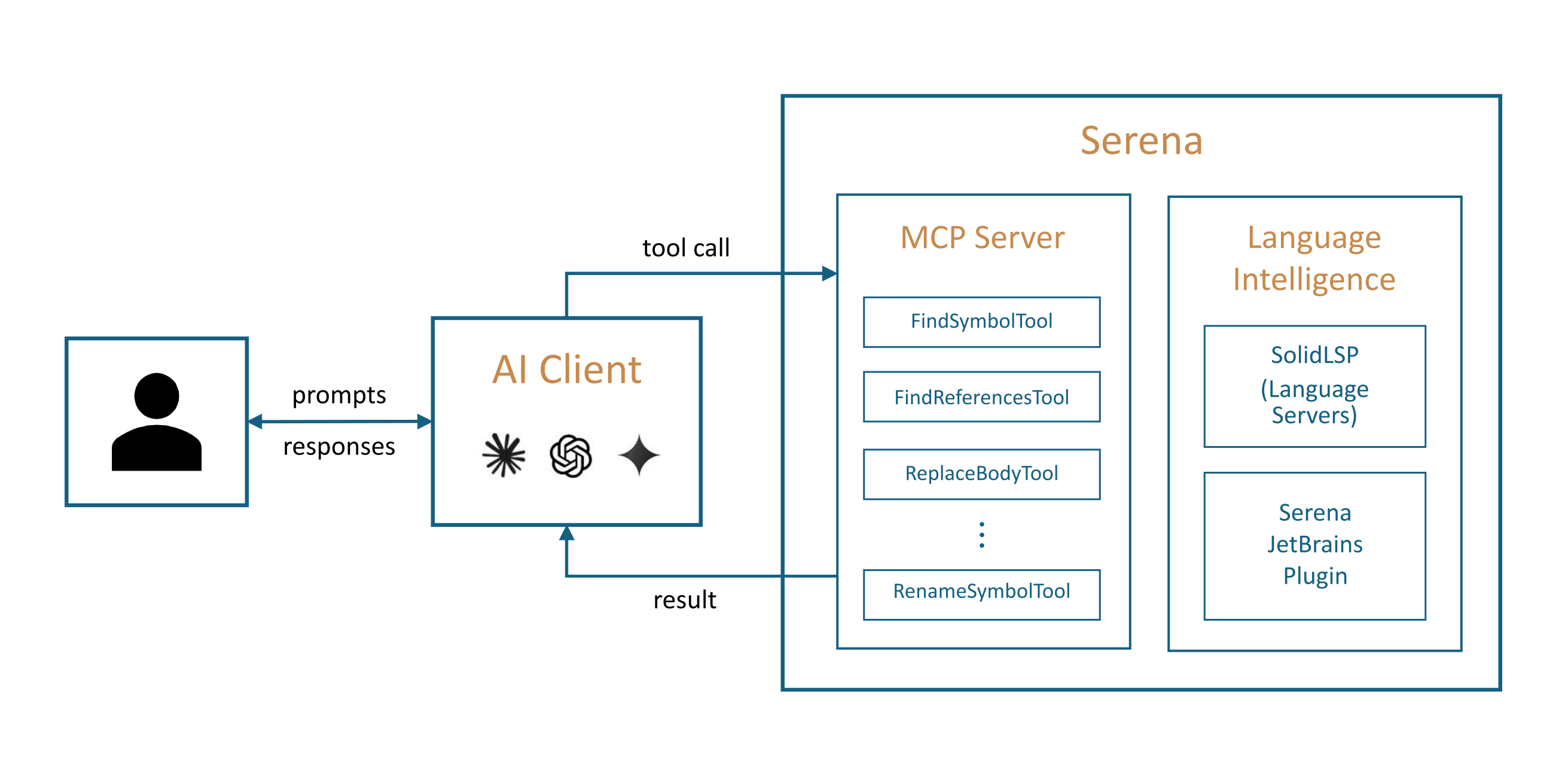
Serena 提供类似于 IDE 功能的语义代码检索、编辑、重构和调试工具,在符号级别运行并利用关系结构。它通过模型上下文协议 (MCP) 与任何客户端/LLM 集成,使代理能够更快、更高效、更可靠地运行,特别是在更大和更复杂的代码库中。该工具包通过语言服务器支持 40 多种编程语言,并提供付费的 JetBrains 插件以增强功能。
试试问 AI
装完之后,这里有 5 个你可以让 AI 做的事:
什么时候选它
当您的 AI 代理需要可靠的 IDE 级代码语义理解来进行重构、导航和编辑,特别是在大型或复杂的多语言项目中时,选择 Serena。
什么时候不要选它
如果您只需要基本的文件操作或简单的文本编辑,请不要选择 Serena,因为它提供的高级语义功能可能对于简单任务来说过于复杂。
此 server 暴露的工具
从 README 抽取出 12 个工具find_symbolFind a symbol in the codebase by name
find_referencing_symbolsFind all symbols that reference a given symbol
renameRename a symbol throughout the codebase
replace_symbol_bodyReplace the implementation body of a symbol
insert_after_symbolInsert code after a specified symbol
insert_before_symbolInsert code before a specified symbol
safe_deleteSafely delete a symbol or code section
read_fileRead the content of a file
search_for_patternSearch for a pattern across the codebase
replace_contentReplace content in files using regex or literal text
list_dirList the contents of a directory
find_fileFind files by name or pattern
可对比工具
安装
安装
**先决条件**: Serena 使用 *uv* 管理,需要 [安装 uv](https://docs.astral.sh/uv/getting-started/installation/)。
- 通过 uv 安装 Serena:
``bash uv add serena ``
- 配置您的 MCP 客户端(例如 Claude Desktop):
``json { "mcpServers": { "serena": { "command": "uv", "args": ["run", "-m", "serena", "serve"], "env": { "SERENA_PROJECT_PATH": "/path/to/your/project" } } } } ``
FAQ
- Serena 支持哪些编程语言?
- Serena 通过其语言服务器集成支持 40 多种编程语言,包括 Python、Java、JavaScript、TypeScript、C++、Go、Rust 等等。
- 我可以将 Serena 与任何 LLM 客户端一起使用吗?
- 是的,Serena 可以支持模型上下文协议 (MCP) 的任何客户端一起使用,包括 Claude Code、Codex、VSCode、Cursor、JetBrains IDE、Claude Desktop 等。
Hacker News 讨论
开发者社区最近的相关讨论。
- 帖子 by MischaPanch · 2025-04-03
serena 对比
最后更新于 · 由 README + GitHub 公开数据自动生成。