chatbot_Shopify
by Mobeen-Dev·★ 25·综合分 43
一个集成了 MCP 的 Shopify 聊天机器人,利用 AI 对话和智能代理功能提供无缝的电商体验。
概述
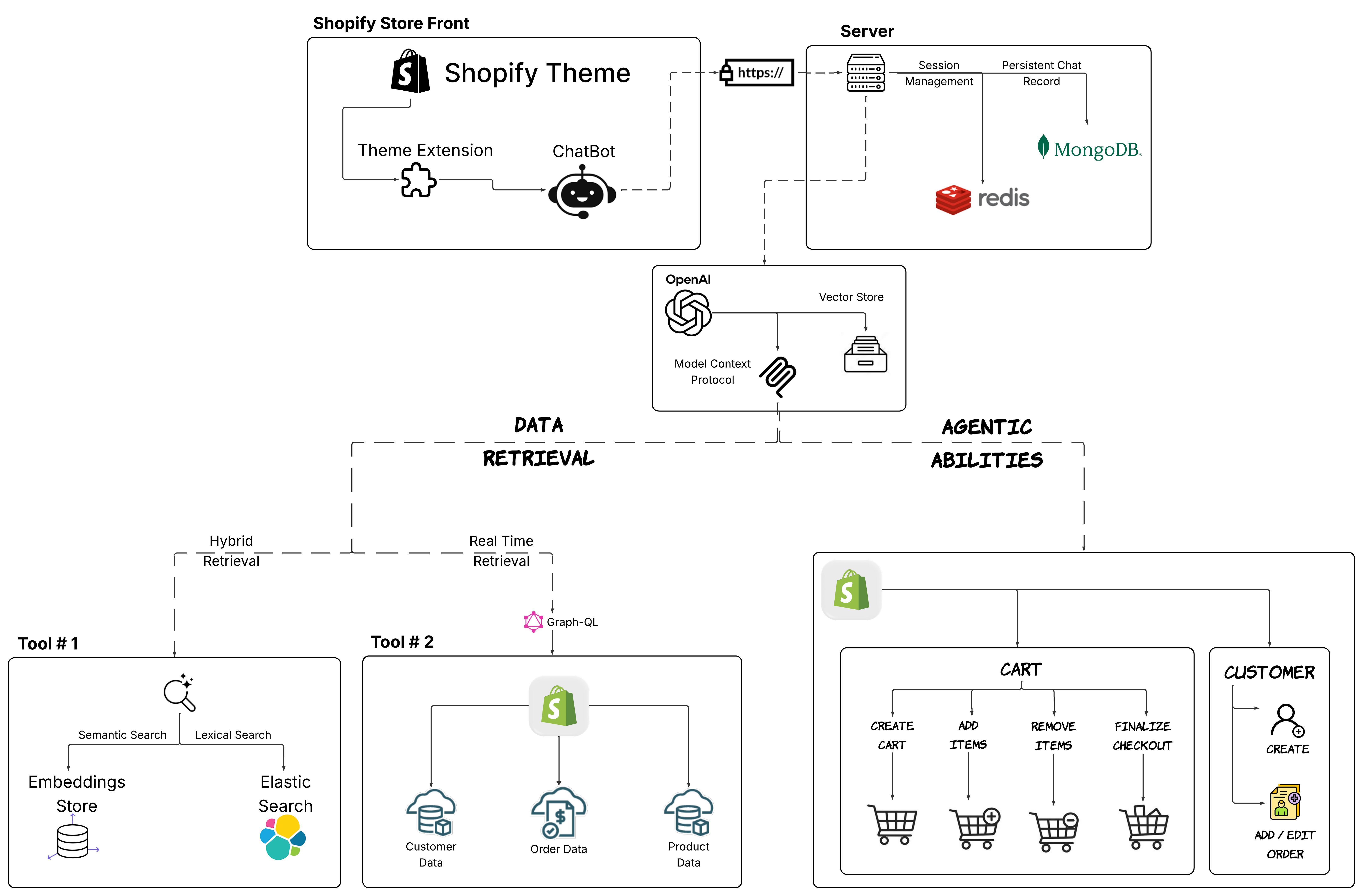
这是一个功能完整的 Shopify 聊天机器人系统,集成了模型上下文协议 (MCP),提供智能客户服务和购物助手功能。系统结合 OpenAI LLM 和使用 FAISS 与 Elasticsearch 的混合搜索功能,提供准确的产品推荐。它实现了先进的架构,包含持久化会话、实时 Shopify 集成以及购物车管理、结账和客户账户处理的智能代理能力。该解决方案作为主题扩展部署,在 Shopify 平台内提供无缝的客户体验。
试试问 AI
装完之后,这里有 7 个你可以让 AI 做的事:
什么时候选它
如果您经营Shopify商店并希望提供AI驱动的客户支持,同时无缝访问产品数据、订单处理和购物车管理功能,请选择此MCP服务器。
什么时候不要选它
如果您不使用Shopify,请不要选择它,因为它与Shopify生态系统紧密耦合,需要Shopify API凭据。
此 server 暴露的工具
从 README 抽取出 12 个工具query_shopify_productsSearch for products in the Shopify store with filters
create_customer_accountCreate a new customer account in Shopify
create_cartCreate a new shopping cart for a customer
add_cart_itemsAdd items to a customer's shopping cart
remove_cart_itemsRemove items from a customer's shopping cart
update_cartUpdate quantities or contents of a shopping cart
create_customer_orderCreate a new order for a customer
query_order_statusCheck the status of a customer's order
update_orderUpdate details or status of an existing order
search_products_semanticSearch for products using semantic similarity
search_products_lexicalSearch for products using keyword matching
create_chat_sessionStart a new chat session with a customer
说明:Tool names inferred from system architecture diagram and feature descriptions. No explicit MCP tool documentation found in README.
可对比工具
安装
安装
- 克隆仓库:
git clone https://github.com/Mobeen-Dev/chatbot_Shopify.git
cd chatbot_Shopify- 设置环境变量:
cp credentials/.env.example credentials/.env
# 编辑 credentials/.env 文件,添加您的 API 密钥和配置- 设置先决条件:
python -m ETL.pipeline --chunk_products --upload_chunks --start_embedding_job- 使用 Docker Compose 启动:
docker-compose build
docker-compose up
Claude Desktop 配置
要在 Claude Desktop 中使用此 MCP 服务器,请将以下内容添加到您的 Claude Desktop 配置文件 config.json 中:
{
  "mcpServers": {
    "shopify-chatbot": {
      "command": "python",
      "args": ["path/to/chatbot_Shopify/src/server.py"],
      "env": {
        "OPENAI_API_KEY": "您的_openai_api_key",
        "SHOPIFY_API_KEY": "您的_shopify_api_key",
        "SHOPIFY_API_SECRET": "您的_shopify_secret",
        "SHOPIFY_STORE_URL": "您的商店.myshopify.com"
      }
    }
  }
}
FAQ
- 这个聊天机器人使用哪个版本的 Shopify API?
- 聊天机器人使用 Shopify GraphQL API 与 Shopify 平台集成,可以访问产品、客户账户和订单。
- 这个聊天机器人能否处理多种语言?
- 系统使用 OpenAI LLM,可以处理多种语言。但是,当前实现似乎主要专注于英语支持,没有特别记录多语言功能。
- 这个聊天机器人的性能容量如何?
- 系统设计支持 100+ 个并发会话,平均响应时间在 500 毫秒以内。可以通过 Docker Swarm 或 Kubernetes 进行横向扩展以提高容量。
chatbot_Shopify 对比
最后更新于 · 由 README + GitHub 公开数据自动生成。