webmcp-react
by MCPCat·★ 24·综合分 43
React hooks,用于将应用功能作为 WebMCP 工具暴露,具有类型安全和 SSR 支持。
developer-toolsai-llmbrowser-automation
3
Forks
0
活跃 Issue
7 个月前
最近提交
162 天前
收录于
概述
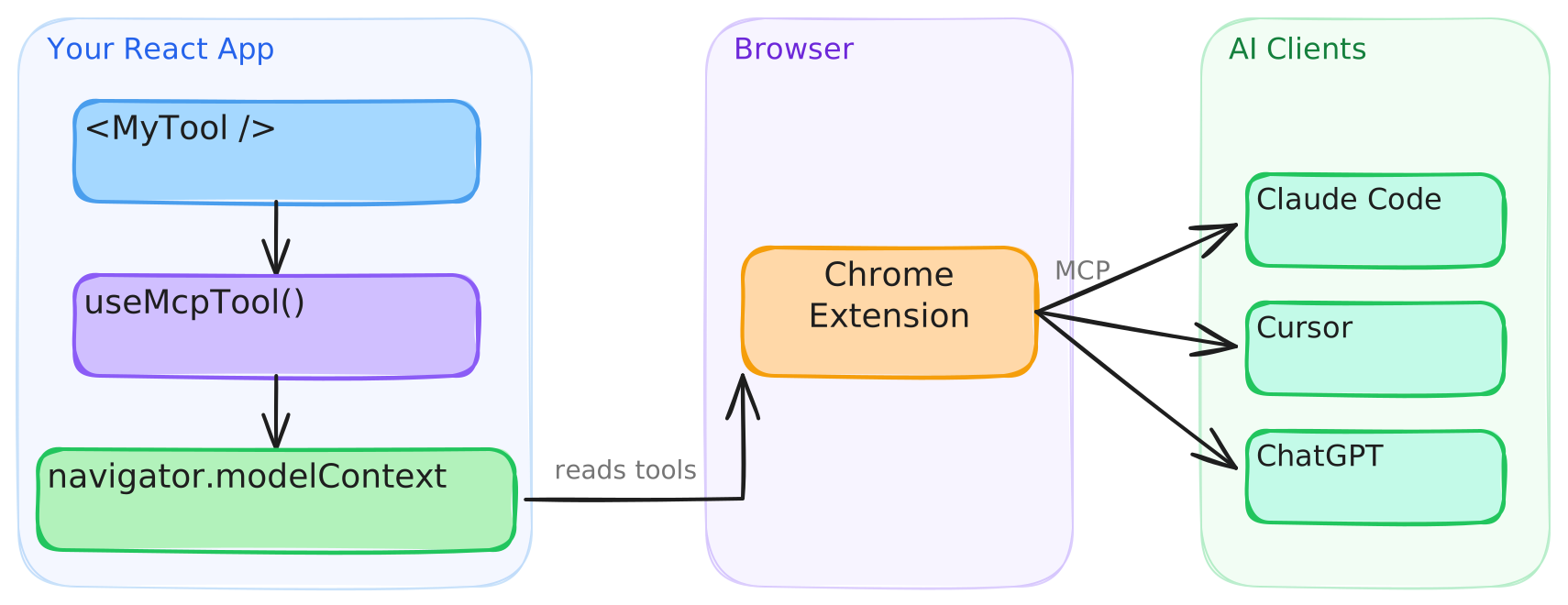
WebMCP React 提供了 React hooks,用于向 navigator.modelContext 注册类型化的工具。它提供基于 Zod 的类型安全工具定义,JSON Schema 作为备用方案,内置针对没有原生 WebMCP 支持浏览器的 polyfill,并能与 Next.js 和 Remix 等 SSR 框架无缝协作。该库确保了 StrictMode 安全性,避免重复注册和孤立工具。
试试问 AI
装完之后,这里有 3 个你可以让 AI 做的事:
你:构建具有 AI 交互工具的 React 应用
你:为 AI 代理创建启用了 WebMCP 的 Web 体验
你:开发具有实时工具执行的 AI 驱动应用
什么时候选它
当构建需要向 AI 代理暴露网页功能的 React 应用时,选择 webmcp-react,可以获得适当的 TypeScript 类型支持。
什么时候不要选它
如果你需要服务器端工具或正在为非 React 环境构建,不要选择它,因为这专门是 WebMCP 的 React 实现。
此 server 暴露的工具
从 README 抽取出 5 个工具search({ query: string }) => Promise<{ content: Array<{ type: 'text', text: string }> }>Search the catalog
translate({ text: string }) => Promise<{ content: Array<{ type: 'text', text: string }> }>Translate text to Spanish
delete_user({ userId: string }) => Promise<any>Permanently delete a user account
checkout({ cartId: string }) => Promise<any>Complete a purchase
calculate({ a: number; b: number; op: string }) => Promise<{ content: Array<{ type: 'text', text: string }> }>Basic arithmetic
可对比工具
webmcpmcp-browserweb-llm-tools
安装
npm install webmcp-react zod对于 Claude Desktop 集成:
{
  "mcpServers": {
    "webmcp": {
      "command": "npx",
      "args": ["webmcp-bridge"]
    }
  }
}
Hacker News 讨论
开发者社区最近的相关讨论。
- 帖子 by kashishhora · 2026-03-05
webmcp-react 对比
最后更新于 · 由 README + GitHub 公开数据自动生成。