esp32_nat_router
by martin-ger·★ 1,956·综合分 54
ESP32 NAT 路由器固件,带 MCP 桥接功能,支持 AI 控制网络特性。
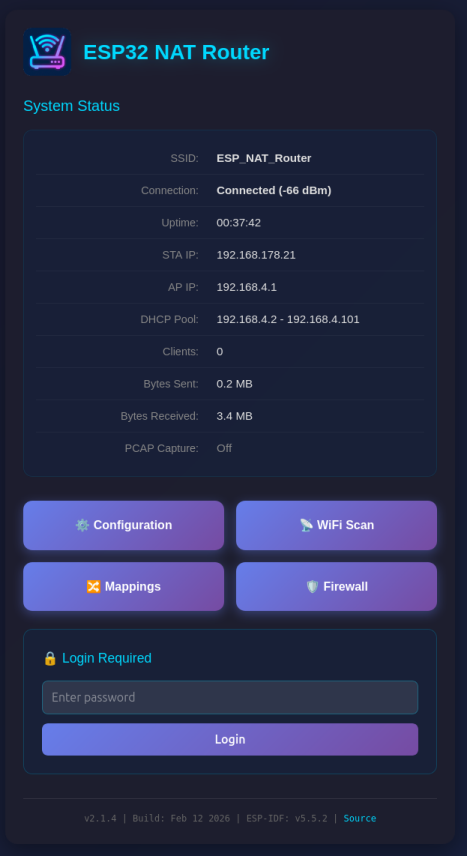
概述
ESP32 NAT 路由器是一个固件项目,将 ESP32 微控制器转变为功能完整的 NAT 路由器,具备先进的网络功能。它支持 WiFi 路由、通过 WireGuard 实现的 VPN 支持、DHCP 保留、端口转发、防火墙功能和数据包捕获。其重要特点之一是 MCP 桥接实现(当前处于 BETA 阶段),允许通过 AI 助手(如 Claude)经由模型上下文协议控制路由器。项目提供多种硬件变体,包括以太网支持、双频 WiFi 以及各种 LED/OLED 显示选项。
试试问 AI
装完之后,这里有 5 个你可以让 AI 做的事:
什么时候选它
如果您需要具有 AI 控制功能的低成本网络路由器,特别是在 IoT 环境或小型网络中,并希望利用 ESP32 的灵活性和 MCP 集成,请选择此路由器。
什么时候不要选它
不要为高性能网络选择此路由器,因为它有有限的吞吐量(5-15 Mbps),并不打算作为专业家庭路由器的替代品。
此 server 暴露的工具
从 README 抽取出 12 个工具get_network_statusRetrieve current network status and router information
set_firewall_ruleAdd or modify firewall rules to control network access
port_forwardConfigure port forwarding to expose internal devices to the internet
start_packet_captureBegin capturing network packets for analysis
configure_vpnSet up WireGuard VPN tunnel configuration
list_clientsShow all connected clients with their details
reboot_deviceReboot the ESP32 router
backup_configurationExport current router configuration
restore_configurationRestore router configuration from a backup
dhcp_reservationSet up static IP assignments for specific devices
update_firmwarePerform OTA firmware update
mqtt_publish_statsPublish router statistics to MQTT server
说明:Tools were inferred from the feature descriptions in the README, particularly from the 'Key Features' section and the documentation table. The actual MCP tool names and signatures are not explicitly documented in the provided text.
可对比工具
安装
安装步骤
- 将固件烧录到您的 ESP32,使用以下任一方法:
- Web 安装程序(最简单):访问 [https://martin-ger.github.io/esp32_nat_router/](https://martin-ger.github.io/esp32_nat_router/) - 使用 esptool 命令行:使用预编译的二进制文件
- 首次启动配置:
- 连接到 'ESP32_NAT_Router' WiFi 网络 - 在浏览器中打开 http://esp32-nat-router.local - 配置上行 WiFi 和 AP 设置 - 点击 '保存并重启'
Claude Desktop 配置
添加到 Claude Desktop 配置文件 config.json:
{
  "mcpServers": {
    "esp32-nat-router": {
      "command": "npx",
      "args": ["@martin-ger/esp32-nat-router-mcp"]
    }
  }
}
FAQ
- 这个 MCP 服务器提供哪些工具?
- 该服务器提供用于网络管理的 MCP 工具,包括设备状态监控、防火墙规则配置、DHCP 保留管理和端口转发设置。它允许 AI 助手以编程方式与路由器的功能交互。
- 硬件要求是什么?
- 该项目支持多种 ESP32 开发板,包括 ESP32、ESP32-C3、ESP32-C5、ESP32-C6、ESP32-S3 和 WT32-ETH01。对于以太网功能,需要配备 LAN8720 PHY 的 W32-ET01 开发板。WiFi 客户端的最大数量取决于 ESP32 型号(ESP32 为 8 个,ESP32-C3 为 5 个)。
Hacker News 讨论
开发者社区最近的相关讨论。
- 帖子 by lnyan · 2021-07-29
esp32_nat_router 对比
最后更新于 · 由 README + GitHub 公开数据自动生成。