webclaw
by kuroko1t·★ 18·综合分 45
WebClaw 是一个基于 Chrome 扩展的 MCP 服务器,通过 WebSocket 连接让 AI 助手控制真实的 Chrome 浏览器会话。
概述
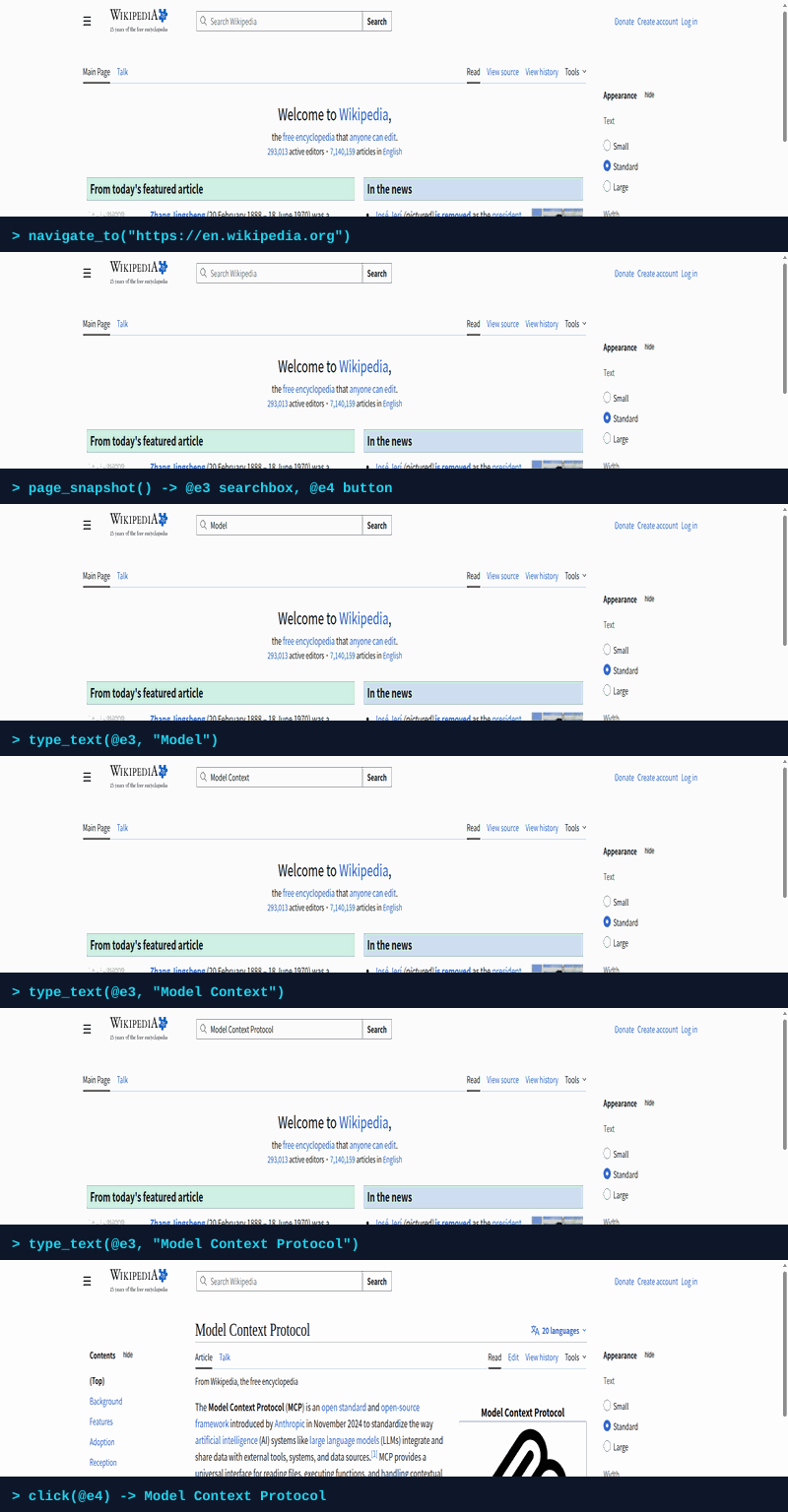
WebClaw 作为 Chrome 扩展运行,完全访问已登录的会话和用户浏览器数据。它提供 21 个 MCP 工具用于浏览器自动化,包括导航、页面交互和标签页管理。系统使用带有 @ref 标签的紧凑可访问性树进行精确元素定位,避免了无头浏览器和机器人检测的陷阱。服务器通过 WebSocket 与 Chrome 扩展通信,使任何 MCP 客户端(如 Claude Desktop、Cursor 或 VS Code)能够实时控制浏览器。
试试问 AI
装完之后,这里有 5 个你可以让 AI 做的事:
什么时候选它
当您需要在真实浏览器中自动化需要已认证的工作流程,且需要避免被检测为机器人时,选择 WebClaw。
什么时候不要选它
如果您需要无头浏览器自动化(无需可见的 Chrome 窗口)或需要 Chrome 之外的其他浏览器支持,不要选择 WebClaw。
此 server 暴露的工具
从 README 抽取出 12 个工具navigate_tourl, tabId?Navigate to a URL
page_snapshotfocusRegion?, interactiveOnly?, tabId?Get a compact accessibility tree with @ref labels
clickref, snapshotId, tabId?Click an element by its @ref label
type_textref, text, snapshotId, clearFirst?, tabId?Type text into an input/textarea by @ref
new_taburl?Open a new tab (optionally with a URL)
list_tabsList all open tabs with tabId, URL, title, and active state
switch_tabtabIdSwitch to a specific tab
go_backtabId?Go back to the previous page
reloadtabId?, bypassCache?Reload the current page
screenshottabId?Capture the visible area of the active tab
list_webmcp_toolstabId?Discover tools on the page (native WebMCP + auto-synthesized from buttons/forms)
invoke_webmcp_tooltoolName, args?, tabId?Invoke a discovered tool (native or synthesized)
可对比工具
安装
安装
1. 配置您的 MCP 客户端
Claude Desktop
添加到 claude_desktop_config.json:
{
  "mcpServers": {
    "webclaw": {
      "command": "npx",
      "args": ["-y", "webclaw-mcp"]
    }
  }
}
其他客户端
# Claude Code
claude mcp add webclaw -- npx -y webclaw-mcp

# Cursor / VS Code / Windsurf
# 添加到相应的 MCP 配置文件中:
{
  "mcpServers": {
    "webclaw": {
      "command": "npx",
      "args": ["-y", "webclaw-mcp"]
    }
  }
}
2. 加载 Chrome 扩展
- 下载最新的 [webclaw-extension.zip](https://github.com/kuroko1t/webclaw/releases/latest)
- 打开
chrome://extensions/→ 启用 **开发者模式** - 点击 **加载解压的扩展程序** → 选择
dist/文件夹
FAQ
- WebClaw 如何避免被检测为机器人?
- WebClaw 作为真实浏览器中的扩展运行,保持正常的 cookie、用户代理和浏览器指纹,使其比无头浏览器更能抵抗机器人检测。
- 它能访问已登录的会话吗?
- 是的,因为它运行在您真实的 Chrome 中,WebClaw 可以访问所有已登录的会话、cookie 和浏览器数据,无需重新认证。
webclaw 对比
最后更新于 · 由 README + GitHub 公开数据自动生成。