aws-geocode-mcp
by Kanahiro·★ 1·综合分 28
使用 Amazon Location Service 进行地理编码的 MCP 服务器,可将地址转换为坐标。
ai-llmotherdeveloper-tools
0
Forks
0
活跃 Issue
17 个月前
最近提交
162 天前
收录于
概述
这个 MCP 服务器使用 Amazon Location Service 提供地理编码功能,允许应用程序将地址转换为地理坐标。它需要具有 Geocode 和 SearchNearby 权限范围的 API 密钥才能运行。服务器可以通过在 claude_desktop_config.json 文件中进行简单配置轻松集成到 Claude Desktop 中,使其成为一个实用的基于位置的服务工具。
试试问 AI
装完之后,这里有 5 个你可以让 AI 做的事:
你:将物理地址转换为经纬度坐标用于地图应用
你:在 AI 助手中实现基于位置的搜索功能
你:支持对附近商家或兴趣点进行基于位置的查询
你:此服务器需要哪些 AWS 权限?
你:我可以指定不同的 AWS 区域吗?
什么时候选它
当你需要地理编码功能且已经在使用 AWS 服务,或者更倾向于使用 Amazon Location Service 而非其他替代方案时选择此服务器。
什么时候不要选它
如果你不想使用 AWS 服务,或者需要在 AWS 生态系统之外使用地理编码功能,则避免使用此服务器。
此 server 暴露的工具
从 README 抽取出 2 个工具geocodeConvert addresses to geographic coordinates using Amazon Location Service
search_nearbySearch for places near a specific location using Amazon Location Service
说明:Tool names inferred from description and AWS Location Service API references, as README doesn't explicitly list tools
可对比工具
google-maps-geocoder-mcpmapbox-mcpnominatim-mcp
安装
安装
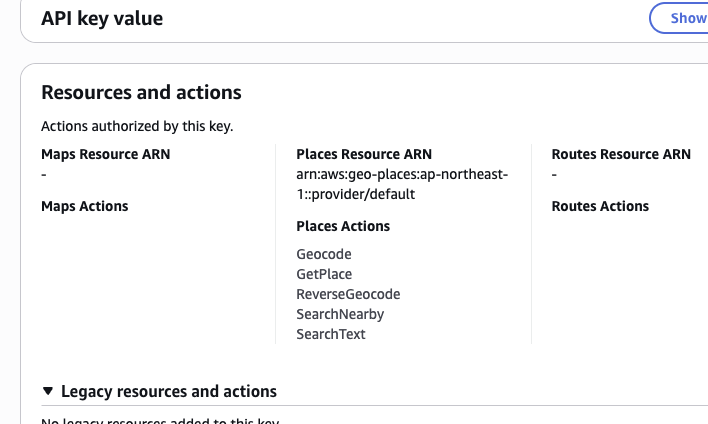
- 首先,从 AWS 管理控制台获取具有以下权限范围的 API 密钥:
- Geocode - SearchNearby
- 全局安装软件包:
npm install -g aws-geocode-mcp- 通过将以下内容添加到您的
claude_desktop_config.json来配置 Claude Desktop:
{
 "mcpServers": {
  "geocoder": {
   "command": "npx",
   "args": ["aws-geocode-mcp"],
   "env": {
    "AMAZON_LOCATION_API_KEY": "YOUR_API_KEY",
    "AWS_REGION": "us-east-1"
   }
  }
 }
}
FAQ
- 此服务器需要哪些 AWS 权限?
- 服务器需要具有 Geocode 和 SearchNearby 权限范围的 API 密钥才能正常运行。
- 我可以指定不同的 AWS 区域吗?
- 是的,您可以设置 AWS_REGION 环境变量。如果未指定,默认值为 ap-northeast-1。
aws-geocode-mcp 对比
最后更新于 · 由 README + GitHub 公开数据自动生成。