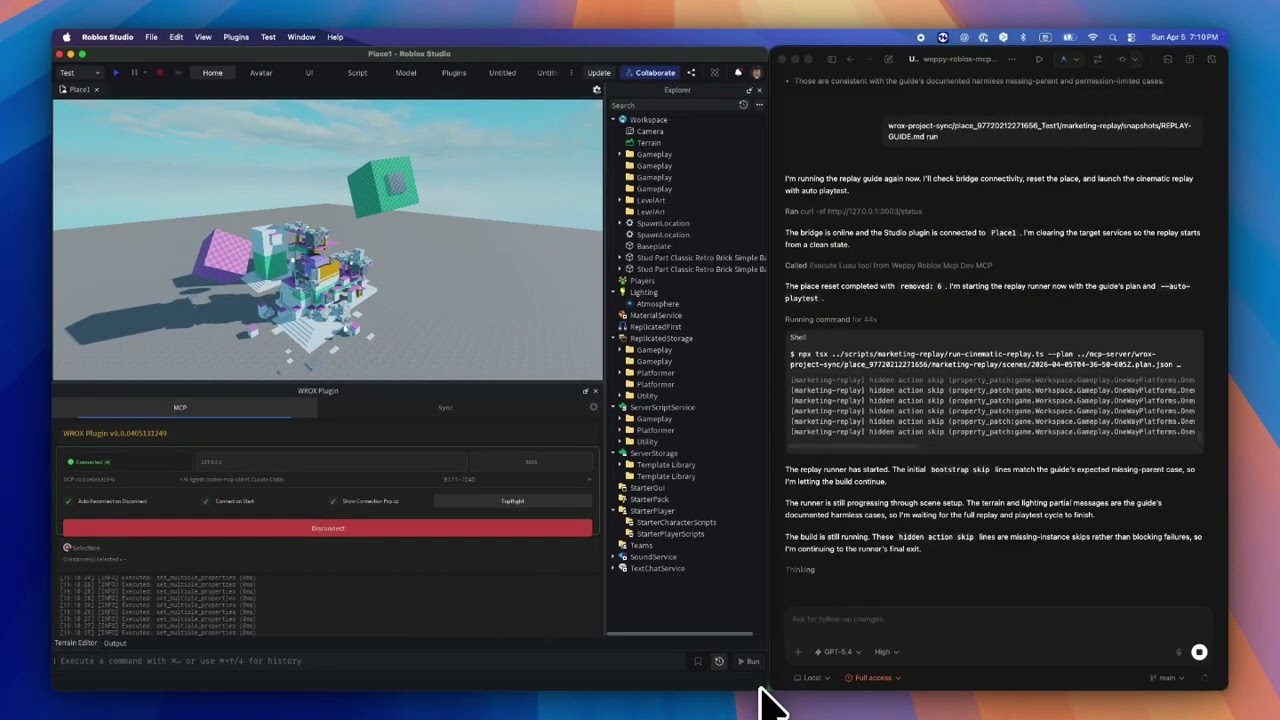
weppy-roblox-mcp
by hope1026·★ 21·综合分 43
一个将AI代理连接到Roblox Studio的MCP服务器,通过自然语言直接操作游戏元素。
概述
WEPPY是一个MCP服务器,连接AI编码代理与Roblox Studio,允许直接创建和编辑脚本、实例、地形、光照、资产等内容。它提供双向项目同步、自动化测试验证,以及实时监控AI操作的仪表板。该服务器支持多种AI客户端,包括Claude Code、Claude Desktop、Cursor、Codex和Gemini,提供一键安装和手动配置选项。
试试问 AI
装完之后,这里有 5 个你可以让 AI 做的事:
什么时候选它
如果您正在开发 Roblox 游戏并希望在 Studio 中直接使用 AI 代理进行原型设计、批量编辑或游戏组件的自动化测试,应选择 WEPPY。
什么时候不要选它
如果您需要在除 Windows 10+ 或 macOS 12+ 以外的平台上访问 Roblox Studio,或者不愿意使用 AGPL-3.0 许可版本或支付专业版升级费用,则不应选择 WEPPY。
此 server 暴露的工具
从 README 抽取出 10 个工具create_instanceCreates new instances in Roblox Studio with specified properties
modify_propertiesModifies properties of existing Roblox Studio instances
generate_terrainGenerates terrain with mountains, rivers, and other features in Roblox Studio
manage_assetsSearches Creator Store and manages asset insertion in Roblox Studio
start_playtestStarts and manages playtests in Roblox Studio with custom test scripts
create_uiCreates and modifies in-game UI elements in Roblox Studio
sync_projectSynchronizes Roblox Studio project with local files
search_instancesSearches for specific instances in Roblox Studio based on criteria
manage_audioManages audio and sound effects in Roblox Studio
create_animationCreates and manages animations in Roblox Studio
说明:Tool names inferred from use cases and descriptions in the README, as there isn't a dedicated 'Tools' section. The README describes functionality through examples rather than explicit tool definitions.
可对比工具
安装
快速安装
**一键安装:**
# macOS / Linux
curl -fsSL https://raw.githubusercontent.com/hope1026/weppy-roblox-mcp/main/install.sh | bash

# Windows (PowerShell)
irm https://raw.githubusercontent.com/hope1026/weppy-roblox-mcp/main/install.ps1 | iex
**手动安装:**
- 访问[网页安装页面](https://weppyai.com/en/install)获取Roblox Studio插件
- 使用以下命令注册MCP服务器:
npx -y @weppy/roblox-mcp@latest**Claude Desktop配置:** 添加到Claude Desktop的config.json文件:
{
  "mcpServers": {
    "weppy-roblox": {
      "command": "npx",
      "args": ["-y", "@weppy/roblox-mcp@latest"]
    }
  }
}
FAQ
- 如何将Claude Code连接到Roblox Studio?
- 从网页安装页面安装,或使用提供的命令为Claude Code添加WEPPY Roblox AI工具包。WEPPY Roblox AI工具包使用'npx -y @weppy/roblox-mcp@latest'作为MCP服务器命令。
- AI能否使用此服务器构建完整的Roblox游戏?
- 是的。AI可以创建实例、编写脚本、生成地形、设置光照、插入资产、配置物理效果等,所有操作都在实时的Roblox Studio会话中完成。它超越了代码生成,实现了可执行的操作。
weppy-roblox-mcp 对比
最后更新于 · 由 README + GitHub 公开数据自动生成。