typo3-mcp-server
by hauptsacheNet·★ 80·综合分 46
TYPO3 MCP服务器通过工作区提供安全AI内容管理,支持OAuth认证。
概述
该扩展为TYPO3提供了MCP服务器实现,允许AI助手通过TYPO3的工作区系统安全地查看和操作页面及记录。所有内容更改都自动排队在TYPO3工作区中,使AI助手能够安全地创建、更新和修改内容,而不会立即影响实时网站。该服务器支持HTTP和stdin/stdout协议,并支持后端用户的OAuth认证。
试试问 AI
装完之后,这里有 5 个你可以让 AI 做的事:
什么时候选它
如果您使用 TYPO3 CMS 并希望获得 AI 协助进行内容管理、SEO 优化和多语言网站管理,具有安全的工作空间操作,请选择此服务器。
什么时候不要选它
如果您需要 fileadmin 支持或工作空间选择功能,请避免使用,因为这些功能目前缺失,或者您不使用 TYPO3 CMS。
此 server 暴露的工具
从 README 抽取出 12 个工具translate_pagesTranslate TYPO3 pages to different languages
import_documentsImport external documents as TYPO3 content
bulk_update_pagesApply bulk updates to multiple pages
optimize_seoAutomatically generate SEO metadata for pages
analyze_content_toneAnalyze and suggest improvements for content tone
audit_contentFind and analyze content based on specific criteria
apply_templatesApply content templates to specific pages
migrate_contentReorganize and move content between pages
manage_translationsManage multi-language content and translations
read_page_contentRetrieve content from a specific TYPO3 page
update_page_contentUpdate content of a specific page in workspace
navigate_page_treeNavigate and explore the TYPO3 page structure
说明:Tool names were inferred from use cases and descriptions in the README rather than a dedicated 'Tools' section. The README mentions these capabilities but doesn't provide explicit tool names or signatures.
可对比工具
安装
安装
composer require hn/typo3-mcp-server**要求:**
- TYPO3 v13.4+
- TYPO3 Workspaces扩展(作为依赖自动安装)
快速开始
选项1:OAuth认证(推荐)
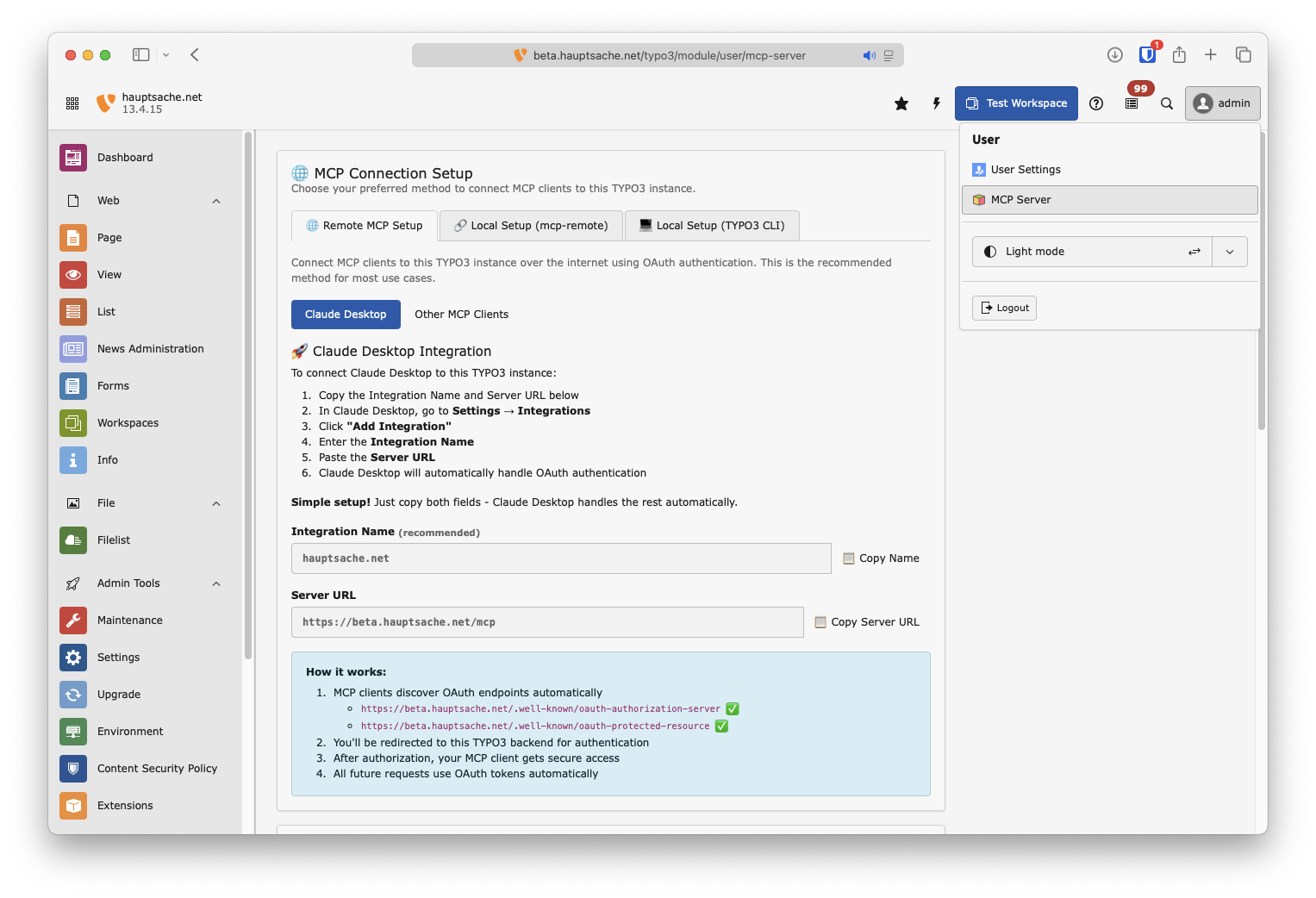
- 在TYPO3后端转到**[用户名] → MCP Server**
- 复制服务器URL(以及可选的集成名称)
- 将集成添加到您的MCP客户端。
选项2:本地命令行连接
将以下内容添加到您的MCP配置文件中(例如,Claude Desktop):
{
   "mcpServers": {
      "[your-typo3-name]": {
         "command": "php",
         "args": [
            "vendor/bin/typo3",
            "mcp:server"
         ]
      }
   }
}
FAQ
- 这个MCP服务器是否可用于生产环境?
- 该MCP服务器已实现多项功能,其中一些标记为实验性功能(内容翻译),另一些仍缺失(文件管理器支持、工作区选择)。它有积极的维护和最近的提交,并且进行了全面测试。
- 哪些AI模型已经测试过这个服务器?
- 该扩展已测试Anthropic(Haiku-4.5)、OpenAI(GPT-5.4-mini、GPT-oss-120b)、Mistral(Mistral-large-2512)和Google(Gemini-3-flash)的模型。
typo3-mcp-server 对比
最后更新于 · 由 README + GitHub 公开数据自动生成。