director
by fdmtl·★ 478·综合分 51
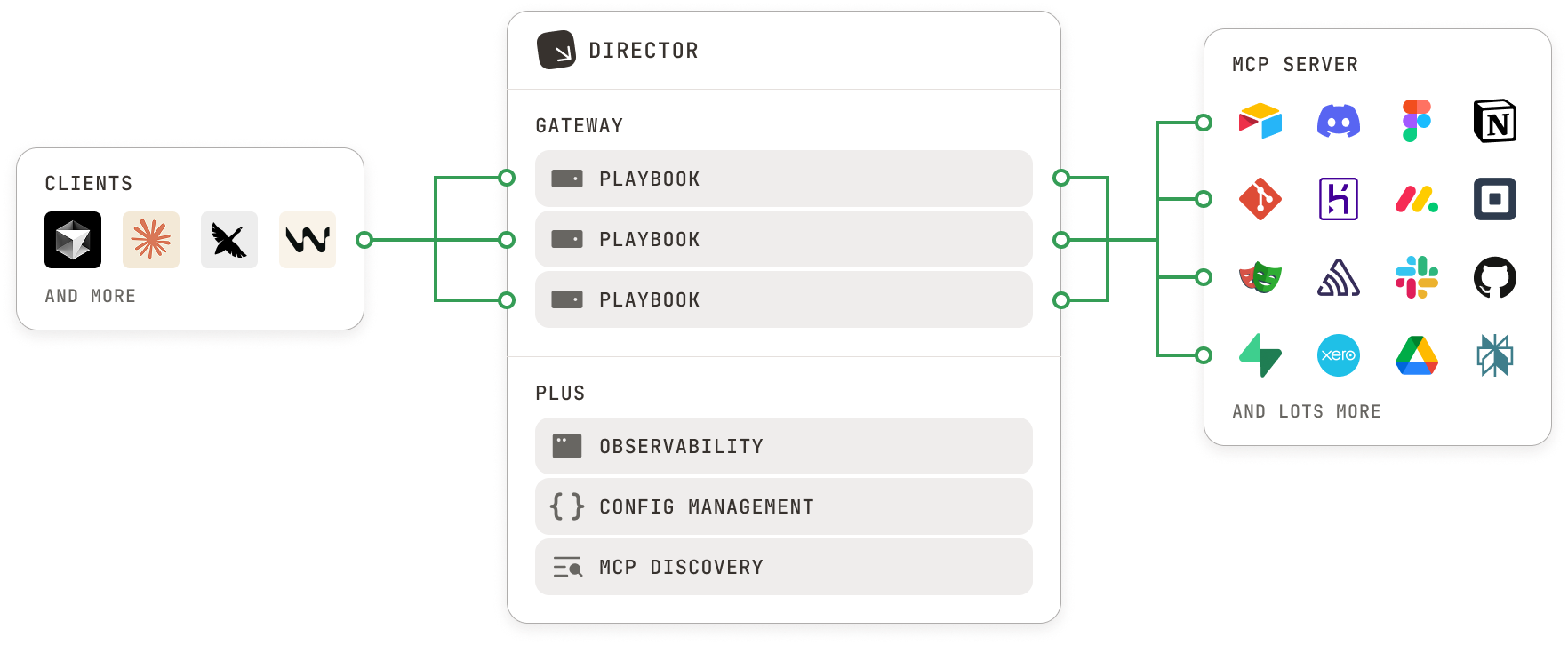
Director 是一个本地优先的平台,用于创建和管理增强 AI 代理技能和功能的 MCP 剧本。
概述
Director 通过"剧本"提供全面解决方案,用于组织和管理 MCP 工具、提示和配置,这些剧本可以轻松切换上下文。该服务充当 AI 代理和 MCP 服务器之间的网关,提供工具过滤、日志记录、强隔离和统一 OAuth 功能。支持 Claude Code、Claude Desktop、Cursor 和 VSCode 等流行 AI 客户端的 1 点击集成,使用户能够轻松为 AI 代理添加专业功能而无需复杂设置。
试试问 AI
装完之后,这里有 5 个你可以让 AI 做的事:
什么时候选它
当您需要管理具有不同配置的多个 MCP 服务器,希望将工具和提示捆绑到可移植的 Playbooks 中,或需要为 MCP 服务提供集中式认证和日志记录时,选择 Director。
什么时候不要选它
如果您需要轻量级、无需额外管理开销的最小 MCP 集成,或者更喜欢直接使用单个 MCP 服务器而非管理层,则应避免使用 Director。
此 server 暴露的工具
从 README 抽取出 12 个工具list-toolsList all tools available in a playbook
get-toolGet details of a specific tool in a playbook
call-toolExecute a specific tool in a playbook with provided arguments
lsList all available playbooks
getShow detailed information about a specific playbook
createCreate a new playbook
destroyDelete a playbook
addAdd an MCP server to a playbook
removeRemove an MCP server from a playbook
prompts-lsList all prompts in a playbook
prompts-getGet details of a specific prompt in a playbook
registry-lsList all available MCP servers in the registry
说明:Tools were extracted from the CLI reference section in the README, specifically from the 'MCP' commands. These appear to be MCP tools provided by the Director server itself rather than tools from other servers that Director might manage.
可对比工具
安装
安装
# 通过 1 行命令安装 Director
$ curl -LsSf https://director.run/install.sh | sh

# 替代方案:通过 npm 安装
$ npm install -g @director.run/cli
Claude Desktop 集成
添加到 Claude Desktop 配置:
{
  "mcpServers": {
    "director": {
      "command": "director",
      "args": ["serve"]
    }
  }
}
FAQ
- Director 中的剧本是什么?
- 剧本是一组 MCP 工具、提示和配置,为 AI 代理提供特定功能。剧本是可移植的,可以轻松切换上下文。
- Director 与普通 MCP 服务器有何不同?
- Director 充当 AI 代理和 MCP 服务器之间的网关,允许您通过剧本组织和管理多个 MCP 服务器。它还提供工具过滤、统一 OAuth 和集中日志记录等额外功能。
director 对比
最后更新于 · 由 README + GitHub 公开数据自动生成。