QuantDinger
by brokermr810·★ 5,392·综合分 58
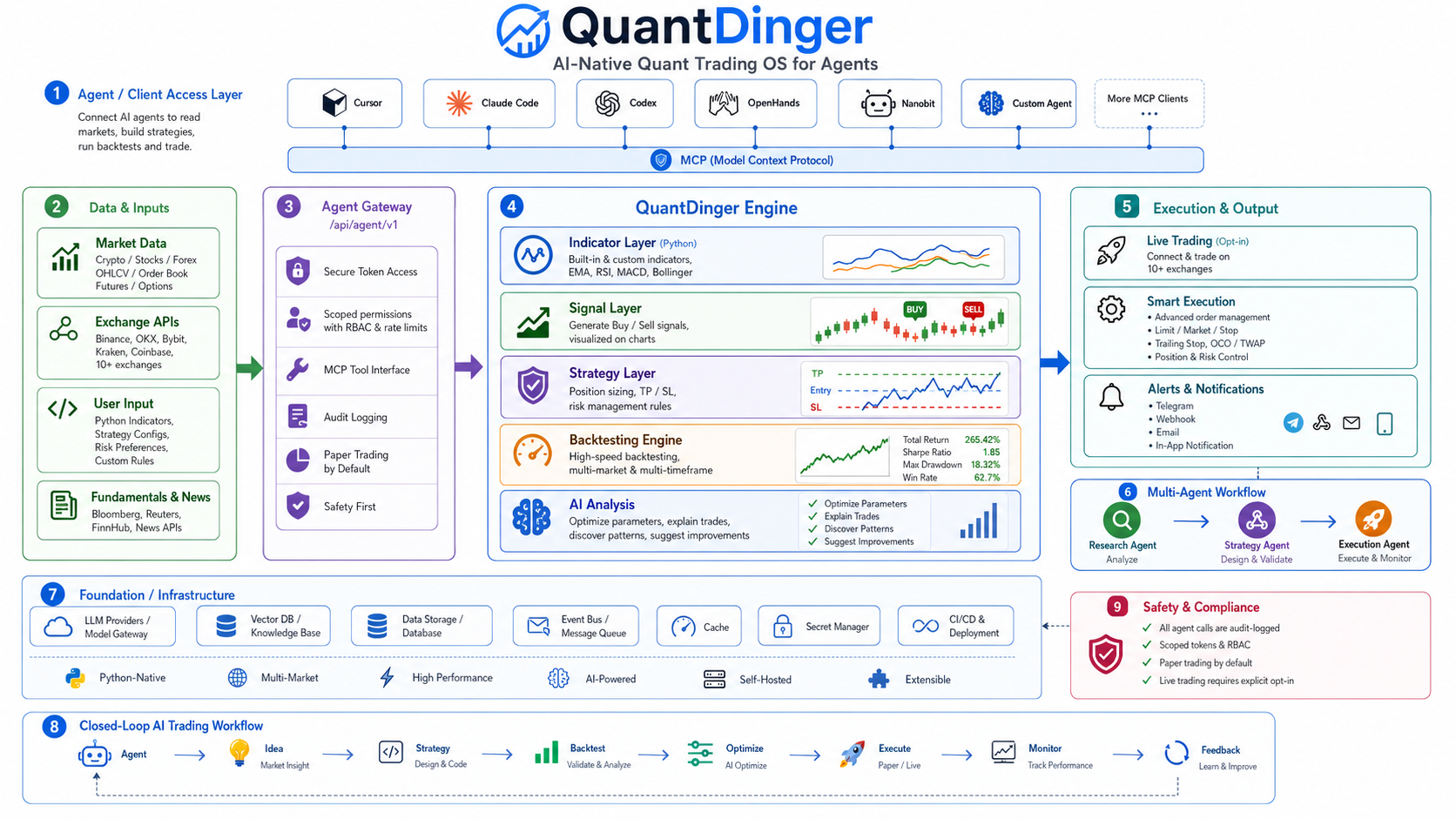
QuantDinger 是一个集成了 MCP 服务器的 AI 驱动量化交易平台,提供市场研究和交易操作功能。
概述
QuantDinger 是一个全面的自我托管量化平台,结合了 AI 辅助研究、Python 原生策略、回测和实时交易功能。它通过 Agent Gateway 提供 MCP 服务器集成,使 AI 代理能够访问市场数据、管理策略、运行回测和执行交易。该平台支持多种经纪商,包括加密货币、IBKR 股票、MT5 外汇和 Alpaca,并具有多用户支持、通知和计费系统等功能。它提供云端和本地托管部署选项,带有预构建的用户界面,只需最少的设置即可使用。
试试问 AI
装完之后,这里有 3 个你可以让 AI 做的事:
什么时候选它
选择QuantDinger当您需要一个AI集成、自托管的量化交易平台,特别是当您希望完全控制数据和执行,同时利用AI代理进行策略开发时。
什么时候不要选它
避免使用QuantDinger如果您只需要一个简单的交易机器人而不需要复杂的架构,或者您需要移动优先的功能而不想自己构建应用程序。
此 server 暴露的工具
从 README 抽取出 12 个工具read_market_dataGet market data for various assets including crypto, stocks, and forex
run_backtestExecute a backtest on a trading strategy with historical data
create_strategyCreate a new trading strategy using Python or built-in indicators
analyze_assetPerform AI analysis on an asset with insights and predictions
execute_tradeExecute paper trading orders on various exchanges
list_strategiesList all available trading strategies in the system
get_performance_metricsRetrieve performance metrics for a strategy or portfolio
optimize_parametersOptimize strategy parameters using historical data
create_watchlistCreate a watchlist to monitor specific assets
get_indicator_valuesGet calculated indicator values for an asset
set_risk_parametersConfigure risk management parameters for trading
query_market_opportunitiesQuery AI-generated market opportunities and insights
说明:Inferred from MCP server documentation and AI integration section. The actual tool names and parameters are not explicitly listed in the README but are implied from the MCP server functionality and agent gateway capabilities.
可对比工具
安装
QuantDinger 可通过 Docker Compose 在几分钟内安装:
git clone https://github.com/brokermr810/QuantDinger.git && cd QuantDinger && cp backend_api_python/env.example backend_api_python/.env && chmod +x scripts/generate-secret-key.sh && ./scripts/generate-secret-key.sh && docker-compose up -d --build启动服务后,可通过 http://localhost:8888 访问,使用默认凭据 quantdinger/123456(务必更改密码)。
与 Claude Desktop 配合使用时,可通过以下方式配置 MCP 服务器:
{
  "mcpServers": {
    "quantdinger": {
      "command": "uvx",
      "args": ["quantdinger-mcp"],
      "env": {
        "QUANTDINGER_BASE_URL": "http://localhost:8888",
        "QUANTDINGER_AGENT_TOKEN": "qd_agent_xxxxxxxx"
      }
    }
  }
}
Hacker News 讨论
开发者社区最近的相关讨论。
- 帖子 by quantdinger · 2026-01-02
QuantDinger 对比
最后更新于 · 由 README + GitHub 公开数据自动生成。