BifrostMCP
by biegehydra·★ 212·综合分 49
VSCode扩展通过MCP协议将语言服务器功能暴露给AI工具。
概述
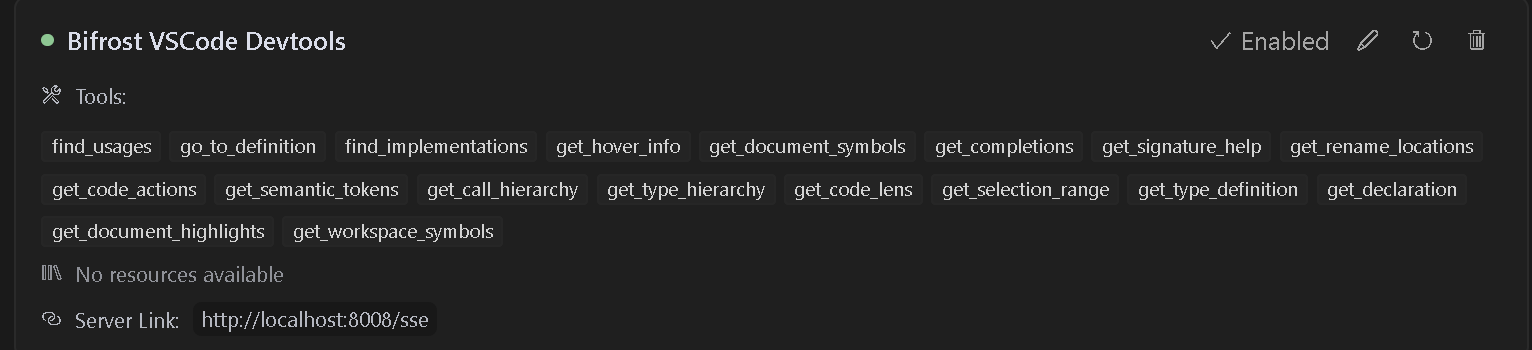
Bifrost是一个VSCode扩展,提供MCP服务器功能,使AI助手能够访问VSCode的强大开发工具和语言特性。它支持各种工具,包括查找用法、转到定义、重命名和代码操作等高级代码导航、分析和操作功能。该扩展默认运行在8008端口,并支持多个项目的独立端点。
试试问 AI
装完之后,这里有 5 个你可以让 AI 做的事:
什么时候选它
当您需要 AI 助手在 VS Code 环境中获得深度的代码理解和导航能力时,选择 Bifrost。
什么时候不要选它
如果您使用的语言没有 VS Code 语言服务器支持,或者您倾向于选择独立的、与 IDE 无关的解决方案,则避免使用 Bifrost。
此 server 暴露的工具
从 README 抽取出 12 个工具find_usagesLocate all symbol references in the code.
go_to_definitionJump to symbol definitions instantly.
find_implementationsDiscover implementations of interfaces/abstract methods.
get_hover_infoGet rich symbol documentation on hover.
get_document_symbolsOutline all symbols in a file.
get_completionsProvide context-aware auto-completions.
get_rename_locationsFind all locations to perform a rename safely.
renamePerform rename on a symbol across the project.
get_code_actionsGet quick fixes, refactors, and improvements.
get_workspace_symbolsSearch symbols across your entire workspace.
get_call_hierarchySee incoming/outgoing call relationships.
get_type_definitionJump to underlying type definitions.
可对比工具
安装
安装
- 从VS Code市场安装[此扩展](https://marketplace.visualstudio.com/items?itemName=ConnorHallman.bifrost-mcp)
- 安装您需要的任何语言特定扩展
- 在VS Code中打开您的项目
配置
扩展激活时会自动启动MCP服务器。配置您的MCP兼容AI助手连接到:
- SSE端点:
http://localhost:8008/sse - 消息端点:
http://localhost:8008/message
Claude Desktop配置
添加到claude_desktop_config.json:
{
  "mcpServers": {
    "Bifrost": {
      "url": "http://localhost:8008/sse"
    }
  }
}
FAQ
- 如何配置多个项目?
- 在每个项目根目录创建一个唯一的端口号的`bifrost.config.json`文件。更新您的AI助手配置以使用项目特定的端点。
- 哪些AI助手与Bifrost兼容?
- Bifrost与任何支持MCP协议的AI助手兼容,包括Cursor、Cline(配合Supergateway)以及可以连接到SSE端点的其他工具。
BifrostMCP 对比
最后更新于 · 由 README + GitHub 公开数据自动生成。