snippy
by Azure-Samples·★ 110·综合分 46
基于Azure Functions的MCP服务器,具有向量和多代理工作流程,用于AI驱动的代码片段管理。
概述
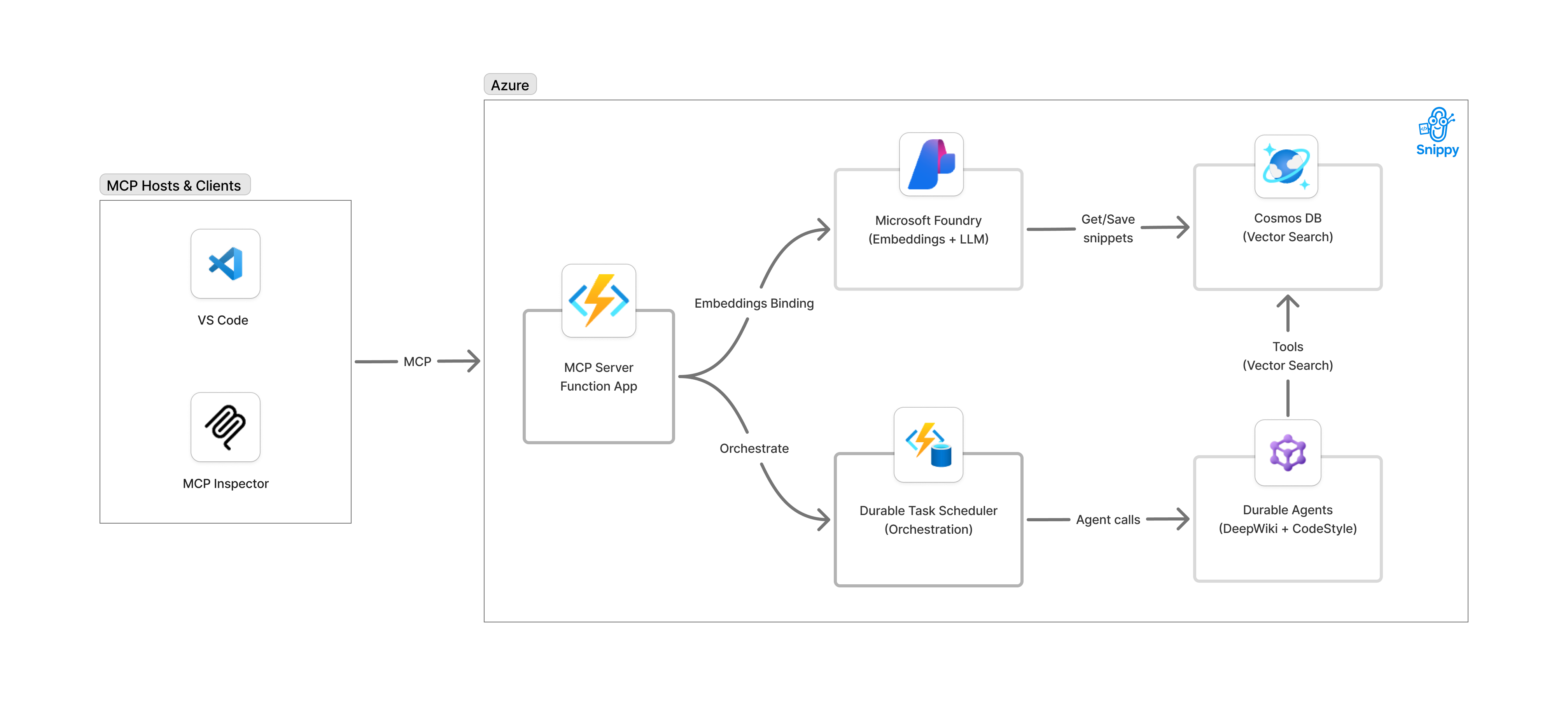
Snippy是一个基于Azure Functions构建的综合性MCP服务器,展示了如何创建用于代码片段管理的AI工具。它集成了Azure OpenAI进行嵌入、Cosmos DB向量索引进行语义搜索,以及Durable Functions进行多代理编排。该服务器暴露了多个MCP工具,包括save_snippet、get_snippet、code_style和deep_wiki,使GitHub Copilot等AI助手能够与复杂的代码管理系统进行交互。
试试问 AI
装完之后,这里有 5 个你可以让 AI 做的事:
什么时候选它
如果您在Azure上构建MCP工具,并需要一个展示多代理编排和向量搜索的参考实现,特别是在处理代码相关应用时,请选择Snippy。
什么时候不要选它
如果您需要供应商中立的解决方案,不使用Azure服务,或需要对提供的多代理工作流模式进行广泛定制,请避免使用Snippy。
此 server 暴露的工具
从 README 抽取出 5 个工具save_snippetSave code snippets with vector embeddings for semantic search
get_snippetRetrieve previously saved code snippets by their unique name
code_styleGenerate language-specific code style guides from saved snippets
deep_wikiCreate comprehensive wiki documentation by analyzing code snippets
generate_comprehensive_documentationOrchestrate multi-agent workflow to produce deep wiki and style guide
可对比工具
安装
安装
**先决条件:**
- Azure订阅
- 已安装azd CLI
- 选择开发环境:GitHub Codespaces、VS Code Dev Containers或本地开发
**部署:**
azd init --template Azure-Samples/snippy
azd auth login
azd up
**对于Claude Desktop:** 添加到Claude Desktop配置:
{
  "mcpServers": {
    "snippy": {
      "command": "python",
      "args": ["-m", "snippy.mcp"]
    }
  }
}
FAQ
- Snipy的主要用途是什么?
- Snippy是一个MCP服务器,将Azure Functions作为工具暴露给AI助手,用于管理具有语义搜索功能的代码片段和生成文档。
- 可以在本地部署Snippy吗?
- Snippy是为Azure部署设计的,但可以在部署到Azure之前使用Docker模拟器在本地进行开发。
snippy 对比
最后更新于 · 由 README + GitHub 公开数据自动生成。