owl-mcp
by ai4curation·★ 15·综合分 39
OWL-MCP通过标准化MCP协议使AI助手能够与OWL本体进行交互。
概述
OWL-MCP是一个模型上下文协议服务器,连接AI系统与Web本体语言(OWL)本体。它提供线程安全的接口,对OWL文件执行CRUD操作,兼容py-horned-owl支持的格式。服务器维护内存模型并与磁盘文件同步,实现实时更新。它特别适合OBO风格的本体,为实体提供带有标准注解属性的人类可读标签。
试试问 AI
装完之后,这里有 5 个你可以让 AI 做的事:
什么时候选它
从事 OWL 本体工作的研究人员和知识工程师,希望通过 AI 创建、修改和维护本体。
什么时候不要选它
如果您需要高级本体可视化功能或支持除 OWL 外的其他知识表示格式。
此 server 暴露的工具
从 README 抽取出 12 个工具add_axiomAdd an OWL axiom to an ontology file
remove_axiomRemove an OWL axiom from an ontology file
find_axiomsFind OWL axioms in an ontology file matching certain criteria
create_ontologyCreate a new OWL ontology file
list_ontologiesList available ontologies in the workspace
get_entity_labelsGet human-readable labels for ontology entities
sync_with_diskForce synchronization between in-memory model and disk file
add_observerRegister an observer for ontology change notifications
remove_observerRemove an observer from ontology change notifications
export_ontologyExport an ontology to a different format
validate_ontologyValidate an ontology for consistency
get_configurationRetrieve stored configuration for ontologies
说明:Tool names and functionality were extracted from the description section that mentions 'The MCP server provides function calls for finding, adding, or removing OWL axioms' and from the features listed in the README. These tools represent th
可对比工具
安装
安装
- 从 [goose installation](https://block.github.io/goose/docs/getting-started/installation/) 安装Goose(桌面版或CLI版)
- 设置LLM提供商(推荐Anthropic)
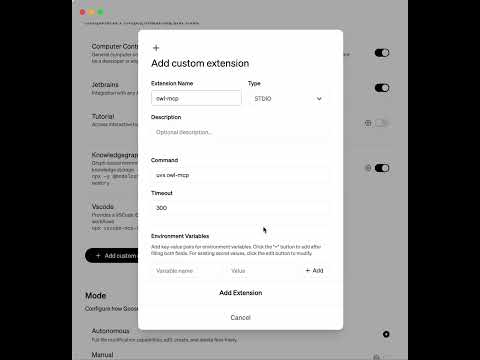
- 在Goose中安装OWL-MCP扩展:
- 直接安装:[安装OWL-MCP](goose://extension?cmd=uvx&arg=owl-mcp&id=owl_mcp&name=OWL%20MCP) - 手动:在Goose的扩展部分添加 uvx owl-mcp
- 开始使用扩展来创建和管理OWL本体
Claude Desktop配置
{
  "mcpServers": {
    "owl-mcp": {
      "command": "uvx",
      "args": ["owl-mcp"]
    }
  }
}
FAQ
- OWL-MCP支持哪些OWL格式?
- OWL-MCP支持py-horned-owl接受的所有格式。它遵循OBO指南,推荐使用功能语法作为源文件格式。
- OWL-MCP如何与Protege等其他工具同步?
- 服务器保持内存模型与磁盘文件同步。进行更改时,会写入磁盘。如果您运行着同一文件的Protege,Protege将自动检测并显示这些更新。
owl-mcp 对比
最后更新于 · 由 README + GitHub 公开数据自动生成。