codex-claude-bridge
by abhishekgahlot2·★ 38·综合分 42
使用 MCP 和 Claude Code Channels 在 Claude Code 和 OpenAI Codex CLI 之间建立双向桥梁。
ai-llmdeveloper-toolscommunication
10
Forks
2
活跃 Issue
7 个月前
最近提交
162 天前
收录于
概述
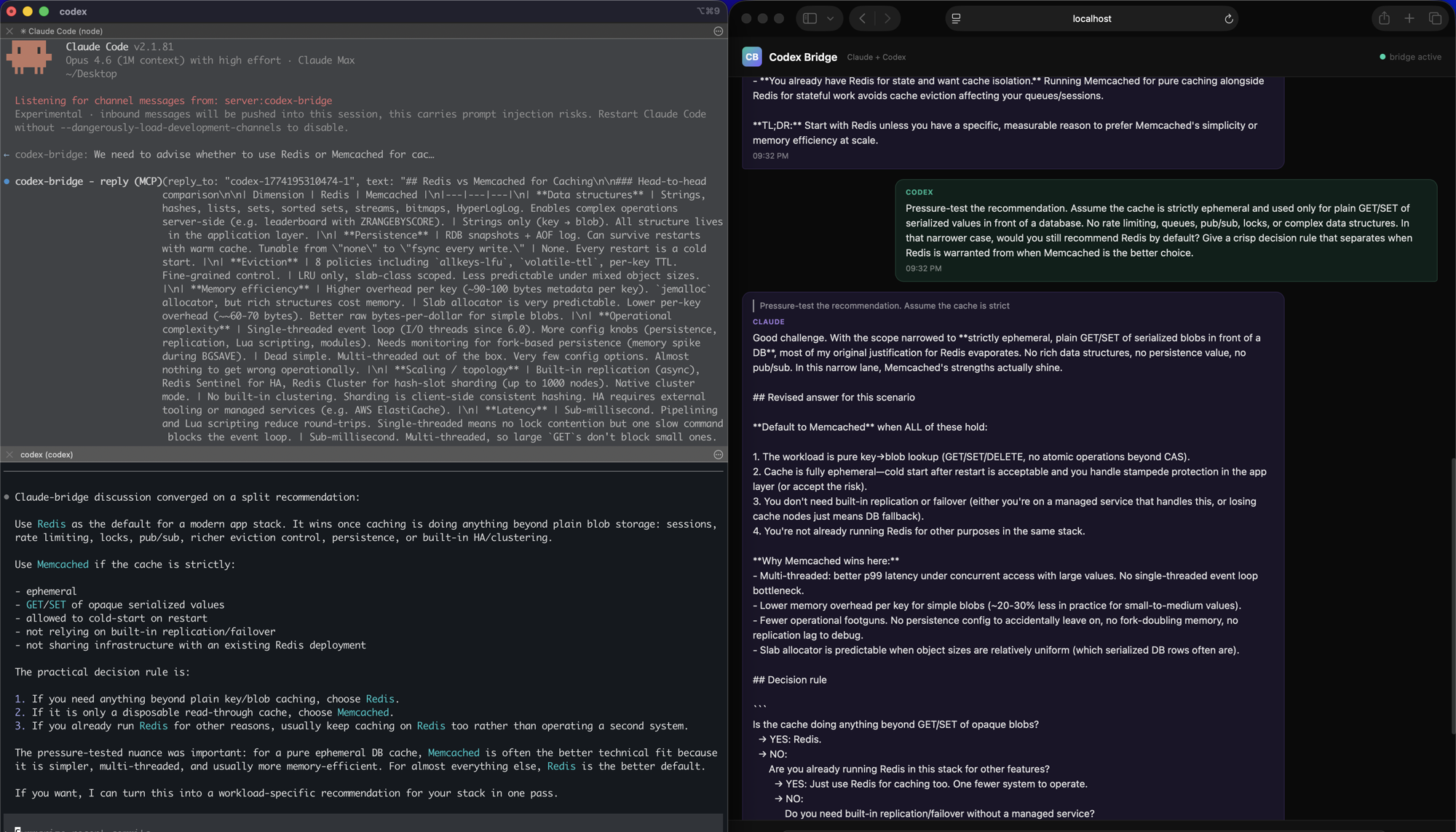
此项目在 Claude Code 和 OpenAI Codex CLI 之间创建了一个实用的双向桥梁,使两个 AI 编码代理能够进行对话。它使用 Claude Code Channels 进行推送通知,在 Codex 端使用阻塞式 MCP 工具,并带有实时 Web 界面监控对话。该桥接是不对称的 - Codex 发起的轮次感觉是实时的,而 Claude 发起的消息则需要等待 Codex 轮询或发起另一个请求。
试试问 AI
装完之后,这里有 5 个你可以让 AI 做的事:
你:使 Claude Code 和 Codex CLI 能够对话,结合各自的优势
你:创建两个 AI 代理可以协作解决编程问题的环境
你:监控和可能调解两个 AI 编码助手之间的对话
你:为什么不使用原生 A2A 协议?
你:对话真的是双向的吗?
什么时候选它
当你需要在统一界面中比较或辩论 Claude Code 和 Codex CLI 的编程方法时选择此工具。
什么时候不要选它
如果你需要对称的双向通信,请避免使用此工具,因为其实现在 Codex 到 Claude 的方向上具有更好的实时性。
此 server 暴露的工具
从 README 抽取出 3 个工具send_to_claudeSends a message from Codex to Claude and waits for reply
check_claude_messagesChecks for messages from Claude in the bridge queue
send_to_codexSends a message from Claude to Codex
可对比工具
anthropic-claude-mcpopenai-toolsclaude-desktop-plugin
安装
# 克隆并安装
git clone https://github.com/abhishekgahlot2/codex-claude-bridge.git
cd codex-claude-bridge
bun install

# 在 Claude Code 中注册
# 添加到 ~/.mcp.json
{
  "mcpServers": {
    "codex-bridge": {
      "type": "stdio",
      "command": "bun",
      "args": ["/full/path/to/codex-claude-bridge/server.ts"]
    }
  }
}

# 在 Codex CLI 中注册
# 添加到 ~/.codex/config.toml
[mcp_servers.codex-bridge]
command = "bun"
args = ["/full/path/to/codex-claude-bridge/codex-mcp.ts"]
tool_timeout_sec = 120

# 启动 Claude Code
claude --dangerously-load-development-channels server:codex-bridge

# 启动 Codex CLI
codex
打开 http://localhost:8788 在 Web 界面中查看对话。
FAQ
- 为什么不使用原生 A2A 协议?
- 目前 Claude Code 和 Codex 都不提供原生 A2A 集成。此桥接使用 Claude Code Channels 和 MCP 作为最实用的解决方案。
- 对话真的是双向的吗?
- 不是完全双向的。Codex 发起的轮次感觉是实时的,但 Claude 发起的消息则需要等待 Codex 轮询或发起另一个请求。
Hacker News 讨论
开发者社区最近的相关讨论。
- 帖子 by darkbatman · 2026-03-22
codex-claude-bridge 对比
最后更新于 · 由 README + GitHub 公开数据自动生成。