postgresql-ssh-mcp
by Zlash65·★ 6·Score 39
PostgreSQL MCP server with SSH tunneling for secure database access through bastion hosts.
Overview
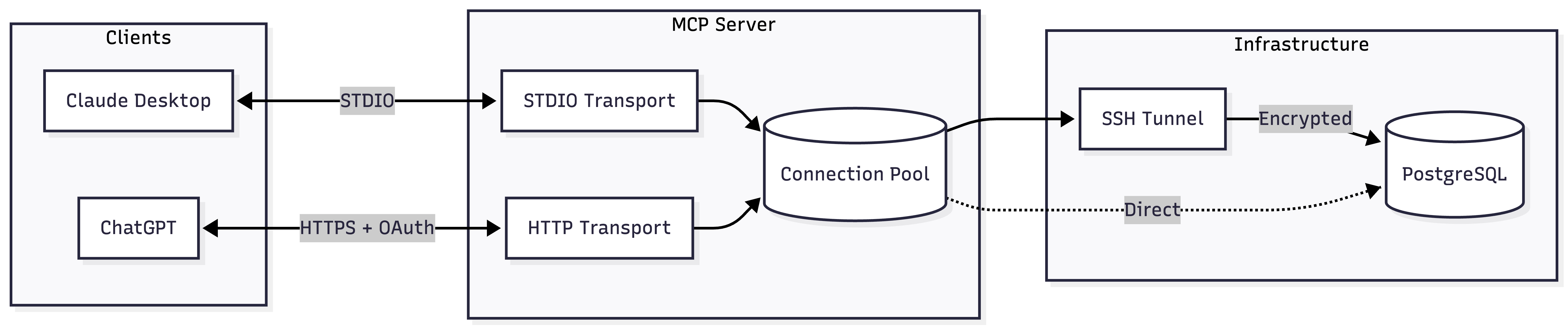
This is a full-featured MCP server for PostgreSQL database access with built-in SSH tunneling capabilities. It provides dual transport modes - STDIO for Claude Desktop and HTTP for ChatGPT - making it versatile across different AI environments. The server implements robust security features including read-only defaults, OAuth support, and automatic SSH tunnel management with TOFU (trust on first use) authentication.
Try asking AI
After installing, here are 5 things you can ask your AI assistant:
When to choose this
Choose this server when you need secure PostgreSQL access through SSH tunnels, especially for ChatGPT integration or Claude Desktop in restricted environments.
When NOT to choose this
Don't choose this if you need write access by default (it's read-only-only unless explicitly configured) or if you're not using PostgreSQL.
Tools this server exposes
12 tools extracted from the READMEexecute_queryExecute SQL with parameterized queries. Results capped by MAX_ROWS.
explain_queryGet EXPLAIN plans in text, JSON, YAML, or XML format. Supports ANALYZE.
list_schemasList database schemas. Excludes system schemas by default.
list_tablesList tables with row counts and sizes. Optionally include views.
describe_tableGet columns, constraints, and indexes for a table.
list_databasesList all databases with owner, encoding, and size.
get_connection_statusGet pool stats, tunnel state, and connection info.
list_active_connectionsShow active connections from pg_stat_activity.
list_long_running_queriesFind queries running longer than a threshold.
get_database_versionGet PostgreSQL server version.
get_database_sizeGet database size and largest tables.
get_table_statsGet vacuum/analyze stats and scan counts for a table.
Comparable tools
Installation
Claude Desktop (STDIO)
Add to your Claude Desktop config:
{
  "mcpServers": {
    "postgres": {
      "command": "npx",
      "args": ["-y", "@zlash65/postgresql-ssh-mcp"],
      "env": {
        "DATABASE_URI": "postgresql://user:password@localhost:5432/mydb"
      }
    }
  }
}
ChatGPT (HTTP Server)
DATABASE_URI="postgresql://user:pass@localhost:5432/mydb" npx @zlash65/postgresql-ssh-mcp-httpThen configure ChatGPT to connect to the HTTP endpoint.
FAQ
- How does the SSH tunneling work?
- The server automatically creates an SSH tunnel to your bastion host and forwards database connections securely through it. No manual `ssh -L` commands needed.
- Can I modify database tables with this server?
- By default, the server is read-only to ensure safe production use. You can enable writes by setting the READ_ONLY environment variable to 'false'.
Compare postgresql-ssh-mcp with
Last updated · Auto-generated from public README + GitHub signals.