wanaku
by wanaku-ai·★ 112·Score 47
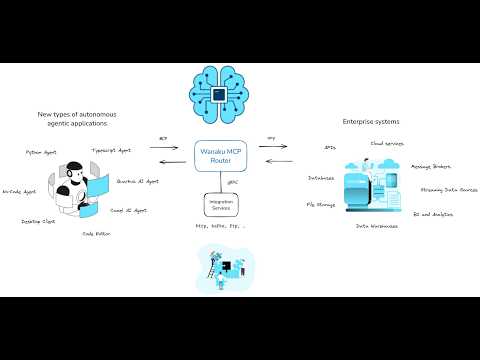
Wanaku MCP Router is a Java-based gateway that connects and routes MCP servers with extensive connectivity options.
Overview
Wanaku is a comprehensive MCP router designed to unify and manage AI applications through the Model Context Protocol. It serves as a central gateway that can bridge multiple MCP servers, leveraging over 300 Apache Camel components for integration. The platform supports secure authentication via Keycloak, Kubernetes-native deployments, and extensible architecture for custom tools and resources. Its multi-namespace capability allows for organized isolation of tools and resources across different contexts.
Try asking AI
After installing, here are 5 things you can ask your AI assistant:
When to choose this
Choose Wanaku when you need to manage multiple MCP servers in enterprise environments, require secure routing with authentication, and need Kubernetes-native deployment.
When NOT to choose this
Don't choose Wanaku if you need a simple MCP server for basic tool integration or if you're looking for a lightweight solution with minimal dependencies.
Comparable tools
Installation
Installation
Using JBang (requires Java 21+)
jbang app install wanaku@wanaku-ai/wanakuUsing Binary Download
- Download the latest binary from [GitHub Releases](https://github.com/wanaku-ai/wanaku/releases)
- Make the binary executable:
chmod +x wanaku - Add to PATH:
sudo mv wanaku /usr/local/bin/
Basic Usage
# Authenticate with Wanaku router
wanaku auth login --url http://localhost:8080

# List available tools
wanaku tools list

# Add a new tool
wanaku tools add --uri http://example.com/api --service http
Claude Desktop Configuration
Add to your claude_desktop_config.json:
{
  "mcpServers": {
    "wanaku": {
      "command": "wanaku",
      "args": ["server"]
    }
  }
}
FAQ
- What is the difference between Wanaku and a standard MCP server?
- Wanaku acts as a router or gateway for MCP servers, providing centralized management and bridging capabilities rather than exposing tools directly.
- Does Wanaku require authentication to run?
- No, authentication via Keycloak is optional. Wanaku can run without authentication but is designed to be secure by default.
Compare wanaku with
Last updated · Auto-generated from public README + GitHub signals.