lazy-mcp
by voicetreelab·★ 87·Score 46
Lazy MCP proxy server that loads tools on-demand to reduce context window usage and token consumption.
Overview
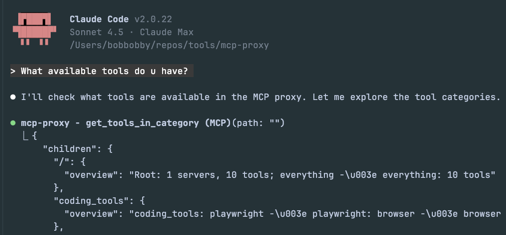
Lazy MCP is a sophisticated proxy server that implements hierarchical tool organization with lazy loading capabilities. It intercepts MCP tool requests and only activates servers when specific tools are actually needed, significantly reducing context pollution and token consumption. The server exposes two meta tools: 'get_tools_in_category' for browsing tool hierarchies and 'execute_tool' for on-demand tool execution. This approach can save substantial tokens, as demonstrated in their example where it reduced context usage by 17% (34,000 tokens).
Try asking AI
After installing, here are 5 things you can ask your AI assistant:
When to choose this
Choose Lazy MCP when you need many MCP tools but face context window limitations, or when you require fine-grained permission control for sensitive operations across multiple MCP servers.
When NOT to choose this
Don't choose Lazy MCP if you have minimal MCP tools that fit within your context window, or if you can't afford the added complexity of a proxy layer.
Tools this server exposes
2 tools extracted from the READMEget_tools_in_categoryget_tools_in_category(path)Navigate the tool hierarchy to explore available tools and categories
execute_toolexecute_tool(tool_path, arguments)Execute tools by their hierarchical path with lazy loading support
Comparable tools
Installation
Installation
- Clone the repository:
git clone https://github.com/voicetreelab/lazy-mcp.git
cd lazy-mcp- Build the proxy server:
make build- Configure by setting up your hierarchy structure:
./build/structure_generator --config config.json --output testdata/mcp_hierarchy- Add to Claude Code:
claude mcp add --transport stdio mcp-proxy build/mcp-proxy -- --config config.json- Set up permission hooks if needed (see README for details).
FAQ
- How does lazy loading save tokens?
- Lazy MCP only activates MCP servers when specific tools are actually requested, rather than loading all tools at startup. This keeps unused tool instructions out of the context window, significantly reducing token consumption.
- Can I control which tools require permission?
- Yes, Lazy MCP supports multiple permission control methods: Claude Code native hooks, token-based hooks, and an OpenCode plugin. These allow you to define sensitive tools that require confirmation before execution.
Compare lazy-mcp with
Last updated · Auto-generated from public README + GitHub signals.