ToolsForMCPServer
by tanaikech·★ 105·Score 46
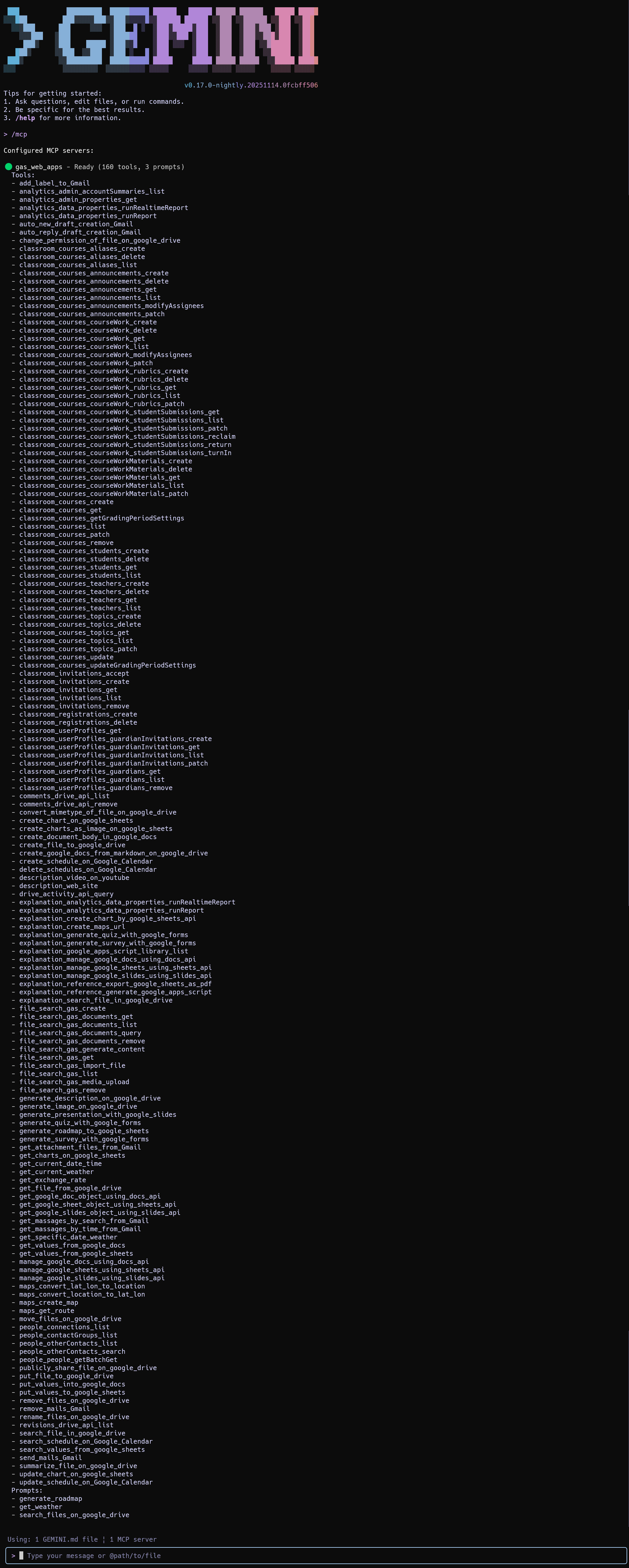
An MCP server built with Google Apps Script providing 160+ tools for Google Workspace integration.
Overview
ToolsForMCPServer is a sophisticated MCP server implemented using Google Apps Script Web Apps, enabling seamless integration with Google Workspace APIs. It offers 160+ pre-built tools for Gmail, Drive, Calendar, and other Google services. The server simplifies authorization for Google APIs, significantly reducing development overhead for applications interacting with Google Workspace services. The implementation leverages two libraries: MCPApp for managing the server lifecycle and communication protocols, and ToolsForMCPServer for the actual tool implementations.
Try asking AI
After installing, here are 5 things you can ask your AI assistant:
When to choose this
Choose this if you're already using Google Workspace and want to extend AI capabilities with custom tools without building complex authentication systems.
When NOT to choose this
Avoid if you need tools outside of Google Workspace ecosystem, or if you prefer a self-hosted solution without dependency on Google's infrastructure.
Tools this server exposes
12 tools extracted from the READMEget_exchange_rateRetrieves current exchange rates between currencies
generate_roadmap_to_google_sheetsCreates a roadmap in Google Sheets
generate_description_on_google_driveGenerates and sets a description for a file on Google Drive
generate_image_on_google_driveGenerates an image from a prompt and saves it to Google Drive
summarize_file_on_google_driveSummarizes a file stored on Google Drive
description_web_siteProvides descriptions of websites given their URLs
send_emailSends an email through Gmail
create_calendar_eventCreates an event in Google Calendar
search_drive_filesSearches for files in Google Drive
get_gmail_messagesRetrieves messages from Gmail
create_google_docCreates a new Google Document
get_calendar_eventsRetrieves events from Google Calendar
Comparable tools
Installation
Installation
- Create a new Google Apps Script project at [script.google.com](https://script.google.com/home/projects/create)
- Install the required libraries:
- MCPApp (Project Key: 1TlX_L9COAriBlAYvrMLiRFQ5WVf1n0jChB6zHamq2TNwuSbVlI5sBUzh) - ToolsForMCPServer (Project Key: 1lnE7UL1jQgPDbTB9yjhiwZM0SaS9MObhzvWUWb_t8FisO6A3bLepvM2j)
- Add the provided script to your project
- Deploy as a Web App with 'Execute as: Me' and 'Who has access: Anyone'
- Configure Gemini CLI by adding this to your settings.json:
{
  "mcpServers": {
    "gas_web_apps": {
      "command": "npx",
      "args": [
        "mcp-remote",
        "https://script.google.com/macros/s/###/exec?accessKey=sample"
      ],
      "env": {}
    }
  }
}
FAQ
- What is the purpose of the API key in the script?
- The API key is required for specific tools that interact with Gemini API, such as generating content or summaries.
- How can I enable additional Google APIs?
- You need to enable them in the 'Advanced Google services' section of your Apps Script project.
Compare ToolsForMCPServer with
Last updated · Auto-generated from public README + GitHub signals.