whoop-mcp
by shashankswe2020-ux·★ 70·Score 49
MCP server connecting AI assistants to WHOOP health and fitness data through OAuth2 authentication with 6 data tools.
Overview
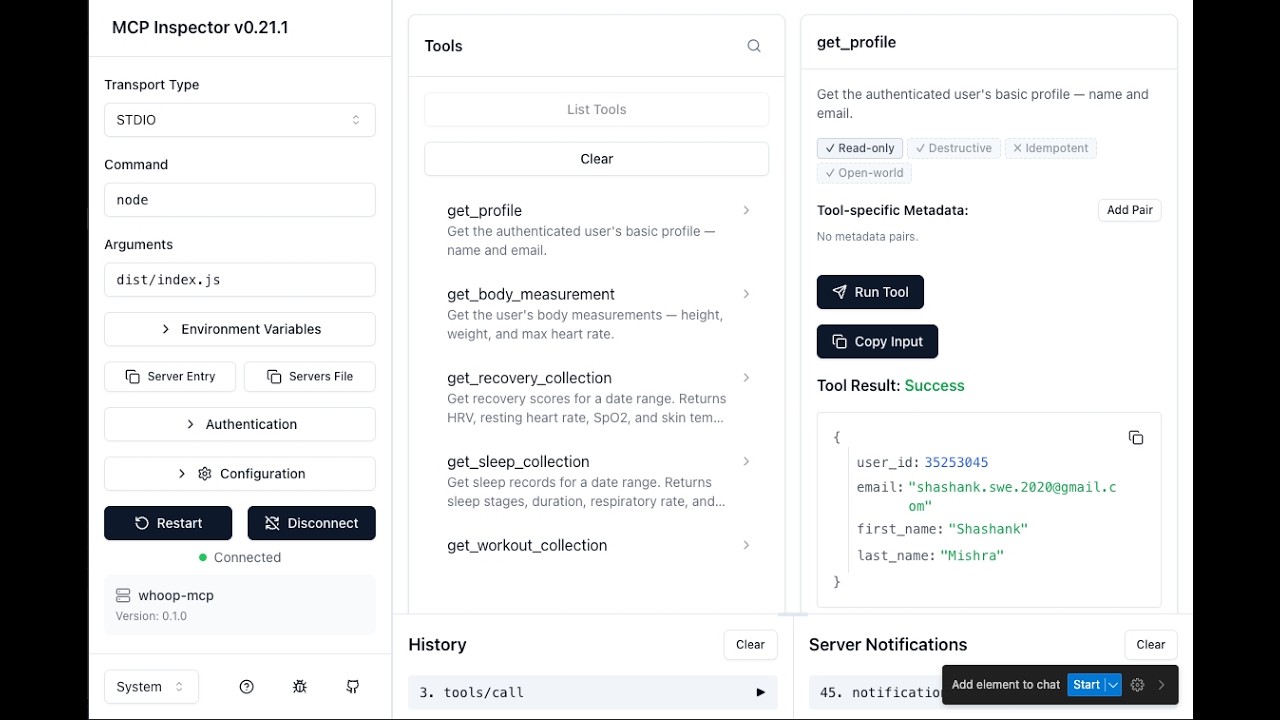
whoop-ai-mcp is a well-structured MCP server that provides AI assistants with access to WHOOP's health and fitness data. The server implements OAuth2 authentication with secure token storage and automatic refresh, ensuring secure access to sensitive health information. It exposes six tools: recovery data, sleep metrics, workout records, physiological cycles, body measurements, and profile information. The implementation uses TypeScript with minimal dependencies, making it lightweight and efficient.
Try asking AI
After installing, here are 5 things you can ask your AI assistant:
When to choose this
Choose this MCP server if you're a WHOOP user who wants to integrate your health data with AI assistants for natural language analysis of your fitness metrics.
When NOT to choose this
Don't choose this if you don't have a WHOOP membership or need access to other health data sources not supported by WHOOP.
Tools this server exposes
6 tools extracted from the READMEget_profile()Get the authenticated user's basic profile — name and email.
get_body_measurement()Get the user's body measurements — height, weight, and max heart rate.
get_recovery_collection(start?, end?, limit?, nextToken?)Get recovery scores for a date range. Returns HRV, resting heart rate, SpO2, and skin temp.
get_sleep_collection(start?, end?, limit?, nextToken?)Get sleep records for a date range. Returns sleep stages, duration, respiratory rate.
get_workout_collection(start?, end?, limit?, nextToken?)Get workout records for a date range. Returns strain, heart rate zones, calories, sport type.
get_cycle_collection(start?, end?, limit?, nextToken?)Get physiological cycles for a date range. Returns strain, calories, heart rate data per cycle.
Comparable tools
Installation
Installation
Via MCP Registry:
Server name: io.github.shashankswe2020-ux/whoopVia Claude Desktop: Add this to your Claude Desktop configuration:
{
  "mcpServers": {
    "whoop": {
      "command": "npx",
      "args": ["whoop-ai-mcp"],
      "env": {
        "WHOOP_CLIENT_ID": "your_client_id",
        "WHOOP_CLIENT_SECRET": "your_client_secret"
      }
    }
  }
}
Global installation:
npm install -g whoop-ai-mcpFAQ
- How do I authenticate with WHOOP?
- The server uses OAuth2 with PKCE. On first run, a browser window will open for you to authorize access to your WHOOP data.
- Where are tokens stored?
- Tokens are cached at ~/.whoop-mcp/tokens.json with 0600 permissions (user-only read/write).
Compare whoop-mcp with
Last updated · Auto-generated from public README + GitHub signals.