scrapegraph-mcp
by ScrapeGraphAI·★ 72·Score 48
ScrapeGraph MCP server provides AI-powered web scraping tools including extract, search, crawl, schema generation, and monitoring capabilities.
Overview
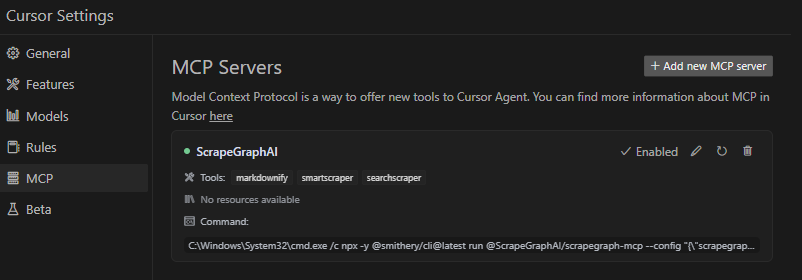
ScrapeGraph MCP server is a production-ready implementation of the Model Context Protocol that connects language models with the ScrapeGraph AI API. It enables AI assistants to perform complex web scraping tasks, extracting structured data from websites, crawling multiple pages, and generating schemas from natural language prompts. The server offers both local and remote deployment options, with comprehensive integration guides for Claude Desktop and Cursor.
Try asking AI
After installing, here are 3 things you can ask your AI assistant:
When to choose this
Choose this server when you need reliable, AI-powered web scraping capabilities through MCP and are already using or willing to integrate with the ScrapeGraph AI API.
When NOT to choose this
Don't choose this if you need open-source scraping without API dependency, want more control over the scraping process, or are concerned about vendor lock-in to ScrapeGraph's services.
Tools this server exposes
12 tools extracted from the READMEscrapeScrape content from web pages with various output formats
extractExtract specific information from a website using AI
searchSearch the web with customizable parameters
crawl_startStart an async multi-page crawl
crawl_get_statusCheck the status of a running crawl job
crawl_stopStop a running crawl job
crawl_resumeResume a paused crawl job
schemaGenerate or augment a JSON Schema from a prompt
creditsCheck remaining API credits
historyView historical usage of API services
monitor_createCreate a scheduled monitoring job
monitor_listList all monitoring jobs
Comparable tools
Installation
Installation
Via Smithery (Recommended)
npx -y @smithery/cli install @ScrapeGraphAI/scrapegraph-mcp --client claudeClaude Desktop Configuration
{
    "mcpServers": {
        "@ScrapeGraphAI-scrapegraph-mcp": {
            "command": "npx",
            "args": [
                "-y",
                "@smithery/cli@latest",
                "run",
                "@ScrapeGraphAI/scrapegraph-mcp",
                "--config",
                "\"{\\\"scrapegraphApiKey\\\":\\\"YOUR-SGAI-API-KEY\\\"}\""
            ]
        }
    }
}
Remote Server
{
  "mcpServers": {
    "scrapegraph-mcp": {
      "command": "npx",
      "args": [
        "mcp-remote@0.1.25",
        "https://scrapegraph-mcp.onrender.com/mcp",
        "--header",
        "X-API-Key:YOUR_API_KEY"
      ]
    }
  }
}
Compare scrapegraph-mcp with
Last updated · Auto-generated from public README + GitHub signals.