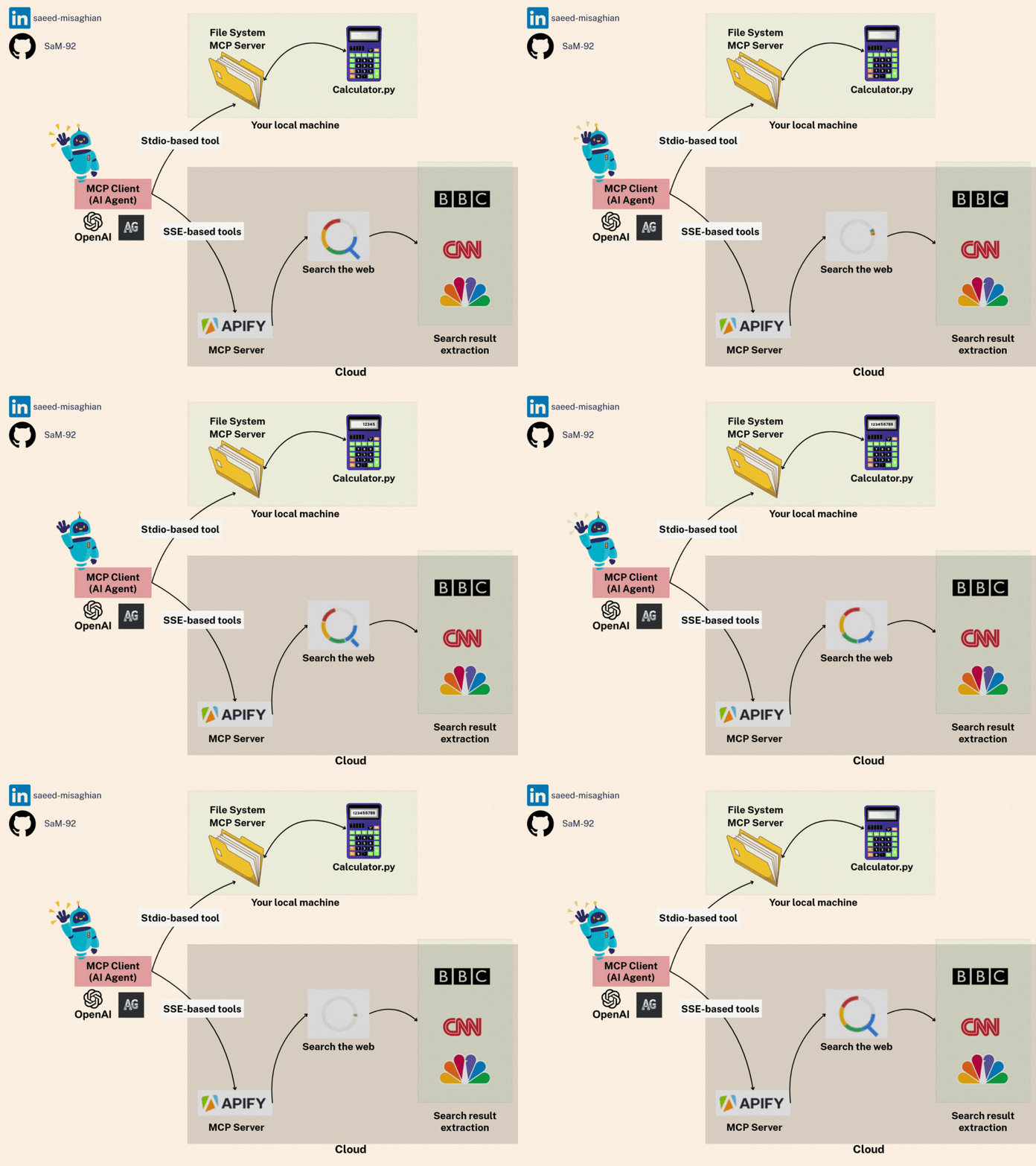
mcp_autogen_sse_stdio
by SaM-92·★ 29·Score 38
A practical example demonstrating AutoGen integration with both local and remote MCP servers using Stdio and SSE.
Overview
This repository provides a clear demonstration of how to integrate MCP servers with AutoGen, showing both local and remote tool connections. The implementation includes a local math server using Stdio transport and a remote Apify tool via SSE for web browsing capabilities. The README is well-structured with detailed setup instructions and code walkthroughs.
Try asking AI
After installing, here are 5 things you can ask your AI assistant:
When to choose this
Choose this when you need to integrate AutoGen with both local and remote MCP tools, particularly when working with hybrid architectures combining simple calculation tools with external web services.
When NOT to choose this
Not suitable for production environments requiring extensive tool integration as this is a demonstration project focused on showing protocol capabilities rather than providing a comprehensive solution.
Tools this server exposes
4 tools extracted from the READMEaddPerforms addition of two numbers
multiplyPerforms multiplication of two numbers
web_searchSearches the web for information
content_retrievalRetrieves and analyzes content from web pages
Note: Tools are explicitly described in the README: local math tools (add, multiply) and remote web browsing tools (web_search, content_retrieval) from Apify
Comparable tools
Installation
Installation
- Ensure you have **Python 3.12** installed
- Install
uv:pip install uv - Create virtual environment:
uv venv --python 3.12 - Activate virtual environment:
- macOS/Linux: source .venv/bin/activate - Windows: \.venv\Scripts\activate
- Install dependencies:
uv pip install -e . - Create
.envfile with your API keys:
``dotenv OPENAI_API_KEY=your_openai_api_key_here APIFY_API_KEY=your_apify_api_key_here ``
- Run with:
uv run mcp_autogen_sse_stdio/main.py
FAQ
- What is the purpose of this MCP server?
- This is not an MCP server itself but rather an example of how to integrate both local and remote MCP servers into AutoGen agents.
- Can I use other MCP servers with this approach?
- Yes, the example demonstrates the pattern for connecting any MCP servers via Stdio or SSE transport, not just the math server and Apify tool shown.
Compare mcp_autogen_sse_stdio with
Last updated · Auto-generated from public README + GitHub signals.