brightspace-mcp-server
by RohanMuppa·★ 19·Score 43
MCP server for Brightspace (D2L) that lets AI check grades, assignments, announcements and course content.
Overview
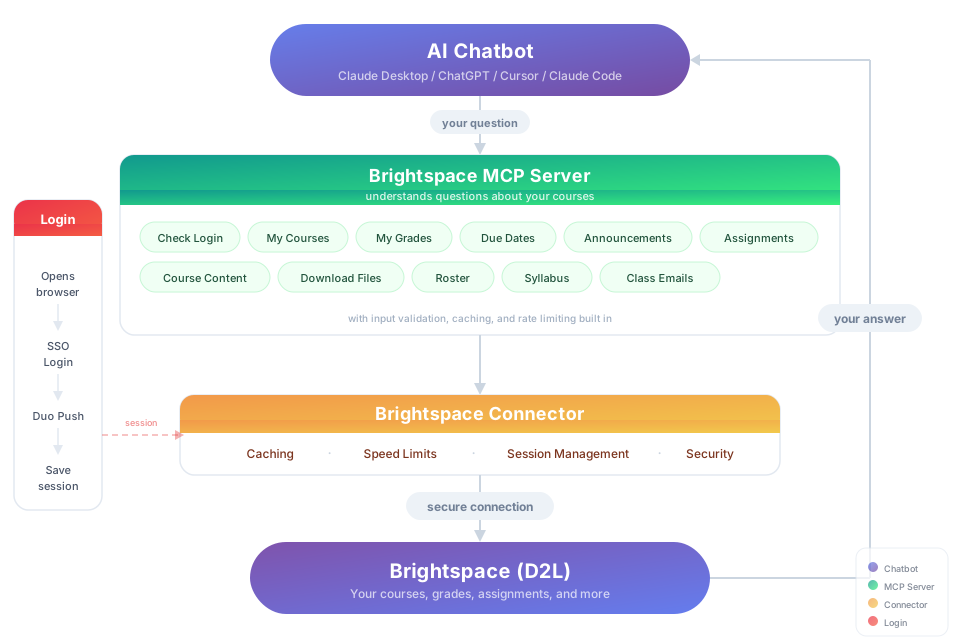
The Brightspace MCP server connects AI assistants to D2L Brightspace platforms used by educational institutions. It provides tools to retrieve grades, check due dates, access announcements, view rosters, retrieve syllabi, and pull course content on-demand. The server supports automatic authentication and works with any school using D2L Brightspace, including Purdue, USC, and hundreds of other institutions.
Try asking AI
After installing, here are 5 things you can ask your AI assistant:
When to choose this
Choose this server if you're a student using D2L Brightspace and want to use AI assistants to quickly access and analyze your course information.
When NOT to choose this
Don't choose this if your school doesn't use D2L Brightspace, or if you need write access to your LMS (this server is read-only).
Tools this server exposes
7 tools extracted from the READMEcheck_gradesCheck your grades across all courses
check_assignmentsCheck assignment due dates and status
check_announcementsCheck course announcements
get_course_contentDownload course materials and content
get_rosterGet class roster and instructor information
get_discussionsCheck discussion forum posts
create_study_planCreate a study schedule based on due dates
Note: Tool names inferred from the 'What You Can Ask About' section and examples in the README. No explicit 'Tools' section found, but functionality descriptions are clear.
Comparable tools
Installation
Installation
**Option 1: Let your AI do it** Paste this into Claude Code, Cursor, Windsurf, Copilot, or any AI coding assistant:
Install brightspace-mcp-server for me by following https://github.com/RohanMuppa/brightspace-mcp-server/blob/main/LLMs.md (use --purdue if I'm at Purdue).**Option 2: Run it yourself**
npx brightspace-mcp-server setupPurdue students can add --purdue to skip entering the school URL.
**Manual Client Configuration** For clients not supporting the automatic setup:
- Run
npx brightspace-mcp-server setupfirst to save credentials - Register the server with command:
npx -y brightspace-mcp-server@latest - On Windows:
cmd /c npx -y brightspace-mcp-server@latest
**Claude Desktop Configuration** Add to claude_desktop_config.json:
{
  "mcpServers": {
    "brightspace": {
      "command": "npx",
      "args": ["-y", "brightspace-mcp-server@latest"]
    }
  }
}
FAQ
- How do I handle expired sessions?
- Sessions re-authenticate automatically. If auto-reauth fails, run `npx brightspace-mcp-server auth` to manually re-authenticate.
- Where are my credentials stored?
- Credentials are stored locally on your machine at `~/.brightspace-mcp/config.json` with restricted permissions. Session tokens are encrypted using AES-256-GCM.
Compare brightspace-mcp-server with
Last updated · Auto-generated from public README + GitHub signals.