mcptools
by posit-dev·★ 174·Score 48
mcptools implements the Model Context Protocol in R, enabling R to act as both MCP server and client for AI integration.
Overview
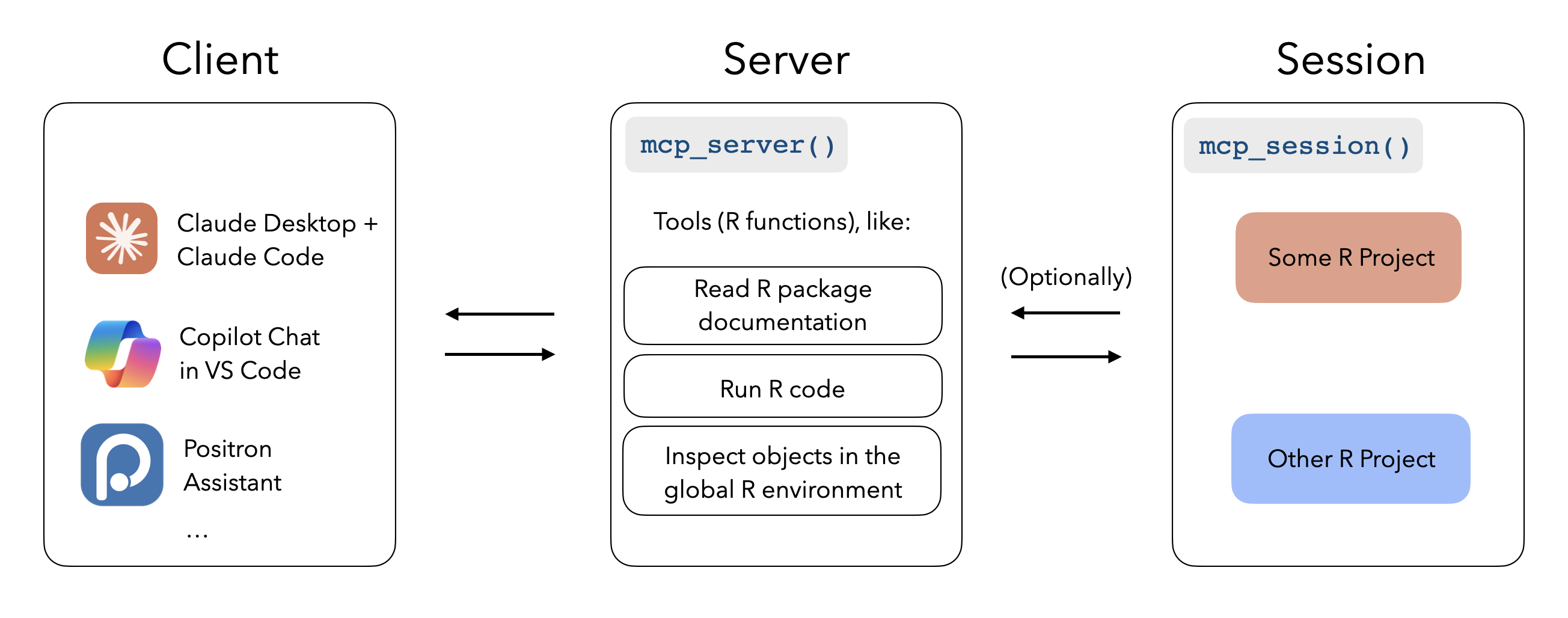
mcptools is a comprehensive implementation of the Model Context Protocol for the R programming language. It enables R to function as both an MCP server, allowing AI tools like Claude Desktop to execute R code in active R sessions, and as an MCP client to register third-party MCP servers within R environments. The package provides two main functionalities: R as an MCP server exposes tools for reading package documentation, running R code, and inspecting global environment objects; while R as an MCP client allows integration of third-party servers with ellmer chats. This bidirectional capability creates a powerful bridge between R and AI assistants.
Try asking AI
After installing, here are 3 things you can ask your AI assistant:
When to choose this
Choose mcptools if you're working with R and want AI assistants to interact with your R sessions, access your environment variables, or execute code directly within your R workflow.
When NOT to choose this
Avoid mcptools if you're not working with R, as it's specifically designed for the R ecosystem and won't be useful for other programming languages.
Tools this server exposes
3 tools extracted from the READMEmcp_servermcp_server()Initializes the mcptools MCP server for R
mcp_sessionmcp_session()Registers an R session to be accessed by MCP clients
mcp_toolsmcp_tools()Returns a list of MCP tools from configuration
Note: The documentation describes MCP server functionality but doesn't provide a complete list of individual tools. The tools mentioned are primarily initialization functions rather than specific data processing tools.
Comparable tools
Installation
Install mcptools from CRAN:
install.packages("mcptools")Or install the development version:
pak::pak("posit-dev/mcptools")To use R as an MCP server with Claude Desktop, add this to your Claude Desktop configuration (~/Library/Application Support/Claude/claude_desktop_config.json):
{
  "mcpServers": {
    "r-mcptools": {
      "command": "Rscript",
      "args": ["-e", "mcptools::mcp_server()"]
    }
  }
}
To use R as an MCP client, create a configuration file at ~/.config/mcptools/config.json with your desired MCP servers.
Compare mcptools with
Last updated · Auto-generated from public README + GitHub signals.