photon
by portel-dev·★ 94·Score 47
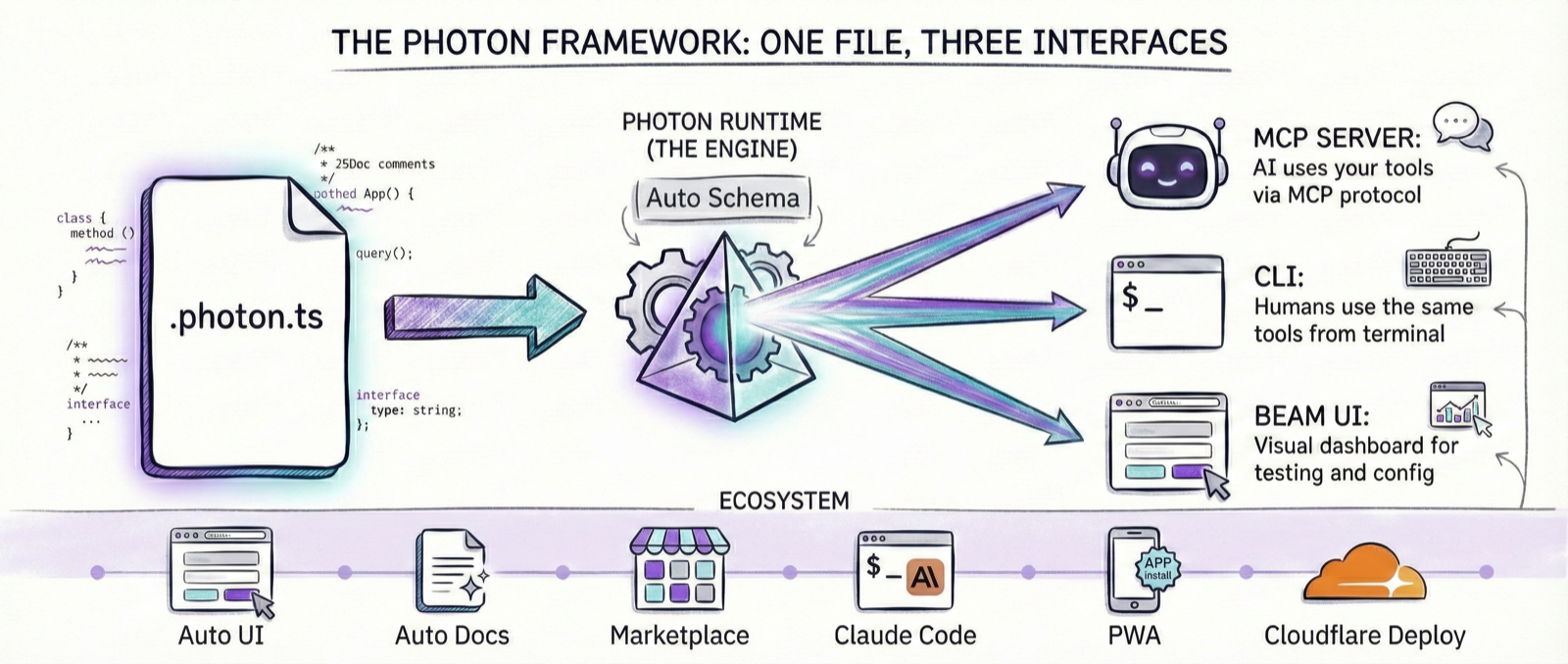
Photon turns TypeScript files into MCP servers, CLI tools, and web interfaces with minimal boilerplate.
Overview
Photon is a development framework that allows developers to define functionality once in TypeScript and automatically expose it through multiple interfaces. It creates MCP servers for AI agents, CLI tools for automation, and web interfaces for humans. The framework reads TypeScript class methods, type annotations, and JSDoc comments to generate fully functional tools with validation, documentation, and UI components automatically. This approach reduces development overhead by eliminating the need to write separate implementations for different interfaces.
Try asking AI
After installing, here are 5 things you can ask your AI assistant:
When to choose this
Choose Photon when you need to create tools that will be used by both humans (via web/CLI) and AI agents (via MCP) from a single codebase definition.
When NOT to choose this
Avoid Photon if you need fine-grained control over MCP server implementation details or if you're already invested in a different MCP framework that meets your needs.
Tools this server exposes
3 tools extracted from the READMEforecastforecast(params: { city: string; days?: number })Get the weather forecast for a city
settingsUser-tunable configuration for the photon
convertconvert({ input, format }: { input: string; format: string })Convert video files using ffmpeg
Comparable tools
Installation
Install Photon globally:
bun add -g @portel/photonCreate a new photon:
photon new my-toolInstall as MCP server for Claude Desktop:
photon mcp install my-toolAdd to Claude Desktop config:
{
  "mcpServers": {
    "my-tool": {
      "command": "photon",
      "args": ["mcp", "my-tool"]
    }
  }
}
FAQ
- What is Photon?
- Photon is a framework that turns TypeScript files into MCP servers, CLI tools, and web interfaces automatically from a single codebase.
- How does Photon differ from traditional MCP server development?
- Photon eliminates the need to write boilerplate MCP server code, handle serialization, or create separate CLI and web interfaces - it generates everything automatically from your TypeScript definitions.
Compare photon with
Last updated · Auto-generated from public README + GitHub signals.