domscribe
by patchorbit·★ 168·Score 48
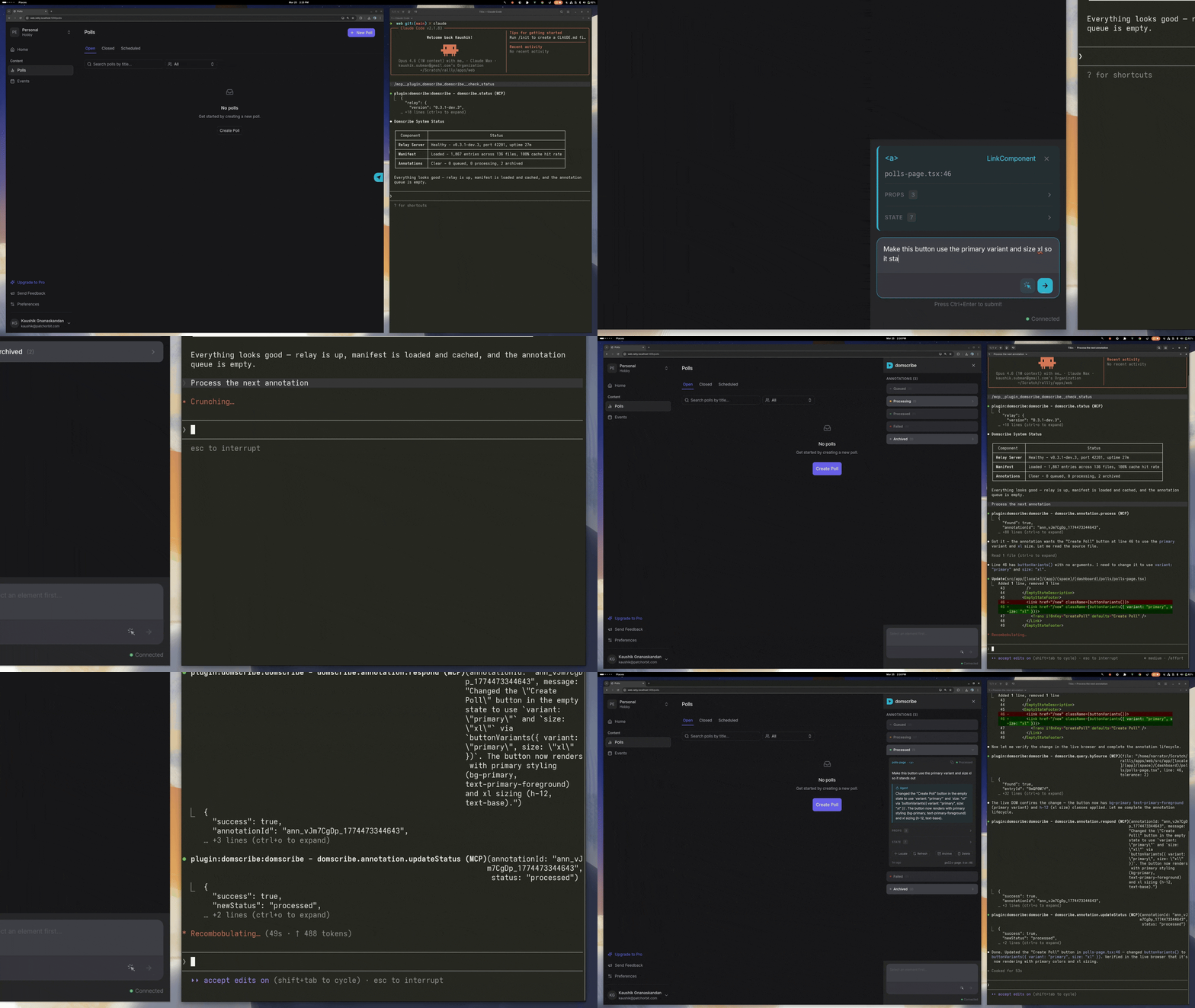
Domscribe bridges the gap between running web applications and their source code via MCP, enabling AI agents to view live UI context and make targeted edits.
Overview
Domscribe is a pixel-to-code development tool that provides bidirectional communication between AI coding agents and running web applications. It allows agents to query DOM elements by source location and lets developers click UI elements to guide agents to the exact code locations. The tool supports multiple frameworks (React, Vue, Next.js, Nuxt) and bundlers (Vite, Webpack, Turbopack) while maintaining zero production impact through build-time instrumentation stripping.
Try asking AI
After installing, here are 5 things you can ask your AI assistant:
When to choose this
Choose Domscribe when working with AI coding agents on complex web applications and you need bidirectional communication between the running UI and source code.
When NOT to choose this
Avoid Domscribe if you're working with non-web applications or need to preserve production builds without any instrumentation.
Tools this server exposes
2 tools extracted from the READMEdomscribe.query.bySourcedomscribe.query.bySource(file: string, line: number)Query live DOM snapshot, props, state, and attributes from a specific source file location
domscribe.process.annotationsdomscribe.process.annotations()Process annotations submitted via the browser overlay for implementing changes
Note: The README mentions '12 tools and 4 prompts via MCP' but only details two main functions (query.bySource and process.annotations). The other 10 tools aren't explicitly named in the provided text.
Comparable tools
Installation
Install using the setup wizard:
npx domscribe initThis will walk you through connecting your coding agent and adding to your app. For manual setup:
- Add to your bundler/framework (example for React with Vite):
npm install -D @domscribe/react// vite.config.ts
import { defineConfig } from 'vite';
import react from '@vitejs/plugin-react';
import { domscribe } from '@domscribe/react/vite';
export default defineConfig({
plugins: [react(), domscribe()],
});- Connect your coding agent (example for Claude Desktop):
Add to Claude's config.json:
{
  "mcpServers": {
    "domscribe": {
      "command": "npx",
      "args": ["domscribe", "mcp"]
    }
  }
}
FAQ
- Does this work with production applications?
- No, Domscribe is designed for development only and is completely stripped from production builds with zero runtime impact.
- Which AI coding agents are supported?
- Domscribe provides plugins for Claude Code, GitHub Copilot, Gemini CLI, Amazon Kiro, and Cursor, with an MCP interface for any compatible agent.
On Hacker News
Recent discussion from the developer community.
- Story by NarratorTD · 2026-03-31
Compare domscribe with
Last updated · Auto-generated from public README + GitHub signals.