obot
by obot-platform·★ 777·Score 53
Complete MCP platform offering hosting, registry, gateway, and chat client.
Overview
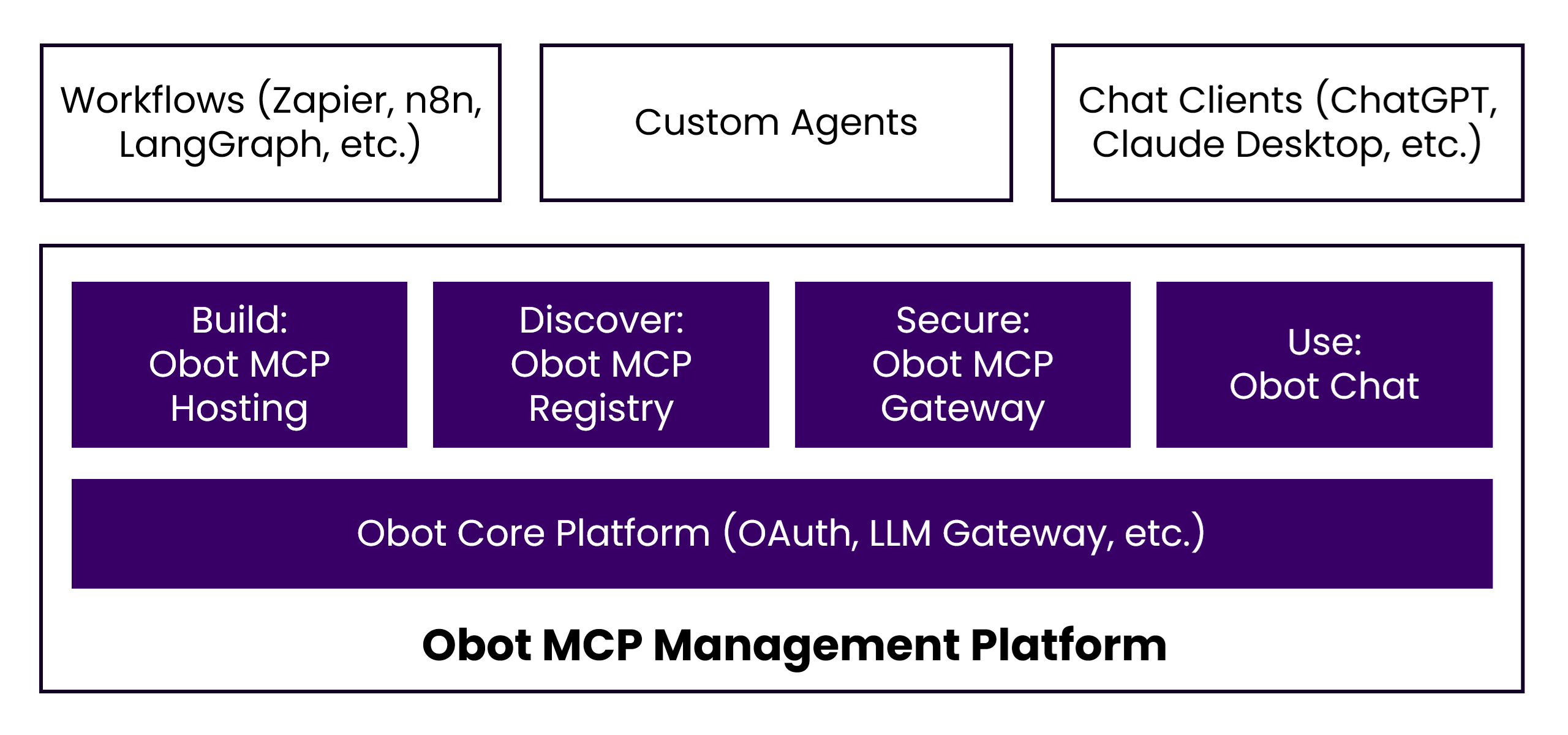
Obot is a comprehensive platform that provides all necessary components for implementing MCP technologies. It includes MCP hosting for both Docker and Kubernetes, an MCP registry for server discovery, an MCP gateway for centralized access control, and a built-in chat client. The platform supports various MCP server types including Node.js, Python, and container-based servers with authentication via OAuth 2.1. It offers features like request logging, usage analytics, and integration with popular workflow frameworks and AI chat clients.
Try asking AI
After installing, here are 5 things you can ask your AI assistant:
When to choose this
Choose Obot when you need a comprehensive solution for hosting, managing, and discovering MCP servers across your organization with built-in security and monitoring.
When NOT to choose this
Don't choose Obot if you simply need a single MCP server for a specific task, as it's a full platform that requires significant resources to deploy and maintain.
Comparable tools
Installation
Obot Installation
Docker Installation
docker run -d --name obot -p 8080:8080 \
  -v /var/run/docker.sock:/var/run/docker.sock \
  -e OPENAI_API_KEY=<API KEY> \
  -e OBOT_SERVER_ENABLE_AUTHENTICATION=true \
  -e OBOT_BOOTSTRAP_TOKEN=<token> \
  ghcr.io/obot-platform/obot:latest
After starting, open http://localhost:8080 in your browser to access the Obot UI. Check the container logs to see your bootstrap token for initial setup.
FAQ
- What MCP servers does Obot support?
- Obot supports Node.js, Python, and container-based MCP servers, including both single-user STDIO servers and multi-user HTTP servers.
- How does authentication work in Obot?
- Obot uses OAuth 2.1 and token handling for authentication. You can enable authentication via the OBOT_SERVER_ENABLE_AUTHENTICATION environment variable.
On Hacker News
Recent discussion from the developer community.
- Story by smw355 · 2025-08-23
- Story by cjellick · 2026-10-21
Compare obot with
Last updated · Auto-generated from public README + GitHub signals.