crash-mcp
by nikkoxgonzales·★ 69·Score 45
CRASH is an MCP server for structured reasoning with step validation, branching, and confidence tracking.
Overview
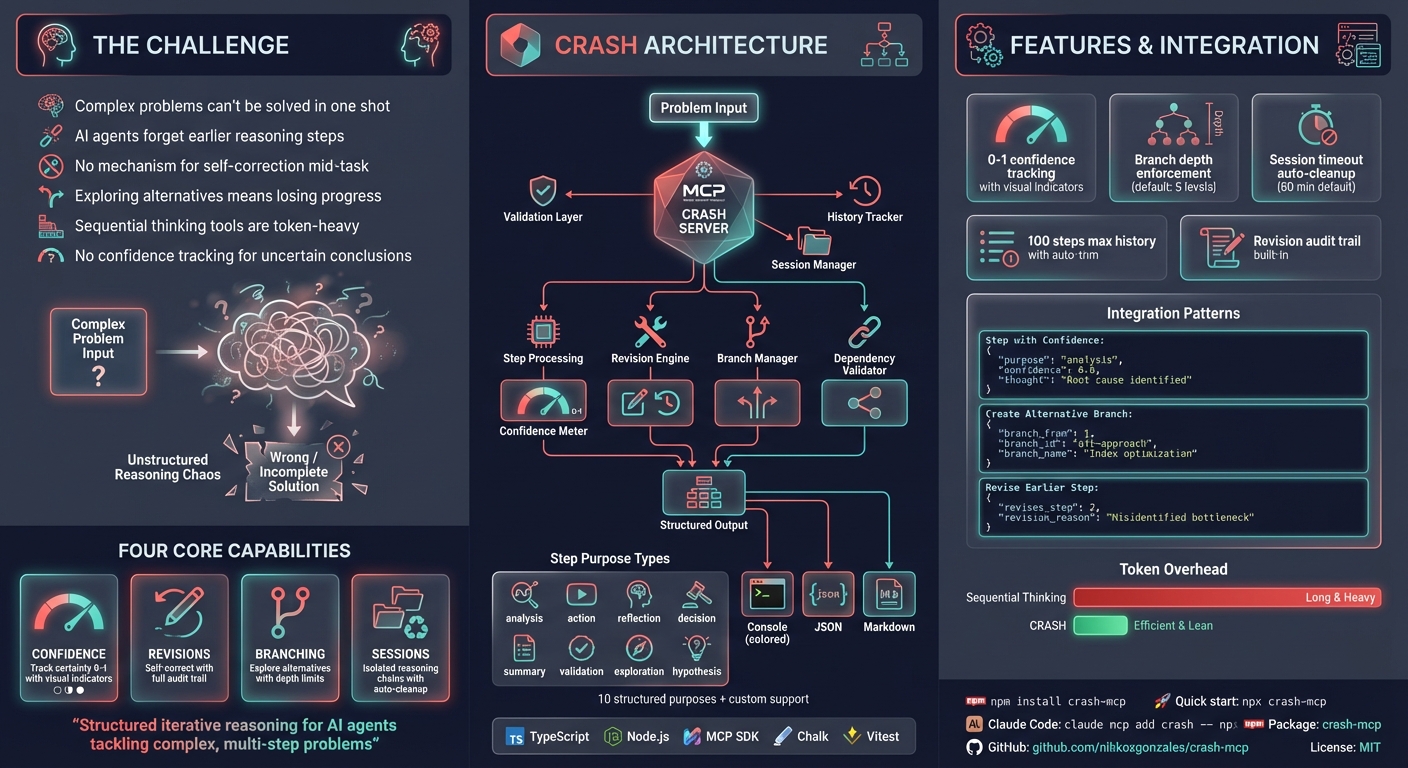
CRASH (Cascaded Reasoning with Adaptive Step Handling) is an MCP server designed to help AI assistants break down complex problems into manageable steps. It provides features like confidence tracking, revision support, and branching for exploring alternative solutions. The server aims to be more token-efficient than sequential thinking approaches by eliminating code from thoughts and streamlining prompting.
Try asking AI
After installing, here are 7 things you can ask your AI assistant:
When to choose this
Choose CRASH for complex, multi-step problem-solving tasks requiring systematic breakdown of issues, especially when you need to explore multiple solution paths or track confidence through reasoning steps.
When NOT to choose this
Avoid CRASH for simple, single-step tasks or pure information retrieval where its structured reasoning overhead provides no benefit.
Tools this server exposes
6 tools extracted from the READMEcreate_reasoning_stepCreate a structured reasoning step with purpose, context, thought, outcome, and next action
revise_stepCorrect a previous reasoning step with revision notes
create_branchCreate a new branch to explore alternative solutions
validate_stepValidate step dependencies and previous steps
finalize_reasoningMark the current step as final to complete the reasoning process
create_sessionCreate a new reasoning session to group related steps
Note: Tool names inferred from usage examples and parameters described in the documentation, but no explicit 'Tools' section exists in the README.
Comparable tools
Installation
npm install crash-mcpOr use directly with npx:
npx crash-mcpQuick Setup
Most MCP clients use this JSON configuration:
{
  "mcpServers": {
    "crash": {
      "command": "npx",
      "args": ["-y", "crash-mcp"]
    }
  }
}
Configuration by Client
| Client | Setup Method | |--------|-------------| | **Claude Code** | claude mcp add crash -- npx -y crash-mcp | | **Cursor** | Add to ~/.cursor/mcp.json | | **VS Code** | Add to settings JSON under mcp.servers | | **Claude Desktop** | Add to claude_desktop_config.json | | **Windsurf** | Add to MCP config file | | **JetBrains** | Settings > Tools > AI Assistant > MCP | | **Others** | Use standard MCP JSON config above |
FAQ
- How is CRASH different from sequential thinking?
- CRASH is more token-efficient as it doesn't include code in thoughts and has streamlined prompting. It's designed to be simpler to use with just 'use crash' instead of 'use sequential_thinking'.
- What kind of problems is CRASH best suited for?
- CRASH excels at complex multi-step problem solving, code analysis and optimization, system design with multiple considerations, debugging requiring systematic investigation, and tasks where you need to track confidence levels.
Compare crash-mcp with
Last updated · Auto-generated from public README + GitHub signals.