mcp-center
by nautilus-ops·★ 41·Score 42
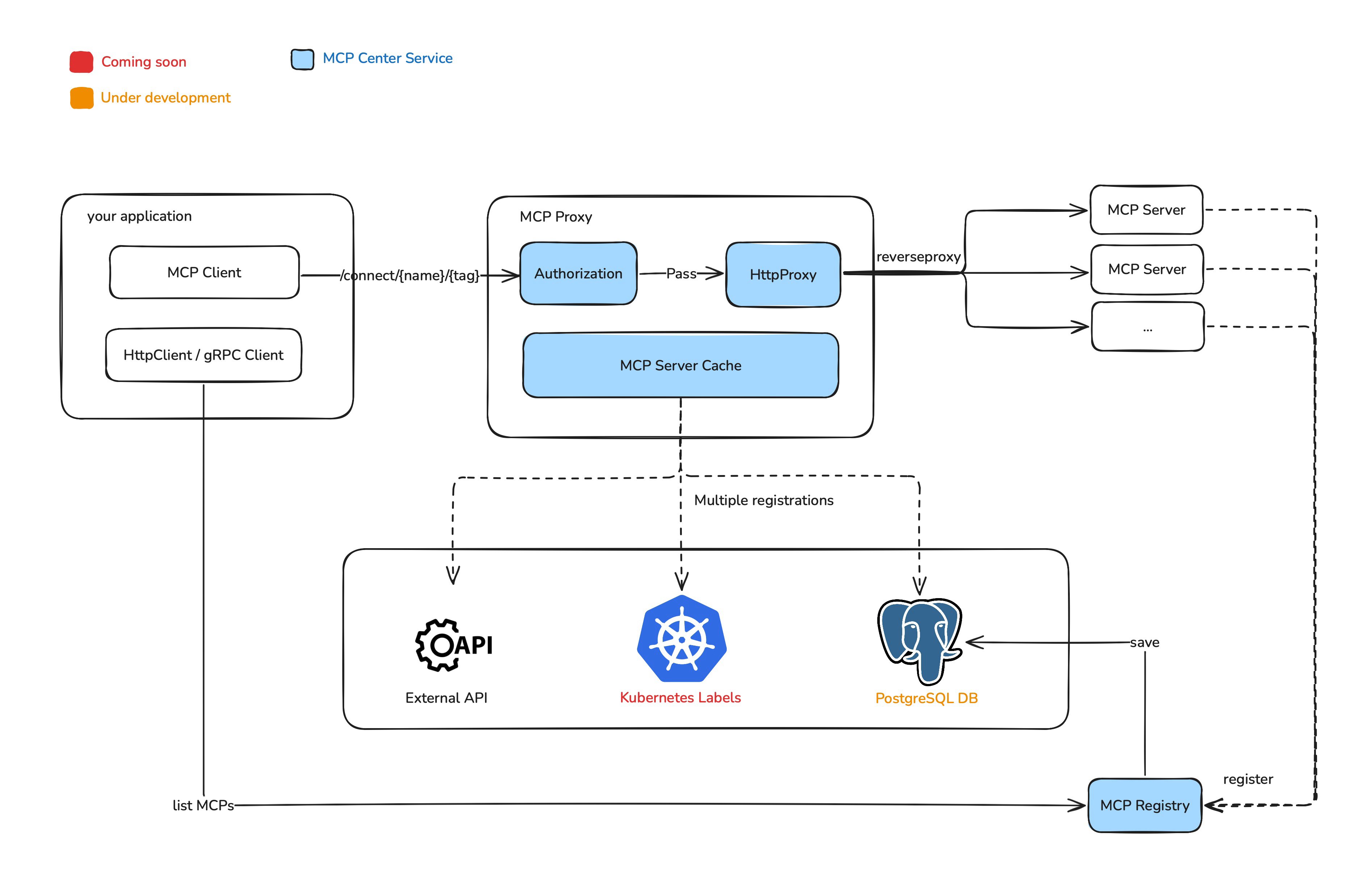
MCP Center is a centralized proxy service for managing and connecting multiple MCP servers with service discovery and authentication.
Overview
MCP Center provides a high-performance proxy service that acts as a centralized registry for MCP servers, simplifying service discovery and management in Kubernetes environments. It supports both SSE and streamable transport protocols, enabling seamless communication between MCP clients and multiple servers. The platform features authentication, plugin system for tool parameter modification and filtering, and standardized lifecycle management for MCP servers.
Try asking AI
After installing, here are 6 things you can ask your AI assistant:
When to choose this
Choose MCP Center if you're managing multiple MCP servers in a Kubernetes environment and need centralized service discovery, authentication, and lifecycle management.
When NOT to choose this
Avoid MCP Center if you only have one MCP server to manage or if you prefer a simpler solution without the overhead of maintaining a proxy service.
Tools this server exposes
3 tools extracted from the READMEregister_mcp_serverRegisters a new MCP server with the centralized platform
get_all_mcp_serversRetrieves all registered MCP servers from the platform
connect_to_mcp_serverEstablishes a connection to a specific MCP server via the proxy
Comparable tools
Installation
Installation
Using Docker
# 1. Pull the latest image
docker pull nautilusops/mcp-center:latest

# 2. Start the container
docker run -d \
  --name mcp-center \
  -p 5432:5432 \
  -e MCP_ADMIN_TOKEN=your-custom-token \
  -e POSTGRES_HOST=your-postgres-host \
  -e POSTGRES_PORT=your-postgres-port \
  -e POSTGRES_USERNAME=your-postgres-username \
  -e POSTGRES_PASSWORD=your-postgres-password \
  -e POSTGRES_DATABASE=your-postgres-database \
  nautilusops/mcp-center:latest
From Source
# Clone the repository
git clone https://github.com/nautilus-ops/mcp-center.git
cd mcp-center

# Build the project
cargo build --release

# Set environments
export MCP_ADMIN_TOKEN=your-custom-token
export POSTGRES_HOST=your-postgres-host
export POSTGRES_PORT=your-postgres-port
export POSTGRES_USERNAME=your-postgres-username
export POSTGRES_PASSWORD=your-postgres-password
export POSTGRES_DATABASE=your-postgres-database

# Run the application
./target/release/mcp-center run --config bootstrap.toml
Claude Desktop Configuration
Add to Claude Desktop config.json:
{
  "mcpServers": {
    "mcp-center": {
      "command": "mcp-center",
      "args": ["proxy"]
    }
  }
}
FAQ
- What transport protocols does MCP Center support?
- MCP Center supports both Server-Sent Events (SSE) transport and Streamable transport protocols.
- Can I deploy MCP Center in Kubernetes?
- Yes, MCP Center is Kubernetes-ready and provides a complete Helm chart for easy deployment.
- How does MCP Center handle authentication?
- MCP Center supports JWT-based authentication with custom admin tokens and API keys for accessing MCP servers.
Compare mcp-center with
Last updated · Auto-generated from public README + GitHub signals.