chatbot_Shopify
by Mobeen-Dev·★ 25·Score 43
Shopify chatbot with MCP integration that uses AI-powered conversations and agentic capabilities for seamless e-commerce experiences.
Overview
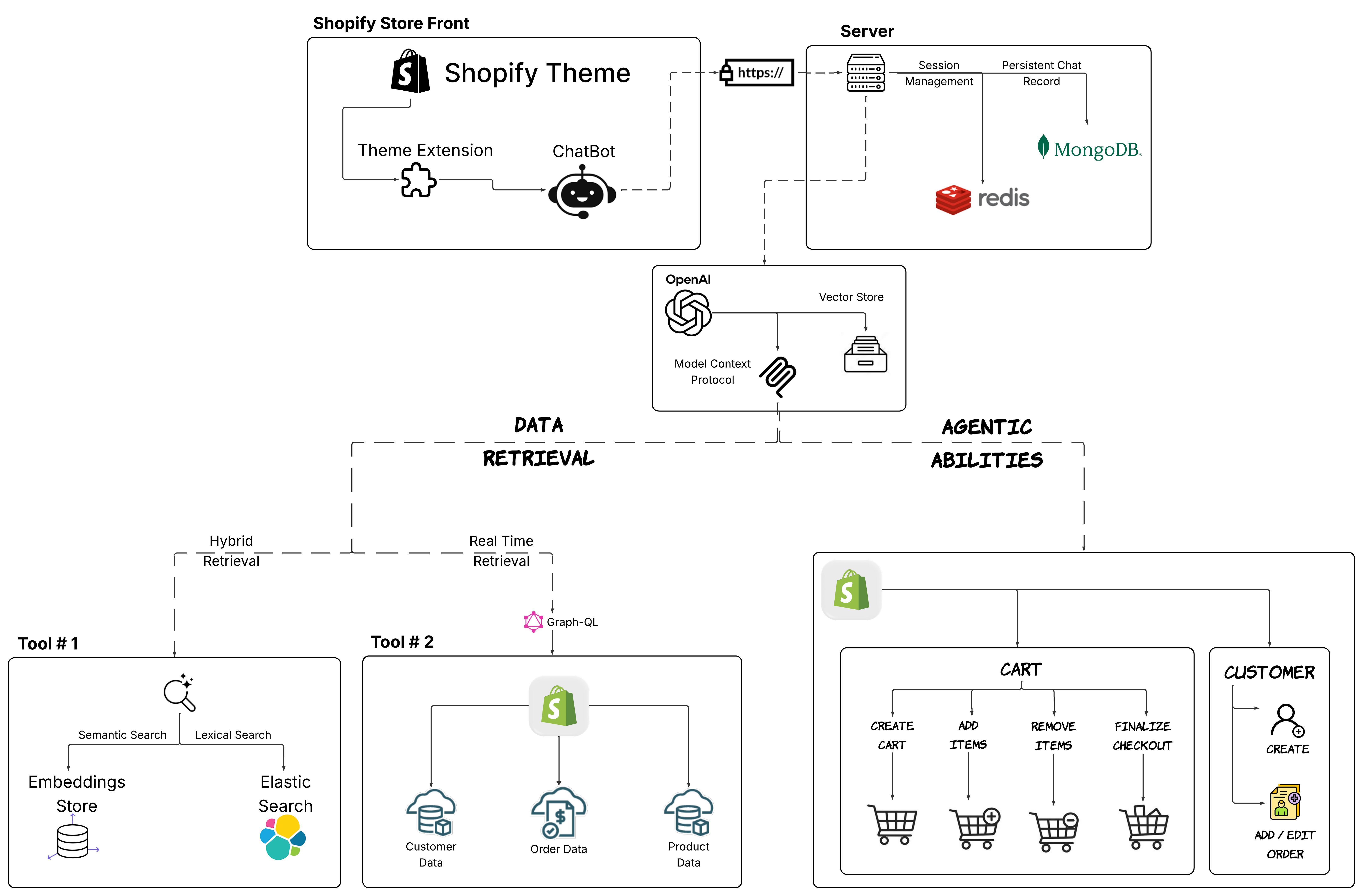
This is a fully-featured Shopify chatbot system that integrates Model Context Protocol (MCP) to provide intelligent customer service and shopping assistance. The system combines OpenAI LLM with hybrid search capabilities using FAISS and Elasticsearch to deliver accurate product recommendations. It implements a sophisticated architecture with persistent sessions, real-time Shopify integration, and agentic abilities for cart management, checkout, and customer account handling. The solution is deployed as a theme extension, providing a seamless customer experience within the Shopify platform.
Try asking AI
After installing, here are 7 things you can ask your AI assistant:
When to choose this
Choose this MCP server if you're running a Shopify store and want AI-powered customer support with seamless access to product data, order processing, and cart management capabilities.
When NOT to choose this
Don't choose this if you're not using Shopify, as it's tightly coupled to the Shopify ecosystem and requires Shopify API credentials.
Tools this server exposes
12 tools extracted from the READMEquery_shopify_productsSearch for products in the Shopify store with filters
create_customer_accountCreate a new customer account in Shopify
create_cartCreate a new shopping cart for a customer
add_cart_itemsAdd items to a customer's shopping cart
remove_cart_itemsRemove items from a customer's shopping cart
update_cartUpdate quantities or contents of a shopping cart
create_customer_orderCreate a new order for a customer
query_order_statusCheck the status of a customer's order
update_orderUpdate details or status of an existing order
search_products_semanticSearch for products using semantic similarity
search_products_lexicalSearch for products using keyword matching
create_chat_sessionStart a new chat session with a customer
Note: Tool names inferred from system architecture diagram and feature descriptions. No explicit MCP tool documentation found in README.
Comparable tools
Installation
Installation
- Clone the repository:
git clone https://github.com/Mobeen-Dev/chatbot_Shopify.git
cd chatbot_Shopify- Set up environment variables:
cp credentials/.env.example credentials/.env
# Edit credentials/.env with your API keys and configuration- Set up prerequisites:
python -m ETL.pipeline --chunk_products --upload_chunks --start_embedding_job- Start with Docker Compose:
docker-compose build
docker-compose up
Claude Desktop Configuration
To use this MCP server with Claude Desktop, add the following to your Claude Desktop config.json:
{
  "mcpServers": {
    "shopify-chatbot": {
      "command": "python",
      "args": ["path/to/chatbot_Shopify/src/server.py"],
      "env": {
        "OPENAI_API_KEY": "your_openai_api_key",
        "SHOPIFY_API_KEY": "your_shopify_api_key",
        "SHOPIFY_API_SECRET": "your_shopify_secret",
        "SHOPIFY_STORE_URL": "your_store.myshopify.com"
      }
    }
  }
}
FAQ
- What Shopify API version does this chatbot use?
- The chatbot uses Shopify GraphQL APIs for integration with the Shopify platform, allowing access to products, customer accounts, and orders.
- Can this chatbot handle multiple languages?
- The system uses OpenAI LLM which can handle multiple languages. However, the current implementation appears to be focused on English language support without specific multilingual features documented.
- What is the performance capacity of this chatbot?
- The system is designed to support 100+ simultaneous sessions with average response times under 500ms. It can be scaled horizontally via Docker Swarm or Kubernetes for increased capacity.
Compare chatbot_Shopify with
Last updated · Auto-generated from public README + GitHub signals.