wassette
by microsoft·★ 888·Score 52
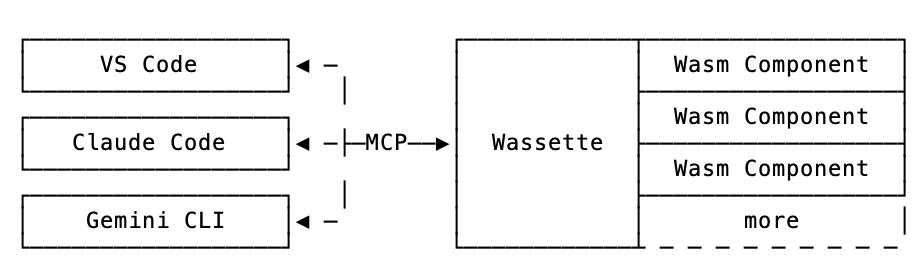
Wassette is a security-oriented runtime that extends AI agents with WebAssembly components via MCP.
Overview
Wassette provides a secure way to extend AI agents with tools implemented as WebAssembly components. Built on Wasmtime, it offers browser-grade isolation while maintaining the convenience of tool integration without leaving the chat interface. The project is particularly focused on security, reusability, and ease of use for AI developers looking to extend their agents with custom functionality.
Try asking AI
After installing, here are 5 things you can ask your AI assistant:
When to choose this
Choose Wassette when you need to execute potentially untrusted tools in a secure sandboxed environment or want to leverage the WebAssembly ecosystem for extending AI agents.
When NOT to choose this
Avoid Wassette if you need mature production-ready functionality or if you're not interested in leveraging the WebAssembly component ecosystem for your tools.
Comparable tools
Installation
Installation
**Quick start (Linux/macOS):**
curl -fsSL https://raw.githubusercontent.com/microsoft/wassette/main/install.sh | bash**Other platforms:** See the [Installation Guide](https://microsoft.github.io/wassette/latest/installation.html) for Windows, Homebrew, Nix, Docker, and more.
Configuration
After installation, register Wassette with your MCP client. For example, in Claude Desktop:
{
  "mcpServers": {
    "wassette": {
      "command": "wassette",
      "args": []
    }
  }
}
FAQ
- How is Wassette different from regular MCP servers?
- Wassette specifically runs WebAssembly components in a secure sandbox, providing browser-grade isolation for enhanced security compared to regular MCP servers.
- Can I use Wassette with any MCP-compatible AI client?
- Yes, Wassette is designed to work with any MCP-compatible client, including GitHub Copilot, Cursor, Claude Code, and Gemini CLI. See the MCP Clients guide for setup instructions.
Compare wassette with
Last updated · Auto-generated from public README + GitHub signals.