MARM-Systems
by Lyellr88·★ 288·Score 51
MARM MCP server provides persistent memory and structured session context for AI agents across tools.
Overview
MARM (Memory Accurate Response Mode) is a universal MCP server that enables cross-platform AI memory, multi-agent coordination, and context sharing. It provides semantic search, persistent cross-session memory, and smart recall capabilities, allowing AI agents to remember and build on prior work consistently. The server supports multiple transport protocols including HTTP, STDIO, and WebSocket, making it compatible with various AI clients like Claude, Gemini, and Qwen.
Try asking AI
After installing, here are 5 things you can ask your AI assistant:
When to choose this
Choose MARM when you need persistent memory across multiple AI sessions and different AI clients, or when working on complex projects requiring continuity of context and multi-agent coordination.
When NOT to choose this
Avoid MARM if you need simple, short-term memory solutions or if you're concerned about the development-only authentication model which requires production OAuth setup.
Tools this server exposes
12 tools extracted from the READMEsearch_memorySearch through persistent memory using semantic similarity
log_sessionLog current conversation session to persistent memory
create_notebookCreate a new persistent notebook entry
query_memoryQuery structured memory with specific criteria
classify_contentAutomatically classify content into memory categories
generate_summaryGenerate a semantic summary of logged conversations
share_memoryShare memory across different AI agents
clear_memoryClear specific memories or reset entire memory pool
export_memoryExport memory data in various formats
auto_logEnable automatic logging of conversations
manage_sessionsManage persistent sessions across conversations
configure_memoryConfigure memory storage and retrieval parameters
Comparable tools
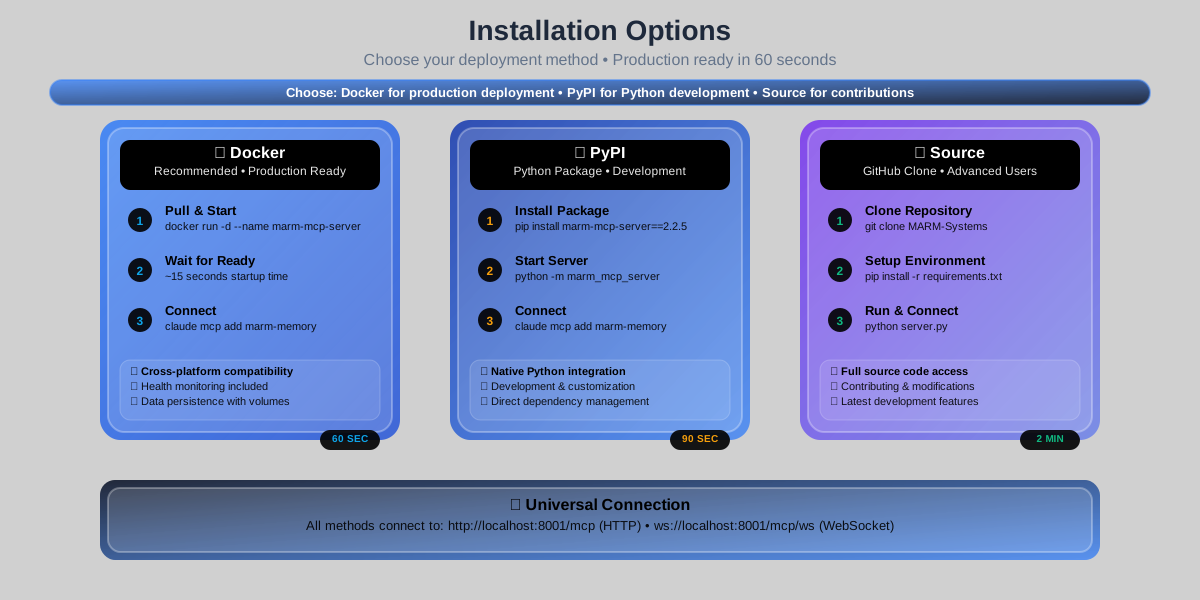
Installation
Installation
**Docker Install (Recommended):**
docker pull lyellr88/marm-mcp-server:latest
docker run -d --name marm-mcp-server -p 8001:8001 -v ~/.marm:/home/marm/.marm lyellr88/marm-mcp-server:latest
claude mcp add --transport http marm-memory http://localhost:8001/mcp
**Local Install:**
pip install marm-mcp-server==2.2.6
pip install -r marm-mcp-server/requirements.txt
python marm-mcp-server
claude mcp add --transport http marm-memory http://localhost:8001/mcp
**Stdio Install:**
pip install marm-mcp-server==2.2.6
pip install -r marm-mcp-server/requirements_stdio.txt
claude mcp add --transport stdio marm-memory-stdio python "path/to/marm-mcp-server/server_stdio.py"
python marm-mcp-server/server_stdio.py
**Claude Desktop Configuration (JSON):**
{
  "mcpServers": {
    "marm-memory": {
      "httpUrl": "http://localhost:8001/mcp",
      "authentication": {
        "type": "oauth",
        "clientId": "local_client_b6f3a01e",
        "clientSecret": "local_secret_ad6703cd2b4243ab"
      }
    }
  }
}
FAQ
- What makes MARM different from other memory solutions?
- MARM is specifically designed as an MCP server, providing persistent memory at the protocol level. It works across different AI clients and maintains conversation continuity regardless of which tool you're using.
- How does MARM handle authentication?
- MARM uses OAuth 2.0 for authentication. For development, it includes mock credentials that can be replaced with proper OAuth providers in production environments.
Compare MARM-Systems with
Last updated · Auto-generated from public README + GitHub signals.