webclaw
by kuroko1t·★ 18·Score 45
WebClaw is a Chrome extension-based MCP server that allows AI assistants to control real Chrome browser sessions through a WebSocket connection.
Overview
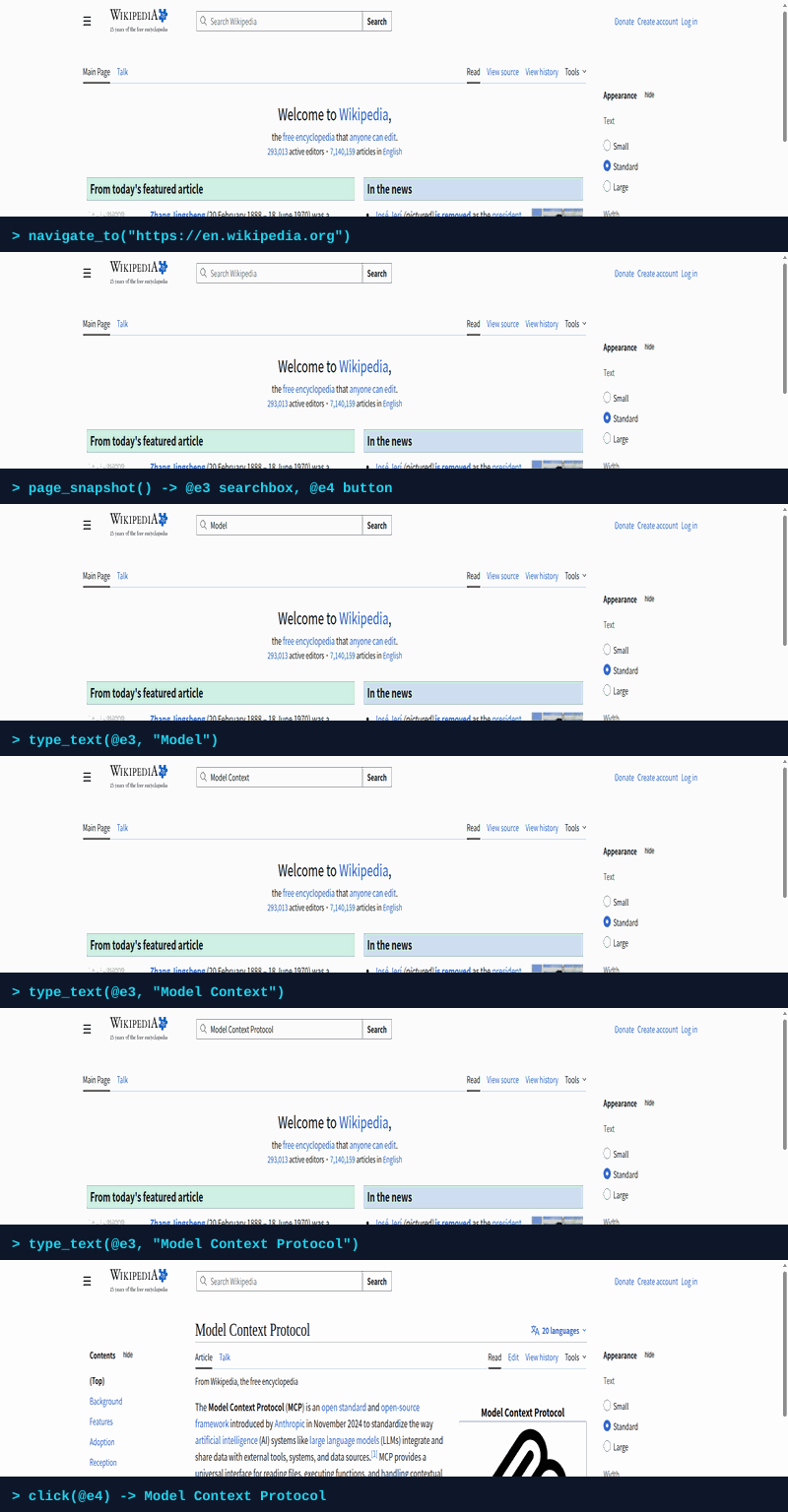
WebClaw operates as a Chrome extension that maintains full access to logged-in sessions and user browser data. It provides 21 MCP tools for browser automation, including navigation, page interaction, and tab management. The system uses a compact accessibility tree with @ref labels for precise element targeting, avoiding the pitfalls of headless browsers and bot detection. The server communicates with the Chrome extension via WebSocket, enabling real-time browser control from any MCP client like Claude Desktop, Cursor, or VS Code.
Try asking AI
After installing, here are 5 things you can ask your AI assistant:
When to choose this
Choose WebClaw when you need to automate authenticated workflows in your real browser with existing sessions and when resistance to bot detection is important.
When NOT to choose this
Don't choose WebClaw if you need headless browser automation without a visible Chrome window or if you require cross-browser support beyond Chrome.
Tools this server exposes
12 tools extracted from the READMEnavigate_tourl, tabId?Navigate to a URL
page_snapshotfocusRegion?, interactiveOnly?, tabId?Get a compact accessibility tree with @ref labels
clickref, snapshotId, tabId?Click an element by its @ref label
type_textref, text, snapshotId, clearFirst?, tabId?Type text into an input/textarea by @ref
new_taburl?Open a new tab (optionally with a URL)
list_tabsList all open tabs with tabId, URL, title, and active state
switch_tabtabIdSwitch to a specific tab
go_backtabId?Go back to the previous page
reloadtabId?, bypassCache?Reload the current page
screenshottabId?Capture the visible area of the active tab
list_webmcp_toolstabId?Discover tools on the page (native WebMCP + auto-synthesized from buttons/forms)
invoke_webmcp_tooltoolName, args?, tabId?Invoke a discovered tool (native or synthesized)
Comparable tools
Installation
Installation
1. Configure your MCP client
Claude Desktop
Add to claude_desktop_config.json:
{
  "mcpServers": {
    "webclaw": {
      "command": "npx",
      "args": ["-y", "webclaw-mcp"]
    }
  }
}
Other clients
# Claude Code
claude mcp add webclaw -- npx -y webclaw-mcp

# Cursor / VS Code / Windsurf
# Add to respective MCP config files:
{
  "mcpServers": {
    "webclaw": {
      "command": "npx",
      "args": ["-y", "webclaw-mcp"]
    }
  }
}
2. Load Chrome Extension
- Download the latest [webclaw-extension.zip](https://github.com/kuroko1t/webclaw/releases/latest)
- Open
chrome://extensions/→ enable **Developer mode** - Click **Load unpacked** → select the
dist/folder
FAQ
- How does WebClaw avoid bot detection?
- WebClaw runs as a Chrome extension in a real browser, maintaining normal cookies, user agents, and browser fingerprints, making it significantly more resistant to bot detection compared to headless browsers.
- Can it access logged-in sessions?
- Yes, since it runs inside your real Chrome, WebClaw has access to all your logged-in sessions, cookies, and browser data without needing to re-authenticate.
Compare webclaw with
Last updated · Auto-generated from public README + GitHub signals.