aws-geocode-mcp
by Kanahiro·★ 1·Score 28
An MCP server for geocoding using Amazon Location Service that converts addresses to coordinates.
Overview
This MCP server provides geocoding functionality using Amazon Location Service, allowing applications to convert addresses into geographic coordinates. It requires an API key with Geocode and SearchNearby scopes to function. The server can be easily integrated into Claude Desktop with a simple configuration in the claude_desktop_config.json file, making it a practical tool for location-based services.
Try asking AI
After installing, here are 5 things you can ask your AI assistant:
When to choose this
Choose this when you need geocoding capabilities and are already using AWS services or prefer Amazon Location Service over alternatives.
When NOT to choose this
Avoid this if you don't want to use AWS services or if you need geocoding capabilities outside the AWS ecosystem.
Tools this server exposes
2 tools extracted from the READMEgeocodeConvert addresses to geographic coordinates using Amazon Location Service
search_nearbySearch for places near a specific location using Amazon Location Service
Note: Tool names inferred from description and AWS Location Service API references, as README doesn't explicitly list tools
Comparable tools
Installation
Installation
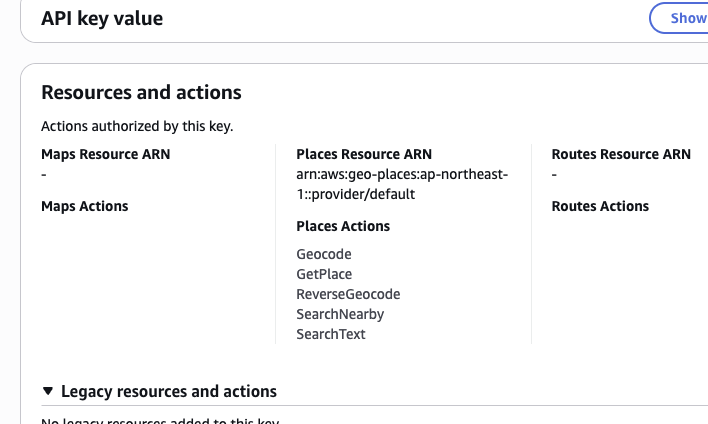
- First, obtain an API key from AWS Management Console with the following scopes:
- Geocode - SearchNearby
- Install the package globally:
npm install -g aws-geocode-mcp- Configure Claude Desktop by adding this to your
claude_desktop_config.json:
{
 "mcpServers": {
  "geocoder": {
   "command": "npx",
   "args": ["aws-geocode-mcp"],
   "env": {
    "AMAZON_LOCATION_API_KEY": "YOUR_API_KEY",
    "AWS_REGION": "us-east-1"
   }
  }
 }
}
FAQ
- What AWS permissions are required for this server?
- The server requires an API key with Geocode and SearchNearby scopes to function properly.
- Can I specify a different AWS region?
- Yes, you can set the AWS_REGION environment variable. The default is ap-northeast-1 if not specified.
Compare aws-geocode-mcp with
Last updated · Auto-generated from public README + GitHub signals.