Charles-mcp
by heizaheiza·★ 233·Score 51
A production-ready MCP server for integrating Charles Proxy with AI agents, enabling real-time traffic capture and analysis.
Overview
Charles MCP Server provides a structured interface for AI agents to interact with Charles Proxy, enabling both live traffic monitoring and historical packet analysis. The server implements a summary-first approach where agents can initially get traffic overviews before drilling down into specific requests. Version 3.0 extends capabilities to support reverse engineering workflows, including request replay, signature analysis, and live reverse analysis sessions. The implementation focuses on optimizing token usage by filtering null values, reducing payload sizes, and providing compact previews by default.
Try asking AI
After installing, here are 5 things you can ask your AI assistant:
When to choose this
Choose this when you need AI agents to analyze HTTP traffic patterns, reverse engineer APIs, or perform security assessments with a structured approach that minimizes token usage while allowing deep inspection.
When NOT to choose this
Don't choose this if you need to analyze non-HTTP protocols, if Charles Proxy is not already part of your workflow, or if you require a simpler traffic inspection tool without reverse engineering capabilities.
Tools this server exposes
12 tools extracted from the READMEstart_live_captureStart or take over current live capture, returning a capture_id
read_live_captureIncrementally read live capture returning only compact route summaries
peek_live_capturePreview new traffic without advancing cursor, returning only compact route summaries
stop_live_captureEnd capture and optionally persist snapshot
query_live_capture_entriesStructure summary of live capture without advancing cursor
group_capture_analysisAggregate and group live or history results by host/path/status
get_traffic_entry_detailRead single entry's detail with warnings for large responses
analyze_recorded_trafficAnalyze specified recording or latest recording with structured summary
list_recordingsList currently saved recording files
charles_statusCheck Charles connection status and current live capture state
reverse_import_sessionImport official Charles XML/native session into canonical reverse store
reverse_replay_entryReplay single imported request with optional parameter variations
Comparable tools
Installation
Quick Installation
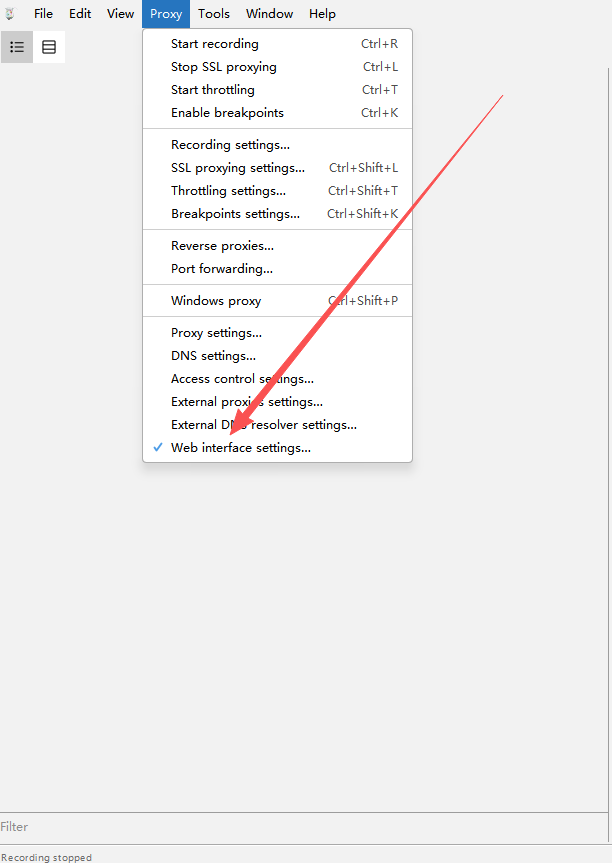
- Ensure Charles Proxy is running with Web Interface enabled (Proxy → Web Interface Settings, username: admin, password: 123456)
- For Claude Desktop:
{
  "mcpServers": {
    "charles": {
      "command": "uvx",
      "args": ["charles-mcp"],
      "env": {
        "CHARLES_USER": "admin",
        "CHARLES_PASS": "123456",
        "CHARLES_MANAGE_LIFECYCLE": "false"
      }
    }
  }
}- For Claude Code CLI:
claude mcp add-json charles '{
  "type": "stdio",
  "command": "uvx",
  "args": ["charles-mcp"],
  "env": {
    "CHARLES_USER": "admin",
    "CHARLES_PASS": "123456",
    "CHARLES_MANAGE_LIFECYCLE": "false"
  }
}'
FAQ
- Does this require Charles Proxy to be installed?
- Yes, you need to have Charles Proxy installed and running with the Web Interface enabled.
- Can this be used for automated testing?
- Yes, the server provides tools for automated traffic analysis, request replay, and signature analysis suitable for testing workflows.
Compare Charles-mcp with
Last updated · Auto-generated from public README + GitHub signals.