Manifold
by Garume·★ 45·Score 45
Manifold is a .NET framework for defining operations once and exposing them via both CLI and MCP surfaces with high performance.
Overview
Manifold provides a clean foundation for developers to build command-line interfaces and MCP servers from the same operation definitions. It uses source generation to create descriptors and invokers that can be composed into custom applications. The framework supports both static method and class-based operations with dependency injection capabilities. Its transport-agnostic design allows it to work with various MCP implementations while focusing on operation definition, binding, metadata, and fast dispatch.
Try asking AI
After installing, here are 5 things you can ask your AI assistant:
When to choose this
Choose Manifold when building .NET applications that need both CLI interfaces and MCP tool support, especially when performance is critical and you want to maintain a single operation definition.
When NOT to choose this
Avoid if you're not using .NET/C# or if you need transport-level features out-of-the-box since Man intentionally doesn't include transport implementations.
Tools this server exposes
1 tool extracted from the READMEmath_addAdds two integers.
Comparable tools
Installation
Install the Manifold NuGet packages based on your needs:
# For CLI applications
<ItemGroup>
  <PackageReference Include="Manifold" Version="1.0.0" />
  <PackageReference Include="Manifold.Generators" Version="1.0.0" PrivateAssets="all" />
  <PackageReference Include="Manifold.Cli" Version="1.0.0" />
</ItemGroup>

# For MCP hosts
<ItemGroup>
  <PackageReference Include="Manifold" Version="1.0.0" />
  <PackageReference Include="Manifold.Generators" Version="1.0.0" PrivateAssets="all" />
  <PackageReference Include="Manifold.Mcp" Version="1.0.0" />
</ItemGroup>
For Claude Desktop integration, add the MCP server using:
{
  "mcpServers": {
    "manifold": {
      "command": "dotnet",
      "args": ["run", "--project", "path/to/your/project.csproj"],
      "env": {
        "DOTNET_ENVIRONMENT": "Development"
      }
    }
  }
}
FAQ
- Does Manifold provide its own MCP transport host?
- No, Manifold is transport-agnostic. It provides tool metadata and execution helpers but requires you to implement or integrate with an MCP transport host.
- What's the performance advantage of Manifold over other CLI and MCP frameworks?
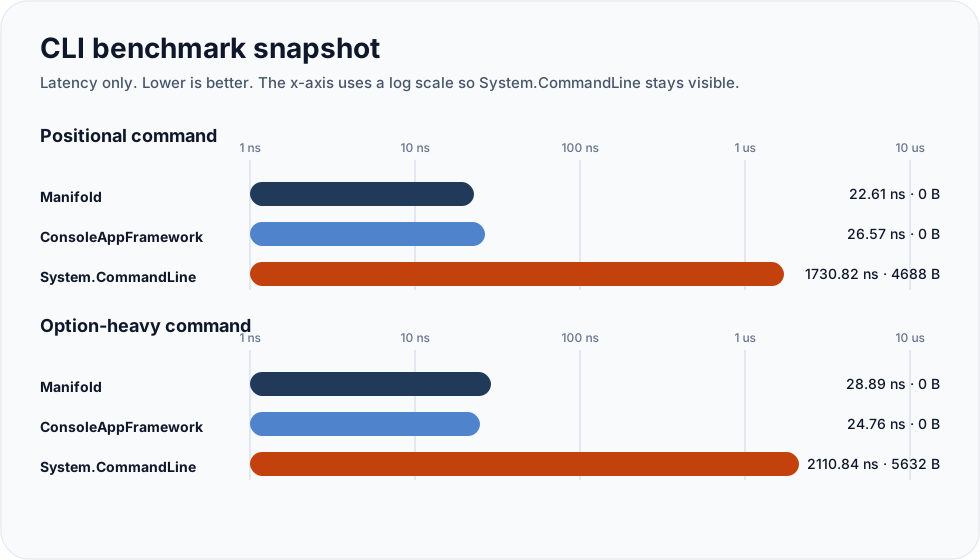
- Benchmarks show Manifold has significantly lower latency (20-30 ns) compared to alternatives like System.CommandLine (1700-2100 ns) and competitive performance against other MCP implementations.
On Hacker News
Recent discussion from the developer community.
- Story by garume · 2026-03-29
Compare Manifold with
Last updated · Auto-generated from public README + GitHub signals.