erickwendel-contributions-mcp
by ErickWendel·★ 232·Score 48
A TypeScript MCP server providing tools to query Erick Wendel's contributions across different platforms with full MCP capabilities.
Overview
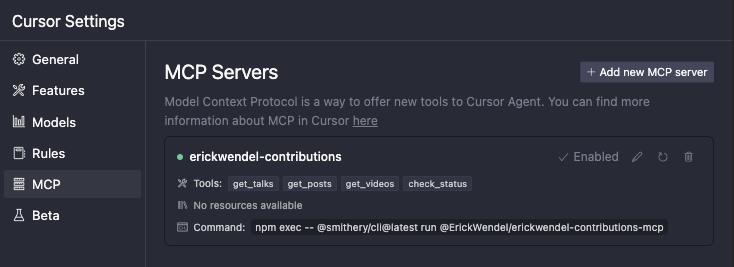
This MCP server provides tools to query Erick Wendel's contributions including talks, blog posts, and videos. It offers full MCP capabilities including tools, prompts, and resources, with TypeScript type safety and Zod validation. The server supports various filtering options and can be integrated with Claude Desktop, Cursor, or MCPHost with Ollama as a free alternative.
Try asking AI
After installing, here are 5 things you can ask your AI assistant:
When to choose this
Choose this server if you need to query Erick Wendel's technical content contributions through MCP-compatible clients and want to filter by multiple criteria like language, year, or topic.
When NOT to choose this
Don't choose this server if you need access to content from other developers or want a more general-purpose contributions aggregator.
Tools this server exposes
6 tools extracted from the READMEget-talksRetrieves a paginated list of talks with optional filtering
get-postsFetches posts with optional filtering and pagination
get-videosRetrieves videos with optional filtering and pagination
check-statusVerifies if the API is alive and responding
find-contentGenerate queries to find specific content by type, topic, and language
summarize-activityCreate summaries of content activity by year
Comparable tools
Installation
Quick Start with Claude Desktop
Add this configuration to ~/Library/Application Support/Claude/claude_desktop_config.json:
{
  "mcpServers": {
    "erickwendel-contributions": {
      "command": "npx",
      "args": ["-y", "@erickwendel/contributions-mcp"]
    }
  }
}
Local Development
- Clone the repository and install dependencies:
git clone https://github.com/ErickWendel/erickwendel-contributions-mcp.git
cd erickwendel-contributions-mcp
npm ci- Add this configuration for local development:
{
  "mcpServers": {
    "erickwendel-contributions": {
      "command": "node",
      "args": ["--experimental-strip-types", "ABSOLUTE_PATH_TO_PROJECT/src/index.ts"]
    }
  }
}
FAQ
- What Node.js version is required?
- The project requires Node.js v23+ as it uses the native TypeScript support added in recent versions.
- Can I use this with other AI tools besides Claude and Cursor?
- Yes, you can use it with MCPHost and Ollama as a free alternative, or any other MCP-compatible client.
Compare erickwendel-contributions-mcp with
Last updated · Auto-generated from public README + GitHub signals.