peta-core
by dunialabs·★ 47·Score 47
Production-ready MCP control plane with security, policy enforcement, and audit capabilities.
Overview
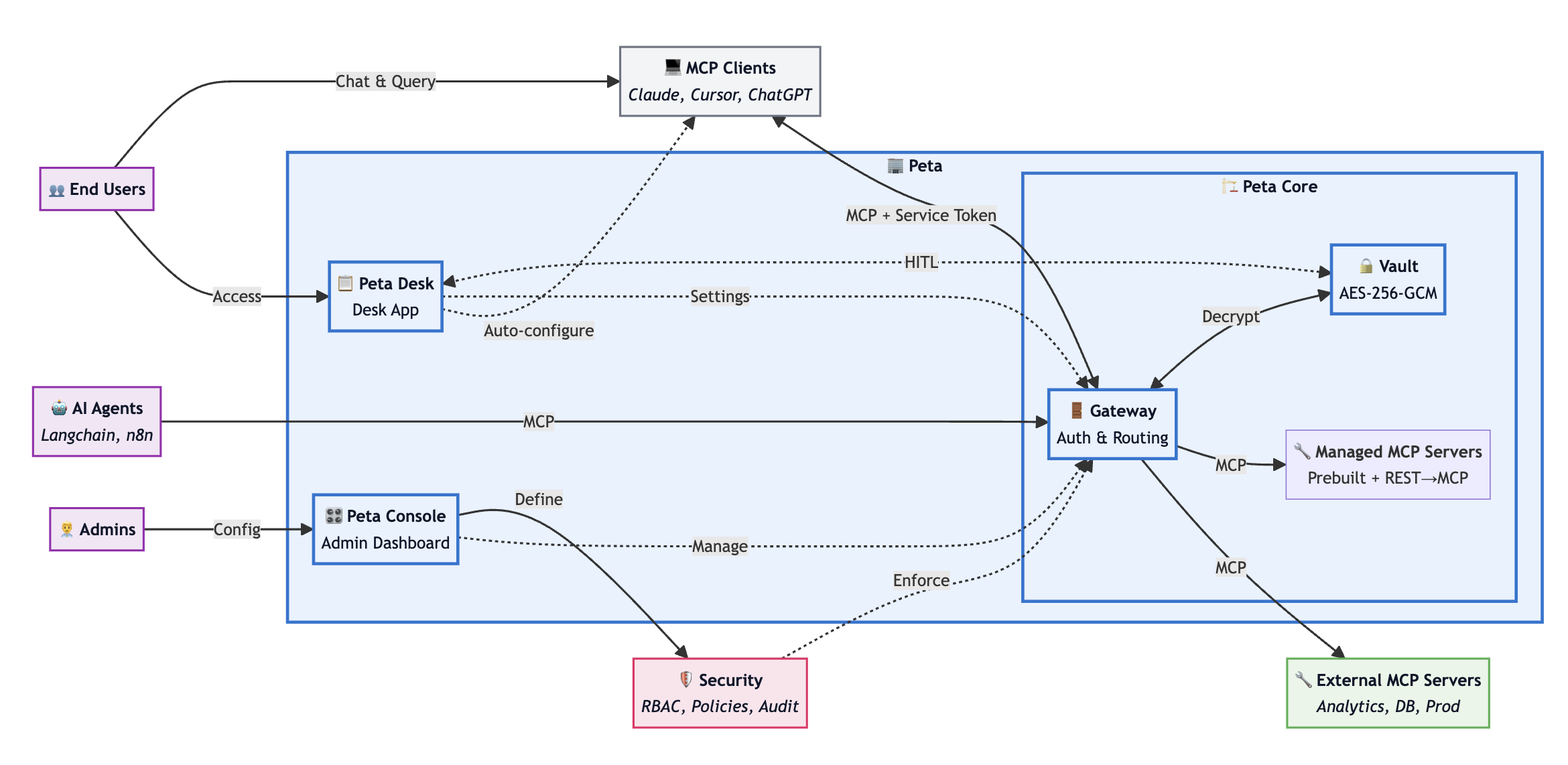
Peta Core is a comprehensive control plane for MCP (Model Context Protocol) that serves as a gateway, vault, policy engine, and audit trail between AI agents and downstream MCP servers. It provides essential infrastructure for running MCP in production, including credential vault with encrypted storage, RBAC/ABAC policy engine with optional human-in-the-loop approvals, and detailed audit logging of every tool call. The solution supports managed runtime with lifecycle controls for downstream servers, protocol compatibility, and self-hosted deployment model without SaaS dependency.
Try asking AI
After installing, here are 5 things you can ask your AI assistant:
When to choose this
Choose Peta Core when you need a production-ready control plane for MCP with enterprise-grade security, centralized policy management, and comprehensive audit capabilities for multiple downstream servers.
When NOT to choose this
Avoid Peta Core if you need a self-contained solution without database dependencies, prefer simpler authentication models, or are unwilling to accept the Elastic License 2.0 restrictions on hosting as a managed service.
Tools this server exposes
8 tools extracted from the READMEcatalog.searchSearch the tool catalog for available tools across servers
catalog.describeGet detailed description of a specific tool from the catalog
catalog.executeExecute a tool discovered through the catalog
tools.listList all available tools for the current server
tools.callExecute a specific tool with provided arguments
policy.evaluateEvaluate a policy decision for a tool call
approval.requestRequest approval for a high-risk operation
approval.statusCheck the status of a pending approval request
Note: Tool names inferred from the architecture documentation describing MCP gateway functionality and catalog features. Exact tool signatures not explicitly documented in this README.
Comparable tools
Installation
Installation
Peta Core can be deployed using Docker or as a Node.js application.
Docker Deployment
docker run -d --name peta-core -p 8080:8080 \
  -e DATABASE_URL=postgresql://user:pass@localhost:5432/peta \
  -e NEXTAUTH_SECRET=your-secret-key \
  petaio/peta-core:latest
Node.js Deployment
npm install -g @peta/core
peta-core start
Configuration
Configure MCP clients to connect to Peta Core:
{
  "mcpServers": {
    "peta": {
      "command": "npx",
      "args": ["@modelcontextprotocol/server-peta", "--host", "localhost", "--port", "8080"]
    }
  }
}
FAQ
- What databases are supported?
- Peta Core requires PostgreSQL 15+ as its primary database. This is for storing audit logs, policy configurations, and credential vault information.
- How does Peta Core handle credentials?
- Credentials are encrypted at rest using PBKDF2 + AES-GCM and are injected server-side at execution time. Clients never see raw credentials, and secrets are never included in audit logs.
Compare peta-core with
Last updated · Auto-generated from public README + GitHub signals.