CAD-MCP
by daobataotie·★ 338·Score 47
MCP server that controls CAD software through natural language commands for drawing operations.
Overview
CAD-MCP is an innovative service that enables users to control CAD software like AutoCAD, GstarCAD, and ZWCAD through natural language instructions. It converts text commands into CAD operations, allowing creation and modification of drawings without manual interface interaction. The server supports basic drawing functions including lines, circles, arcs, rectangles, text, patterns, and dimensions, along with layer management and drawing saving capabilities.
Try asking AI
After installing, here are 5 things you can ask your AI assistant:
When to choose this
Choose CAD-MCP when you need to control CAD software through natural language commands and are already using Windows with supported CAD applications like AutoCAD.
When NOT to choose this
Don't choose CAD-MCP if you need cross-platform support, work exclusively with CAD software not on the supported list, or require advanced CAD automation beyond drawing basic shapes and saving files.
Tools this server exposes
10 tools extracted from the READMEdraw_lineDraw a line in the CAD software
draw_circleDraw a circle in the CAD software
draw_arcDraw an arc in the CAD software
draw_polylineDraw a polyline in the CAD software
draw_rectangleDraw a rectangle in the CAD software
draw_textAdd text to the CAD drawing
draw_hatchDraw a hatch pattern in the CAD software
add_dimensionAdd linear dimension annotation to the drawing
save_drawingSave the current CAD drawing as a DWG file
process_commandProcess natural language commands into CAD operations
Comparable tools
Installation
Installation
- Install dependencies:
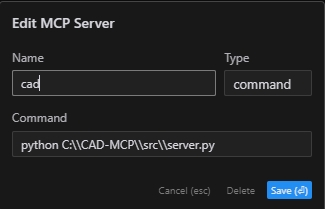
pip install -r requirements.txt- Configure your MCP client (Claude Desktop example):
{
    "mcpServers": {
        "CAD": {
            "command": "python",
            "args": [
                "~/cad-mcp/src/server.py"
            ]
        }
    }
}- Start the server:
python src/server.pyFAQ
- Which CAD software does CAD-MCP support?
- CAD-MCP supports AutoCAD, GstarCAD (GCAD), and ZWCAD.
- What system requirements are needed?
- CAD-MCP requires Windows operating system and one of the supported CAD software installations.
Compare CAD-MCP with
Last updated · Auto-generated from public README + GitHub signals.