codebase-mcp
by danyQe·★ 43·Score 42
Privacy-first AI coding assistant that turns Claude into a powerful MCP-based development tool with semantic search, memory, and quality-checked code generation.
Overview
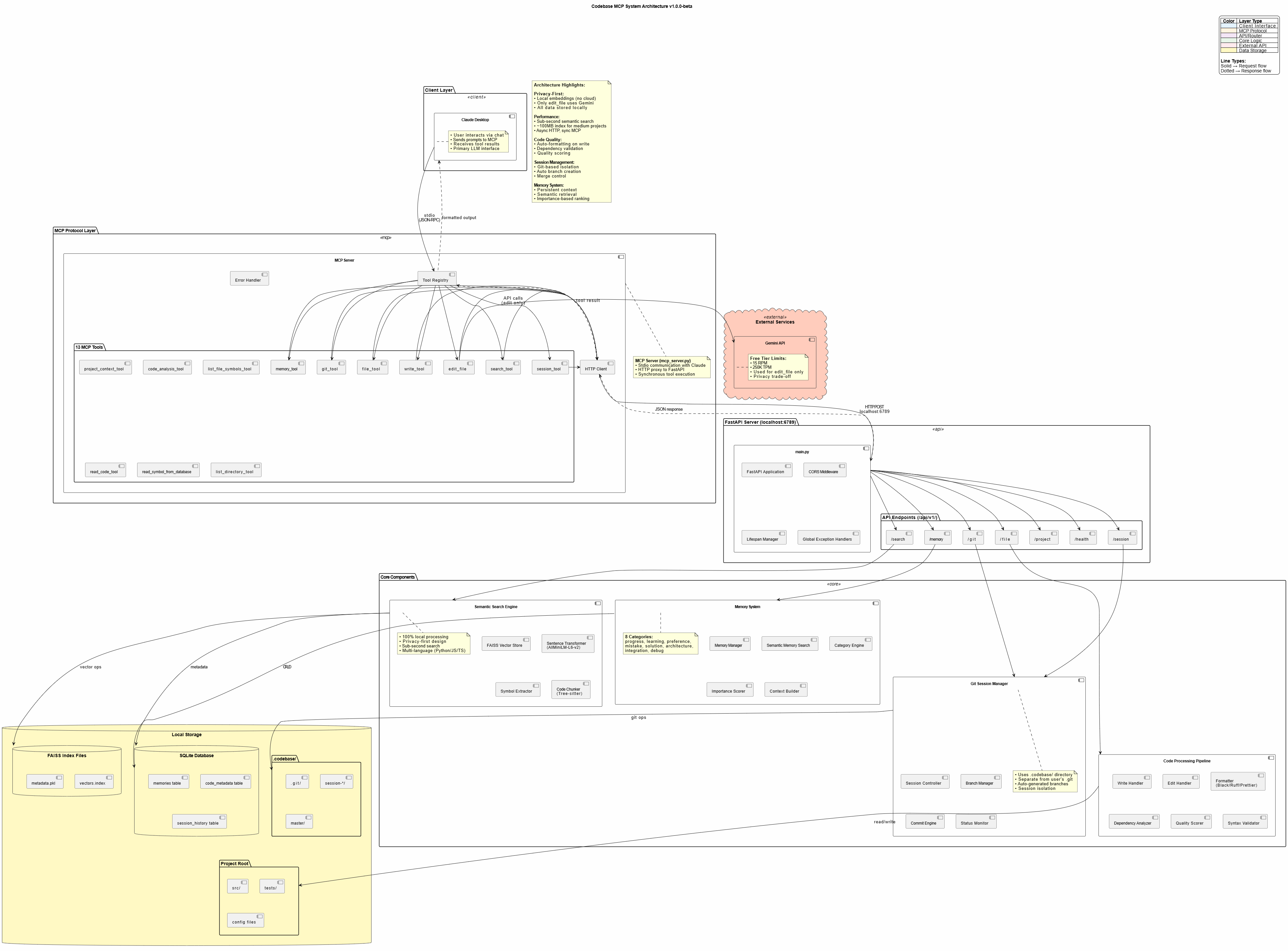
Codebase MCP is an open-source development assistant that integrates with Claude Desktop through the Model Context Protocol. It provides 13 specialized tools for codebase management, including semantic search, persistent memory, intelligent code writing with auto-formatting, and session-based Git workflows. The system operates locally with minimal cloud dependencies, using only Google's Gemini API for AI-assisted editing operations. It's designed as a free alternative to paid coding assistants like Cursor, leveraging an existing Claude subscription.
Try asking AI
After installing, here are 5 things you can ask your AI assistant:
When to choose this
Choose this if you already have a Claude subscription and want privacy-first AI coding assistance without paying additional monthly fees for tools like Cursor or Windsurf.
When NOT to choose this
Avoid this if you need edit operations beyond Gemini's free tier limits (15 RPM, 250K TPM) or if you require support for languages other than Python, JavaScript, TypeScript, and FastAPI.
Tools this server exposes
12 tools extracted from the READMEsession_toolManage development sessions with automatic branch creation and commits
memory_toolStore and retrieve persistent knowledge across chat sessions
git_toolPerform Git operations including status, diff, commit and branch management
write_toolCreate new files with auto-formatting and quality scoring
edit_fileAI-assisted file editing with Gemini-powered suggestions
search_toolPerform semantic code search across the entire codebase
read_code_toolRead code with symbol-level precision and line range support
project_context_toolAnalyze project structure and dependencies
list_directory_toolExplore directory structures with tree views and metadata
code_analysis_toolPerform code quality checks including syntax, linting and dependencies
list_file_symbols_toolExtract functions, classes and interfaces from source files
project_structure_toolVisualize project structure with enhanced tree views and statistics
Comparable tools
Installation
Prerequisites
- Python 3.11+
- Claude Desktop (or any MCP-compatible client)
- Git installed
- [uv](https://github.com/astral-sh/uv) package manager (recommended)
Installation
- **Clone the repository:**
git clone https://github.com/danyQe/codebase-mcp.git
cd codebase-mcp- **Install globally:**
# Install uv if you haven't
pip install uv

# Create virtual environment and install dependencies
uv venv
source .venv/bin/activate  # On Windows: .venv\Scripts\activate
uv pip install -r requirements.txt

# Install formatters globally
pip install black ruff- **Configure Gemini API:**
cp .env.example .env
# Get free API key from: https://aistudio.google.com/app/apikey
# Add to .env:
GEMINI_API_KEY=your_api_key_here- **Configure Claude Desktop:**
Add to your claude_desktop_config.json:
{
  "mcpServers": {
    "codebase-manager": {
      "command": "/path/to/your/.venv/bin/python",
      "args": [
        "/path/to/codebase-mcp/mcp_server.py"
      ]
    }
  }
}- **Start the FastAPI server:**
python main.py /path/to/your/project- Use with Claude Desktop by restarting it and starting to chat - Claude now has access to 13+ MCP tools!
FAQ
- How does Codebase MCP compare to Cursor?
- Codebase MCP is an open-source alternative that uses your existing Claude subscription instead of requiring a separate $20-40/month fee. It provides similar features like semantic search and AI-assisted editing while being privacy-first with local processing.
- What data is sent to external services?
- Only the edit_file tool uses Google's Gemini API, and only sends the specific file being edited (no project context or history). All other operations including embeddings, search, and memory processing run locally on your machine.
Compare codebase-mcp with
Last updated · Auto-generated from public README + GitHub signals.