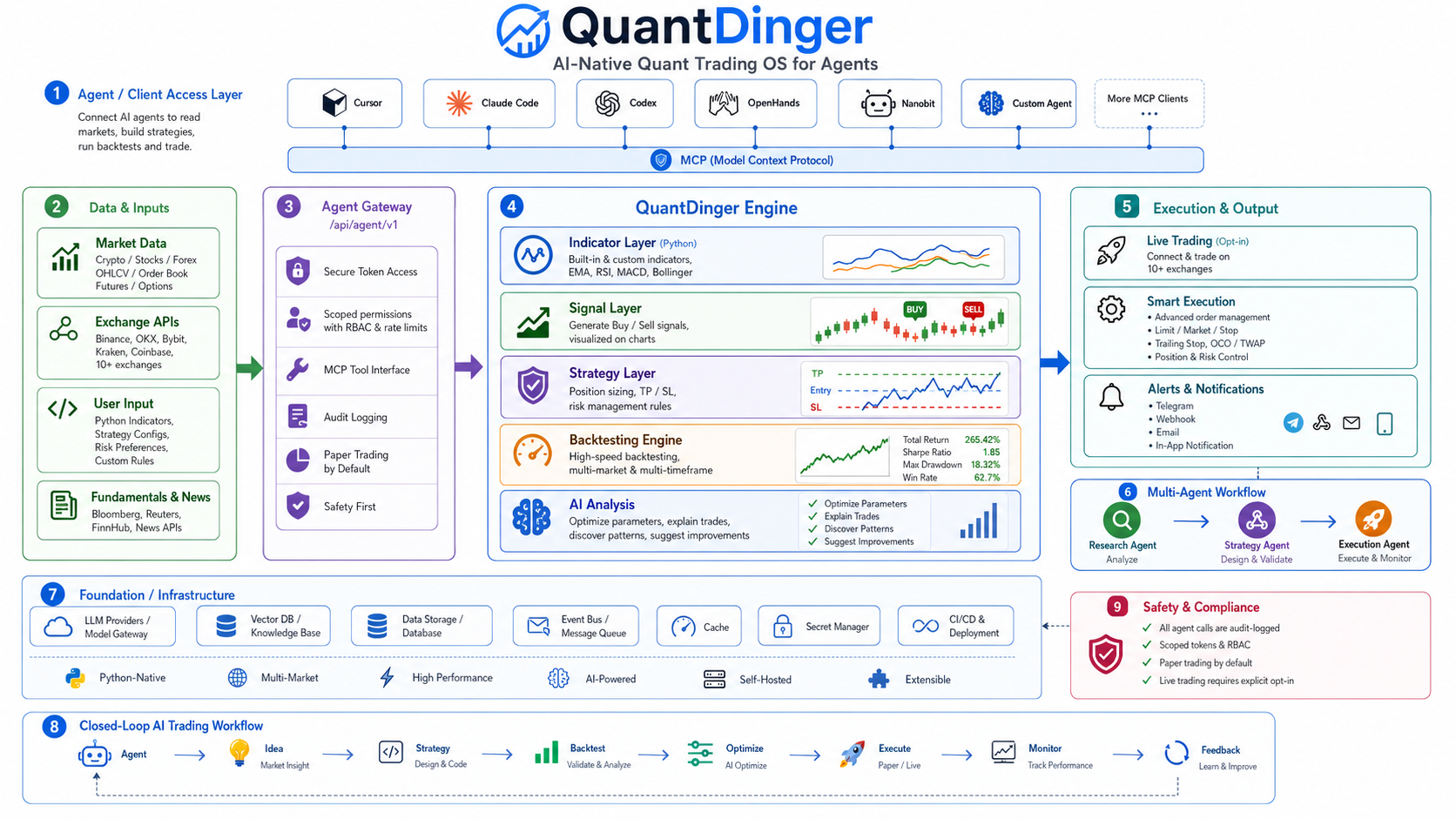
QuantDinger
by brokermr810·★ 5,392·Score 58
QuantDinger is an AI-powered quantitative trading platform with MCP server integration for market research and trading operations.
Overview
QuantDinger is a comprehensive self-hosted quantitative platform that combines AI-assisted research, Python-native strategies, backtesting, and live trading capabilities. It provides MCP server integration through its Agent Gateway, enabling AI agents to access market data, manage strategies, run backtests, and execute trades. The platform supports multiple brokers including crypto, IBKR stocks, MT5 forex, and Alpaca, with features like multi-user support, notifications, and billing systems. It offers both cloud-hosted and self-hosted deployment options with a prebuilt UI that requires minimal setup.
Try asking AI
After installing, here are 3 things you can ask your AI assistant:
When to choose this
Choose QuantDinger if you need a self-hosted quantitative trading platform with AI integration, particularly when you want full control over data and execution while leveraging AI agents for strategy development.
When NOT to choose this
Avoid QuantDinger if you're looking for a simple trading bot without the complex architecture, or if you need mobile-first capabilities without building the app yourself.
Tools this server exposes
12 tools extracted from the READMEread_market_dataGet market data for various assets including crypto, stocks, and forex
run_backtestExecute a backtest on a trading strategy with historical data
create_strategyCreate a new trading strategy using Python or built-in indicators
analyze_assetPerform AI analysis on an asset with insights and predictions
execute_tradeExecute paper trading orders on various exchanges
list_strategiesList all available trading strategies in the system
get_performance_metricsRetrieve performance metrics for a strategy or portfolio
optimize_parametersOptimize strategy parameters using historical data
create_watchlistCreate a watchlist to monitor specific assets
get_indicator_valuesGet calculated indicator values for an asset
set_risk_parametersConfigure risk management parameters for trading
query_market_opportunitiesQuery AI-generated market opportunities and insights
Note: Inferred from MCP server documentation and AI integration section. The actual tool names and parameters are not explicitly listed in the README but are implied from the MCP server functionality and agent gateway capabilities.
Comparable tools
Installation
QuantDinger can be installed via Docker Compose in just a few steps:
git clone https://github.com/brokermr810/QuantDinger.git && cd QuantDinger && cp backend_api_python/env.example backend_api_python/.env && chmod +x scripts/generate-secret-key.sh && ./scripts/generate-secret-key.sh && docker-compose up -d --buildAfter starting the service, access it at http://localhost:8888 with default credentials quantdinger/123456 (be sure to change the password).
To use with Claude Desktop, configure MCP server with:
{
  "mcpServers": {
    "quantdinger": {
      "command": "uvx",
      "args": ["quantdinger-mcp"],
      "env": {
        "QUANTDINGER_BASE_URL": "http://localhost:8888",
        "QUANTDINGER_AGENT_TOKEN": "qd_agent_xxxxxxxx"
      }
    }
  }
}
On Hacker News
Recent discussion from the developer community.
- Story by quantdinger · 2026-01-02
Compare QuantDinger with
Last updated · Auto-generated from public README + GitHub signals.