bonnard-cli
by bonnard-data·★ 48·Score 45
Bonnard CLI provides an agent-native analytics platform with MCP server integration for governed data queries.
Overview
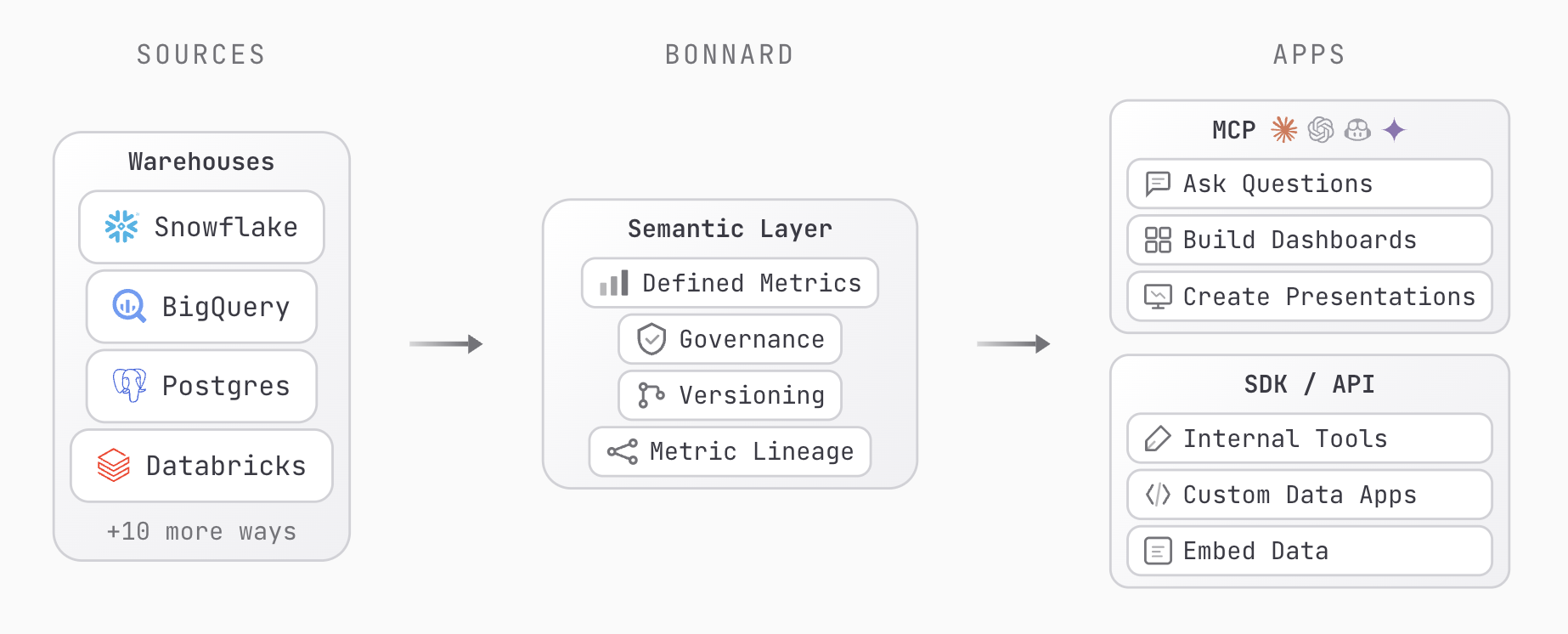
Bonnard is an open-source agentic schema CLI optimized for Claude, Gemini, Codex, and Copilot. It serves as a semantic layer that connects data warehouses to various surfaces including AI agents through MCP, dashboards in markdown format, and internal tools via REST API. The platform ensures consistent metrics definitions across all consumers, addressing the common issue of metric drift between different tools. It supports major data warehouses like Snowflake, BigQuery, Databricks, and PostgreSQL, with auto-detection capabilities for existing schemas and relationships.
Try asking AI
After installing, here are 5 things you can ask your AI assistant:
When to choose this
Teams already using multiple data warehouses who want a consistent semantic layer for AI agents without building a custom data pipeline.
When NOT to choose this
You need write access to your database or require complex data transformations - Bonnard is focused on read-only access and semantic consistency.
Tools this server exposes
12 tools extracted from the READMEbon_initScaffold a new project with agent configs
bon_datasource_addConnect a data source or add demo data
bon_validateValidate YAML syntax locally
bon_deployDeploy to production with a version message
bon_pullDownload deployed models to local project
bon_queryRun queries (JSON or SQL) against the semantic layer
bon_schemaExplore deployed measures, dimensions, and views
bon_dashboard_devPreview a markdown dashboard locally
bon_dashboard_deployDeploy a markdown dashboard
bon_mcpMCP server setup instructions
bon_keys_createCreate a publishable or secret API key
bon_docsBrowse documentation from the CLI
Comparable tools
Installation
Install with npm:
npm install -g @bonnard/cliSetup the MCP server:
bon mcpFor Claude Desktop, add to your config.json:
{
  "mcpServers": {
    "bonnard": {
      "command": "npx",
      "args": ["@bonnard/cli", "mcp"]
    }
  }
}
FAQ
- What data sources does Bonnard support?
- Bonnard supports major data warehouses including Snowflake, Google BigQuery, Databricks, PostgreSQL, Amazon Redshift, and DuckDB. It also integrates with data tools like dbt, Dagster, Prefect, Airflow, and various BI tools.
- How does Bonnard ensure metric consistency?
- Bonnard provides a unified semantic layer where all consumers (AI agents, dashboards, SDK) query the same governed metrics defined in one schema, eliminating metric drift across different tools.
Compare bonnard-cli with
Last updated · Auto-generated from public README + GitHub signals.